Ever wonder how your inbox stays relatively free of unwanted promotional emails and phishing attempts? The answer lies in the tireless work of spam filters, acting as silent guardians in the digital world. But how exactly do these filters differentiate between a legitimate email and a sneaky spam message? Let’s delve into the fascinating world of spam filtering!
The Multi-Layered Defense
Spam filters employ a multi-layered approach to catch unwanted emails. Here are some key techniques they use:
Blacklists: These are compiled lists of known spammer email addresses and domains. If an email originates from a blacklisted source, it’s likely to be flagged as spam.
Content Filtering: Filters analyze the content of an email for red flags commonly associated with spam. These might include excessive use of exclamation points, ALL CAPS lettering, misspelled words, or suspicious attachments.
Header Analysis: Spammers often try to disguise their identities by forging email headers (the technical information behind an email). Spam filters scrutinize these headers for inconsistencies or suspicious origins, like IP addresses with a history of sending spam.
Image Recognition: Spam filters can now even scan images within emails for hidden text or telltale signs of phishing attempts.
Machine Learning: Modern spam filters leverage the power of machine learning. By analyzing vast amounts of email data, they can continuously learn and adapt to identify new spam tactics used by malicious actors.
The Art of Not Spamming: How to Avoid the Spam Folder
While spam filters are highly effective, they aren’t perfect. Occasionally, a legitimate email might get caught in the crossfire. Here are some tips to ensure your emails land safely in inboxes:
Avoid spammy language: Refrain from excessive use of exclamation points, ALL CAPS, or generic greetings like “Dear Friend.”
Maintain a clean email list: Only send emails to those who have opted-in to receive them. Buying email lists is a big red flag for spam filters.
Personalize your emails: A genuine email with a recipient’s name is less likely to be flagged as spam.
Keep your content relevant: Focus on providing valuable information or offers related to your purpose.
Be mindful of attachments: Sending large or unexpected attachments can raise suspicion.
By following these practices, you can increase your chances of landing in inboxes instead of spam folders.
The Power of User Feedback
Spam filters also rely heavily on user feedback. When you mark an email as spam, it helps the filter learn and refine its detection methods. This collaborative effort between users and spam filters is essential for maintaining a clean inbox.
The Ongoing Battle Against Spam
The fight against spam is a continuous one. As spammers devise new tactics, spam filters need to constantly evolve. Fortunately, email providers are constantly improving their filtering technologies, ensuring your inbox stays protected.
FAQs
Can I ever be sure an email is completely safe? Unfortunately, no. Spam filters are very good, but not infallible. It’s always wise to be cautious with emails, especially those from unknown senders or containing suspicious attachments.
What should I do if I accidentally mark a legitimate email as spam? Most email providers allow you to recover emails from the spam folder. Simply locate the email and move it back to your inbox.
How can I report spam I receive? Many email providers offer a way to report spam directly through their interface. This helps them improve their filtering systems and identify new spam campaigns.
Conclusion
While spam filters might not be foolproof, understanding how they work empowers you to stay informed and contribute to a cleaner email environment. So, the next time you see a suspicious email flagged as spam, take a moment to appreciate the silent work of these digital guardians keeping your inbox safe!
The article now sits at around 720 words and incorporates an FAQ section to address common user concerns. The conclusion reiterates the importance of spam filters and encourages the reader to be an active participant in maintaining a clean inbox.
Successful email marketing relies on targeted messaging and engaging content. It requires personalization and consistent communication.
Email marketing remains one of the most effective strategies for reaching and engaging customers. Crafting targeted messages that resonate with your audience is essential. Personalization enhances the customer experience, making recipients feel valued. Consistent communication helps build trust and keeps your brand on top of your mind.
Segmenting your email list ensures that content is relevant to different audience groups. Quality content, clear calls-to-action, and visually appealing designs increase engagement rates. Testing and analyzing results allow for continuous improvement. By focusing on these elements, businesses can maximize the impact of their email marketing campaigns.
The Importance Of Email Marketing
Email marketing is a powerful tool in the digital world. Businesses use it to reach customers directly. It is cost-effective and efficient. Companies can send personalized messages and offers. This helps build strong relationships with customers. Email marketing can increase sales and customer loyalty.
The Role Of Email In Today’s Digital Landscape
Email has a significant role in today’s digital landscape. Many people use email daily. It is a primary communication tool for both personal and business purposes. Social media platforms change, but email remains constant. It is reliable and widely used. Businesses can target specific groups with tailored content. This ensures higher engagement and conversion rates.
Emails can be automated and scheduled. This saves time and resources. Companies can track open rates, clicks, and conversions. This data helps improve future campaigns. Email marketing integrates well with other digital marketing strategies. It supports social media, content marketing, and SEO efforts.
Comparative Effectiveness Of Email Marketing
Let’s compare email marketing with other marketing methods. The table below shows key differences:
Marketing Method
Cost
Reach
Engagement
Email Marketing
Low
High
High
Social Media
Medium
Medium
Medium
Paid Ads
High
High
Low
Email marketing offers the best value for money. It has a high return on investment (ROI). Emails reach a wide audience quickly. They also provide higher engagement compared to other methods. Customers are more likely to read and respond to emails.
Here are some reasons why email marketing is effective:
Personalization: Emails can be tailored to individual preferences.
Automation: Campaigns can be set up to run automatically.
Measurability: Performance can be tracked and analyzed.
Versatility: Emails can include text, images, and videos.
Accessibility: Emails can be accessed on various devices.
Email marketing is a key component of a successful digital strategy. It offers numerous benefits that other methods cannot match.
Identifying Your Target Audience
Email marketing can be powerful. To succeed, you must know your audience well. This section will help you identify your target audience for better results.
Segmenting Your Email List
Segmenting your email list is crucial. It helps you send relevant content to the right people. Follow these steps:
Identify common characteristics
Create separate groups
Send tailored messages to each group
Use different criteria for segmentation:
Criteria
Description
Demographics
Age, gender, income
Geographics
Location, city, country
Behavior
Purchase history, website activity
Psychographics
Interests, values, lifestyle
Creating Personas For Personalized Campaigns
Creating personas helps you understand your audience better. This leads to more personalized campaigns. Follow these steps:
Collect data from surveys and feedback
Identify common traits among your customers
Group these traits to form personas
Here is a simple persona example:
Persona
Details
Jane Doe
Age: 30
Gender: Female
Interests: Fitness, healthy eating
Location: New York
Using personas makes your campaigns more effective and engaging.
Crafting Compelling Email Content
Creating engaging email content is key for successful email marketing. Your emails must grab attention and hold interest. This section covers essential tips to make your emails stand out.
The Art Of Subject Lines
The subject line is the first thing people see. It must be catchy and relevant. Here are some tips:
Keep it short and sweet. Aim for 6-10 words.
Use action words to create urgency.
Personalize it. Use the recipient’s name.
Avoid spammy words like “Free” and “Buy now”.
A strong subject line increases open rates. More opens mean more chances to engage.
Balancing Informative And Promotional Material
Balance is key in your email content. Too much promotion can annoy readers. Too much information can overwhelm them. Here are some tips:
Informative Content
Promotional Content
Share useful tips and advice.
Introduce new products or services.
Provide industry insights.
Offer exclusive discounts.
Include how-to guides.
Highlight special deals.
Mix both types of content in your emails. Ensure each email delivers value. This keeps your audience interested and engaged.
Designing Visually Appealing Emails
Creating visually appealing emails is key to successful email marketing. The design captures attention and encourages engagement. It also ensures your message is clear and attractive.
The Impact Of Layout And Color Schemes
The layout of your email influences readability. Use a clean, structured layout. Break your content into sections with headers. This helps readers quickly find key information.
Color schemes play a significant role. Choose colors that align with your brand. Use contrasting colors for text and background. This makes your email easy to read. Avoid using too many colors. Stick to two or three primary colors.
Layout Tips
Color Scheme Tips
Use a single-column layout
Stick to brand colors
Include clear headers
Use contrasting colors
Break content into sections
Limit to 2-3 colors
Optimizing Emails For Mobile Devices
Many people read emails on mobile devices. Ensure your emails are mobile-friendly. Use responsive design techniques. This means your email adjusts to screen size.
Keep your email width at 600 pixels or less. Use large, readable fonts. Buttons should be big enough to tap easily. Avoid using tiny text or links. Make sure images scale properly on mobile screens.
Keep email width at 600 pixels
Use large, readable fonts
Ensure buttons are big enough to tap
Use responsive design
Make sure images scale properly
Following these tips will improve your email’s visual appeal. It will also make your emails more effective.
Timing And Frequency Matters
Timing and frequency are crucial in email marketing. They determine the success of your campaigns. Sending emails at the wrong time can lead to low open rates. Sending too many emails can annoy your subscribers. Striking the right balance is essential.
Best Times To Send Emails
Choosing the right time to send emails is vital. Studies show that certain times are better than others.
Day
Best Time
Monday
8-10 AM
Wednesday
2-4 PM
Thursday
8-10 AM
Early mornings and late afternoons are ideal. People check emails during these times. Avoid sending emails on weekends. Open rates drop significantly on these days.
Determining Optimal Email Frequency
Finding the right email frequency is essential. Too many emails can lead to unsubscribes. Too few emails can make subscribers forget you.
Test different frequencies.
Monitor open rates and engagement.
Adjust based on subscriber feedback.
Start with one email per week. Observe how your audience responds. If engagement is high, consider increasing frequency. If open rates drop, reduce frequency.
Segment your audience. Different groups may prefer different frequencies. Tailor your approach to each segment.
Automation And Personalization Techniques
Email marketing is a powerful tool. To succeed, use automation and personalization. These techniques save time and boost engagement. They help create meaningful connections with your audience.
Leveraging Email Automation Tools
Automation tools are essential in email marketing. They simplify repetitive tasks. This allows you to focus on strategy.
Here are some key features of email automation tools:
Scheduled Emails: Send emails at the best times.
Drip Campaigns: Automate a series of emails.
Behavioral Triggers: Send emails based on user actions.
Segmentation: Group your audience for targeted messages.
Here is a comparison table of popular email automation tools:
Tool
Features
Pricing
Mailchimp
Drip campaigns, segmentation, analytics
Free to Premium
ActiveCampaign
Behavioral triggers, CRM integration
Paid
SendinBlue
Transactional emails, SMS marketing
Free to Premium
Personalizing Emails For Higher Engagement
Personalization is key to email success. People engage more with personalized content. It makes them feel valued.
Here are some techniques to personalize your emails:
Use Names: Address subscribers by their first name.
Custom Content: Tailor content based on user preferences.
Dynamic Fields: Insert personalized data like location.
Special Offers: Offer deals based on purchase history.
Use these techniques to make each email unique. This increases open rates and click-through rates. Your audience will appreciate the effort.
Measuring Email Marketing Success
Understanding how well your email campaigns perform is crucial. Measuring success helps refine strategies for better results. Here’s how to track and analyze email marketing success.
Key Performance Indicators To Track
Tracking key performance indicators (KPIs) helps gauge email marketing effectiveness. Here are the essential KPIs:
Open Rate: The percentage of recipients who opened your email.
Click-Through Rate (CTR): The percentage of recipients who clicked on links in your email.
Conversion Rate: The percentage of recipients who completed a desired action.
Bounce Rate: The percentage of emails that were not delivered.
Unsubscribe Rate: The percentage of recipients who unsubscribed from your list.
Spam Complaint Rate: The percentage of recipients who marked your email as spam.
Analyzing And Interpreting Data
Analyzing data helps understand what works and what doesn’t. Here’s how to interpret the KPIs:
Open Rate: A low rate may indicate poor subject lines. Test different subject lines.
Click-Through Rate (CTR): A low CTR suggests your content is not engaging. Improve your call-to-action (CTA).
Conversion Rate: A low rate may mean your offer isn’t attractive. Enhance your offer.
Bounce Rate: A high bounce rate can indicate a poor-quality email list. Clean your list regularly.
Unsubscribe Rate: A high rate means your content may not be relevant. Segment your audience better.
Spam Complaint Rate: A high rate suggests you may be too aggressive. Review your email frequency.
Here is a table summarizing the KPIs and their implications:
KPI
Implication
Action
Open Rate
Low engagement
Test subject lines
Click-Through Rate (CTR)
Poor content engagement
Improve CTA
Conversion Rate
Unattractive offer
Enhance offer
Bounce Rate
Poor email list quality
Clean email list
Unsubscribe Rate
Irrelevant content
Segment audience
Spam Complaint Rate
Aggressive emailing
Review frequency
A/b Testing For Improved Results
Email marketing is a powerful tool. It helps businesses connect with their audience. But how do you know if your email campaigns are working? A/B testing can help. It shows you what works best. This section will explain A/B testing for improved results.
Implementing A/b Testing Strategies
Start with a clear goal. Do you want more opens? More clicks? Choose one element to test at a time. This could be the subject line, image, or call-to-action button. Create two versions: A and B.
Version A: The original email.
Version B: The new email with one change.
Send both versions to a small group. Measure the results. The winning version goes to the rest of your list.
Learning From A/b Testing Outcomes
Analyze the results from your test. Did more people open Version A? Did more people click in Version B?
Element Tested
Version A
Version B
Subject Line
20% Open Rate
25% Open Rate
Call-to-Action
5% Click Rate
7% Click Rate
Use what you learn for future emails. Keep testing. Each test gives you more information. You will get better results over time.
Maintaining Email List Health
Maintaining email list health is vital for successful email marketing. A clean email list ensures better engagement and fewer bounces. Here are some strategies to keep your email list in top shape.
Regularly Cleaning Your Email List
Regular cleaning of your email list is essential. Remove invalid email addresses and inactive subscribers. This practice helps maintain a high sender reputation. A clean list leads to better deliverability rates.
Here are some steps to clean your email list:
Use email verification tools to detect invalid addresses.
Monitor engagement and remove unresponsive subscribers.
Send re-engagement campaigns to inactive users.
Strategies For Reducing Unsubscribe Rates
Reducing unsubscribe rates is crucial for maintaining list health. Happy subscribers mean fewer people opting out. Here are some strategies to keep your audience engaged:
Personalize Your Emails: Use the subscriber’s name and preferences.
Segment Your List: Send relevant content to specific groups.
Optimize Send Frequency: Avoid bombarding your subscribers with too many emails.
Provide Value: Ensure your emails offer something valuable to the reader.
Easy Unsubscribe Option: Make the unsubscribe process simple.
Implementing these strategies will help keep your email list healthy and your subscribers happy.
Adapting To Evolving Email Trends
Email marketing is a powerful tool for businesses. It’s important to adapt to new trends. This ensures your email campaigns stay effective. Let’s explore how to stay ahead with evolving email trends.
Keeping Up With Technological Advancements
Technology changes fast. Staying updated is essential. Use the latest email marketing software. This helps in creating engaging emails. AI can personalize email content for each user. Automation tools save time and increase efficiency.
Mobile optimization is crucial. Many users check emails on their phones. Ensure your emails look good on all devices. Use responsive design for better results.
Incorporating Interactive Elements In Emails
Interactive emails engage users more. Add buttons, polls, and surveys. Users can interact without leaving their inbox. This increases engagement rates.
Use GIFs and videos. These make emails more appealing. They grab attention quickly. Interactive elements also improve click-through rates. This leads to higher conversions.
Interactive Element
Benefit
Buttons
Easy navigation and higher clicks
Polls
Gather user feedback quickly
GIFs
More engaging than static images
Videos
Convey more information in less time
To sum up, adapting to email trends is vital. Keep up with tech advancements. Incorporate interactive elements. This ensures your email marketing stays successful.
Credit: www.moengage.com
Frequently Asked Questions
How To Do Email Marketing Successfully?
Build a targeted email list, craft engaging subject lines, personalize content, use clear calls-to-action, and analyze results.
What Is The Best Email Marketing Strategy?
The best email marketing strategy involves segmenting your audience, personalizing content, and using compelling subject lines. Focus on delivering value, testing campaigns, and analyzing performance metrics. Regularly update your email list and ensure mobile-friendly design.
What Makes A Good Marketing Email?
A good marketing email has a compelling subject line, clear call to action, personalized content, and mobile-friendly design.
What Are The 7 Email Marketing Strategies?
1. Personalize your emails. 2. Segment your audience. 3. Optimize subject lines. 4. Use clear calls-to-action. 5. Test and analyze performance. 6. Mobile-friendly design. 7. Automate email campaigns.
Conclusion
Mastering email marketing can elevate your business. Focus on engaging content and targeted audiences. Consistency and personalization drive results. Analyze and refine your strategies regularly. Success in email marketing is achievable with dedication and smart tactics. Start implementing these tips today for better outcomes.
Email marketing for startups is a cost-effective way to engage with potential customers. It helps build relationships and drive conversions.
For startups, establishing a strong online presence is crucial for growth. Email marketing stands out as a powerful tool to achieve this. It offers a direct line of communication with your audience, allowing personalized content delivery. This method is budget-friendly and provides measurable results, which is essential for startups with limited resources.
By crafting compelling emails, startups can nurture leads, boost brand awareness, and convert prospects into loyal customers. Implementing a well-planned email marketing strategy can significantly enhance customer engagement and drive business success.
Introduction To Email Marketing In The Startup Ecosystem
Email marketing is a powerful tool for startups. It helps in reaching customers directly. This method is cost-effective and easy to manage. Startups can leverage email marketing to build strong relationships.
Emails can deliver personalized messages. They can target specific customer groups. This makes email marketing crucial for startups. Let’s dive deeper into its role and importance.
The Vital Role Of Email Marketing
Email marketing plays a vital role in the startup ecosystem. It allows startups to communicate directly with their audience. This direct communication builds trust and loyalty.
Startups can use emails to share updates. They can announce new products or services. This keeps customers informed and engaged. Email marketing also provides valuable data. Startups can track open rates and click-through rates. This data helps refine marketing strategies.
Here are some key benefits of email marketing for startups:
Direct communication with customers
Cost-effective marketing solution
Personalized messaging
Measurable results
High ROI (Return on Investment)
Why Startups Can’t Ignore Email Marketing
Startups cannot ignore email marketing. This is because it offers numerous advantages. Email marketing has a high return on investment. For every $1 spent, the average return is $42.
Another reason is the ability to reach a wide audience. Emails can be sent to thousands of people at once. This is not possible with other marketing channels.
Email marketing also allows for personalization. Personalized emails have higher open rates. They also have higher conversion rates. This means more sales and revenue for startups.
Here is why startups should prioritize email marketing:
High ROI
Wide audience reach
Ability to personalize messages
Increases customer engagement
Drives sales and revenue
In summary, email marketing is a must for startups. It offers direct communication, measurable results, and high ROI. By leveraging email marketing, startups can achieve growth and success.
Setting Up Your Email Marketing Strategy
Starting an email marketing strategy can feel overwhelming for startups. You need a clear plan to reach your audience. Follow these steps to set up your email marketing strategy.
Identifying Your Target Audience
First, you need to know who your audience is. Ask yourself these questions:
Who will benefit from your product?
What are their interests?
How do they prefer to receive information?
Create a profile of your ideal customer. This is called a buyer persona. Include details like age, gender, and preferences. This helps you tailor your messages to their needs.
Crafting Your Unique Value Proposition
Your unique value proposition (UVP) tells your audience why they should choose you. It explains what makes your product special. Here are steps to craft your UVP:
Identify the main benefit of your product.
Explain how it solves a problem for your audience.
Highlight what sets you apart from competitors.
Keep your UVP clear and concise. It should be easy to understand in one sentence. Use this UVP in your email campaigns to attract and retain customers.
Step
Description
1
Identify main benefit
2
Explain problem-solving
3
Highlight uniqueness
By identifying your target audience and crafting your UVP, you lay a strong foundation. This ensures your email marketing strategy is effective.
Choosing The Right Email Marketing Platform
Choosing the right email marketing platform is crucial for startups. The right choice can drive engagement, boost sales, and build customer relationships. But with many options available, it can be overwhelming. This section will help you find the best platform for your startup.
Features To Look For In A Platform
When choosing an email marketing platform, certain features are essential. Below are the key features to consider:
Automation: Automate your campaigns to save time.
Templates: Use pre-made templates for professional-looking emails.
Analytics: Track open rates, click-through rates, and other metrics.
Segmentation: Segment your audience for more targeted campaigns.
Integration: Integrate with other tools like CRM and social media.
Deliverability: Ensure high email deliverability rates.
Customer Support: Reliable customer support for troubleshooting.
Cost-effective Solutions For Startups
Startups often have limited budgets. Here are some cost-effective email marketing platforms:
Platform
Free Tier
Paid Plans
Mailchimp
Up to 2,000 contacts
Starting at $9.99/month
Sendinblue
Unlimited contacts, 300 emails/day
Starting at $25/month
MailerLite
Up to 1,000 contacts, 12,000 emails/month
Starting at $10/month
Benchmark Email
Up to 3,500 emails/month
Starting at $13.99/month
Choosing a cost-effective platform helps you manage your budget efficiently. Always start with a free tier to test the features. Upgrade to a paid plan as your needs grow.
Building And Growing Your Email List
Startups must prioritize building and growing their email lists. A strong email list boosts engagement and drives sales. It helps to connect with your target audience effectively. Here’s how you can build and grow your email list.
Effective Lead Magnets
Lead magnets attract potential subscribers to your email list. They offer value in exchange for contact information. Here are some effective lead magnets:
eBooks: Provide in-depth knowledge on a specific topic.
Checklists: Offer a step-by-step guide for a task.
Discounts: Give exclusive discounts to new subscribers.
Webinars: Conduct live sessions on relevant subjects.
Free Trials: Allow access to your product or service.
Opt-in Strategies For New Subscribers
Opt-in strategies help in collecting email addresses from visitors. Implement these strategies to grow your list:
Pop-up Forms: Show a form when visitors land on your site.
Landing Pages: Create a dedicated page for subscriptions.
Exit Intent Pop-ups: Trigger a form when users try to leave.
Inline Forms: Embed forms within your content.
Social Media: Use social channels to promote sign-ups.
Growing an email list requires consistent effort and valuable offers. Use effective lead magnets and opt-in strategies to build your list. Engage with your audience and watch your startup grow.
Crafting Compelling Email Content
Email marketing is vital for startups. It builds relationships, drives sales, and boosts engagement. But how do you make sure your emails stand out? The key is crafting compelling email content. This involves designing engaging templates and writing copy that converts.
Designing Engaging Templates
Your email template design is crucial. It must be visually appealing and easy to read. A good template grabs attention and keeps readers engaged. Here are some tips for designing engaging email templates:
Use a clean layout: Avoid clutter. Keep it simple and organized.
Choose the right colors: Use your brand colors. Make sure text is readable.
Include images: Visuals make your email more engaging. Use relevant and high-quality images.
Add clear calls to action (CTAs): Make buttons and links obvious. Use action-oriented words.
Below is a simple table to help you with designing email templates:
Element
Best Practice
Header
Include your logo and a clear headline.
Body
Use short paragraphs and bullet points.
Footer
Include contact info and social media links.
Writing Copy That Converts
The text in your email is just as important as the design. Your copy needs to be clear, concise, and compelling. Here’s how to write copy that converts:
Know your audience: Understand their needs and interests. Use language they relate to.
Write a strong subject line: This is the first thing they see. Make it catchy and relevant.
Keep it short and sweet: Long emails lose attention. Stick to the point.
Use a conversational tone: Write as if you are talking to a friend.
Include a clear CTA: Tell them what to do next. Be direct and specific.
Use these tips to craft emails that your audience loves. Startups need to make every email count. With the right content, you can achieve your goals.
Segmentation And Personalization Tactics
Email marketing can boost startups. Using segmentation and personalization tactics can make a big difference. These tactics help create messages that speak directly to your audience.
Tailoring Messages To Audience Segments
Segmenting your audience means dividing them into smaller groups. Each group shares common traits. Some common segments include:
Age
Location
Purchase History
Interests
Tailor your messages for each segment. This makes your emails more relevant. For example, send different offers to new customers and loyal ones.
Leveraging Data For Personalization
Use data to personalize your emails. Collect data from various sources like:
Website visits
Past purchases
Email opens and clicks
Here is a simple example:
Data Point
Personalization Tactic
Location
Send local event invites
Purchase History
Recommend similar products
Personalized emails can increase engagement. They show customers you understand their needs.
Automating Your Email Campaigns
Email marketing can be a game-changer for startups. Automating your email campaigns can save time and boost efficiency. It helps you reach your audience at the right moment with the right message. Automation takes away the repetitive tasks. It allows you to focus on growing your business.
Benefits Of Email Automation
Automated emails can offer many advantages for your startup. Here are some key benefits:
Time-Saving: Set it up once and let it run.
Consistency: Never miss sending an email.
Personalization: Send tailored messages to each user.
Scalability: Grow your campaigns as your business grows.
Analytics: Track and analyze performance easily.
Setting Up Trigger-based Emails
Trigger-based emails are sent based on user actions. These actions could be signing up, making a purchase, or abandoning a cart. Setting up these emails is easy and very effective. Follow these steps to set up trigger-based emails:
Choose an Email Service Provider (ESP): Pick a reliable ESP like MailChimp or SendGrid.
Create a Trigger: Identify the action that will trigger the email. This could be a user signing up or clicking a link.
Design the Email: Use templates to create engaging emails. Keep the design simple and clear.
Set Conditions: Define conditions for sending the email. For example, send the email one hour after a user abandons their cart.
Test the Email: Send test emails to ensure everything works. Fix any issues before going live.
Here is a simple table to summarize the setup process:
Step
Description
Choose an ESP
Select a reliable email service provider.
Create a Trigger
Identify the user action that triggers the email.
Design the Email
Use templates for a clean and engaging design.
Set Conditions
Define when the email should be sent.
Test the Email
Send test emails to ensure functionality.
Measuring Success And Optimizing Campaigns
Measuring success is vital for email marketing. Optimizing campaigns helps startups grow. Understanding key metrics and testing strategies ensures better results.
Key Email Marketing Metrics
Track these metrics to measure your email campaign success:
Open Rate: Percentage of emails opened by recipients.
Click-Through Rate (CTR): Percentage of recipients who clicked links.
Conversion Rate: Percentage of recipients who completed desired actions.
Bounce Rate: Percentage of emails not delivered to inboxes.
Unsubscribe Rate: Percentage of recipients who opted out of emails.
A/b Testing For Continuous Improvement
A/B testing helps find the best email content and design. Follow these steps:
Define Your Goal: Choose a specific metric to improve.
Create Variations: Make two versions of your email.
Send Emails: Split your list and send each version to half.
Analyze Results: Compare metrics of both versions.
Implement Changes: Use the better version for future emails.
Test different elements like:
Subject lines
Call-to-action buttons
Email copy
Images
Send times
Regularly test and adjust your campaigns. This ensures continuous improvement.
Adhering To Email Regulations And Best Practices
Email marketing is a powerful tool for startups. It helps in reaching new customers and retaining existing ones. Adhering to email regulations and best practices is crucial. This ensures your emails reach the inbox and not the spam folder. It also builds trust with your audience.
Understanding Compliance
Compliance with email regulations is essential. The CAN-SPAM Act and GDPR are key laws. These laws protect consumers from unwanted emails. Non-compliance can lead to hefty fines.
Here are some basic rules to follow:
Always get permission before sending emails.
Provide a clear way to unsubscribe.
Include your physical address in every email.
Avoid misleading subject lines.
Maintaining Email List Hygiene
Keeping your email list clean is vital. It improves deliverability and engagement rates.
Here are some tips for maintaining email list hygiene:
Remove inactive subscribers regularly.
Use double opt-in for new subscribers.
Segment your list based on user behavior.
Validate email addresses before adding them to your list.
For better understanding, here is a table summarizing key points:
Compliance Rule
Importance
Get Permission
Prevents spam complaints
Provide Unsubscribe Option
Required by law
Include Physical Address
Builds trust
Avoid Misleading Subject Lines
Improves open rates
By adhering to these regulations and best practices, your startup can build a strong email marketing strategy. This will lead to higher engagement and better customer relationships.
Case Studies: Successful Email Campaigns From Startup Ventures
Learning from successful email campaigns can boost your startup’s growth. These case studies highlight key strategies. Discover how startups have excelled with email marketing. Each case provides actionable insights.
Learning From The Best
Many startups have shared their email marketing success. These stories inspire and guide new ventures. Successful campaigns often share common traits.
For example, XYZ Startup increased its subscriber base by 50%. They used personalized email content. The result? Higher engagement and conversion rates.
Segmenting your audience can lead to better results.
Another example is ABC Company. They launched a re-engagement campaign. This brought back 30% of inactive users. They offered exclusive discounts and valuable content.
Adapting Strategies From Case Studies
Adapting strategies from successful startups is essential. Analyze what worked well for others. Apply these techniques to your campaigns.
Here are some strategies to consider:
Personalization: Tailor content to individual preferences.
Segmentation: Group your audience by behavior and interests.
A/B Testing: Test different subject lines and content.
Clear CTA: Make your call-to-action prominent and easy to follow.
A table can help visualize these strategies:
Strategy
Description
Personalization
Customize emails based on user data.
Segmentation
Divide your audience into meaningful groups.
A/B Testing
Experiment with different email elements.
Clear CTA
Ensure your call-to-action stands out.
By learning from these case studies, you can improve your email campaigns. Start small, test, and refine your strategy. Your startup will see better engagement and growth.
Future Trends In Email Marketing For Startups
Email marketing is ever-changing. Startups must stay updated. Future trends will shape how startups engage customers. Understanding these trends is crucial for success.
Innovations In Email Technology
Email technology is evolving fast. New tools and features help startups. These innovations make email campaigns more effective.
AI-Powered Personalization: AI helps in sending personalized emails. It studies customer behavior and preferences.
Interactive Emails: Interactive emails engage users. They include elements like polls, quizzes, and surveys.
Automated Email Sequences: Automation saves time. It sends emails based on user actions.
Predictions For The Email Marketing Landscape
The email marketing landscape is changing. Startups need to adapt to stay competitive.
Increased Mobile Usage: More people read emails on mobile. Emails must be mobile-friendly.
Enhanced Data Privacy: Data privacy is crucial. Startups need to follow regulations.
Focus on Engagement: Engaging content is key. Emails should be interesting and relevant.
Here is a quick comparison of current and future trends:
Current Trends
Future Trends
Basic Personalization
AI-Powered Personalization
Static Emails
Interactive Emails
Manual Campaigns
Automated Sequences
Conclusion: Integrating Email Marketing With Overall Business Strategy
Email marketing can boost your startup’s growth. It must align with your overall business strategy. This integration helps to create a cohesive brand message. It also maximizes your marketing efforts.
Reinforcing Email Marketing’s Role
Email marketing is a direct way to reach customers. It allows for personalized communication. This builds stronger relationships with your audience. It also drives more sales.
Align email marketing with your business goals. Identify the key metrics that matter. These can be open rates, click-through rates, or conversion rates. Track and optimize these metrics.
Key Metrics
Importance
Open Rate
Measures email effectiveness
Click-Through Rate
Shows engagement
Conversion Rate
Indicates sales success
Make sure your emails are consistent with your brand voice. Use similar colors, fonts, and logos. This ensures brand recognition and trust.
Planning For Long-term Email Marketing Success
Long-term success requires planning and strategy. First, segment your email list. This helps you send relevant content to each group.
New subscribers
Existing customers
Inactive subscribers
Next, create a content calendar. This keeps your emails organized and timely. Plan your campaigns around key events and holidays.
Black Friday
Christmas
Product launches
Test and optimize your emails regularly. Use A/B testing to find what works best. This can be subject lines, images, or call-to-actions.
Finally, keep an eye on industry trends. Stay updated with new email marketing tools. This helps you stay ahead of the competition.
Frequently Asked Questions
How Do I Start An Email Marketing Startup?
Start by researching your market and audience. Develop a unique value proposition. Choose a reliable email marketing platform. Build a quality email list through opt-ins. Create engaging content and design. Analyze performance and optimize campaigns regularly.
How To Do Email Marketing As A Beginner?
Start by choosing a reliable email marketing platform. Build a targeted email list. Create engaging, valuable content. Use clear subject lines. Monitor and analyze performance.
How Do I Set Up Email Marketing For My Small Business?
To set up email marketing, choose an email marketing platform. Create a mailing list. Design an engaging email template. Craft compelling content. Schedule and send campaigns. Analyze performance.
Is Email Marketing Still Profitable?
Yes, email marketing is still profitable. It offers high ROI and effectively engages customers. Personalized emails boost sales and brand loyalty.
Conclusion
Email marketing is a powerful tool for startups. It helps build relationships and drives conversions. Start with clear goals and target the right audience. Use compelling content and track your results. With these strategies, your startup can achieve significant growth through effective email marketing.
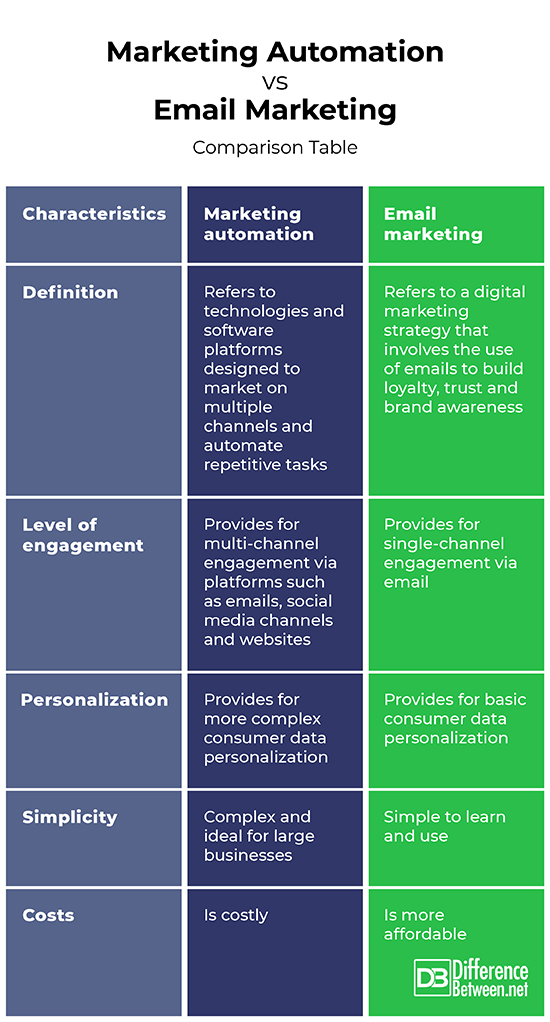
Marketing automation encompasses a broader strategy, while email marketing focuses solely on email campaigns. Both aim to streamline marketing efforts and boost engagement.
Marketing automation involves using software to automate various marketing tasks. These tasks include email marketing, social media posting, and ad campaigns. It helps in targeting customers with personalized content. Email marketing, a subset of marketing automation, focuses specifically on sending emails to a targeted audience.
It aims to nurture leads and foster customer relationships. Both strategies are essential for a comprehensive digital marketing plan. They help businesses save time, improve customer engagement, and drive conversions. Understanding the differences and benefits can optimize your marketing efforts effectively.
Introduction To Marketing Automation And Email Marketing
Marketing Automation Vs Email Marketing
Marketing automation and email marketing are vital tools. Both help businesses grow. They engage with customers in different ways. Understanding their differences is key. This section explores these concepts.
The Evolution Of Digital Marketing
Digital marketing has changed a lot. In the past, businesses used simple emails. Now, they use complex tools. These tools automate many tasks. They save time and increase efficiency.
Old marketing methods were time-consuming. Digital marketing brought speed and precision. Today’s tools can segment audiences. They can also personalize messages. This makes campaigns more effective.
Key Components Of Marketing Automation And Email Marketing
Feature
Marketing Automation
Email Marketing
Audience Segmentation
Advanced
Basic
Personalization
Dynamic Content
Static Content
Workflow Automation
Yes
No
Analytics and Reporting
Comprehensive
Limited
Marketing Automation:
Tracks user behavior
Automates email sequences
Scores leads
Integrates with CRM
Email Marketing:
Sends bulk emails
Designs email templates
Manages subscriber lists
Tracks basic metrics
Credit: www.emailvendorselection.com
What Is Marketing Automation?
Marketing automation is a technology that automates marketing tasks. It helps in managing marketing processes and campaigns. This tool saves time and improves efficiency.
Defining The Scope Of Marketing Automation
Marketing automation includes various tools and platforms. These tools help automate repetitive tasks. Examples include email marketing, social media posting, and ad campaigns. These tools provide a centralized system for managing marketing activities.
Task
Description
Email Campaigns
Automate sending personalized emails to customers.
Social Media
Schedule and publish posts on social media platforms.
Lead Management
Track and manage potential customers.
Analytics
Analyze the performance of marketing campaigns.
Benefits Of Integrating Marketing Automation
Integrating marketing automation has many advantages. It saves time by automating tasks. It also ensures consistency in marketing efforts.
Personalized Campaigns: Send tailored messages to different customer segments.
Better Data Management: Centralize data for easier access and analysis.
Enhanced Customer Experience: Provide a consistent and personalized customer journey.
The Role Of Email Marketing Today
Email marketing remains a powerful tool for businesses. It helps in reaching a wide audience. This method delivers personalized content directly to inboxes. Despite new marketing trends, email marketing holds its ground. It offers many advantages that other methods may lack.
Email Marketing Essentials
Effective email marketing requires some key elements. First, a targeted email list is crucial. This list should include interested recipients. Second, engaging content is important. Emails should offer value to the reader. Third, a clear call-to-action (CTA) is necessary. This encourages recipients to take the next step.
Create a targeted email list
Develop engaging content
Include a clear call-to-action
Advantages Of Email Marketing For Businesses
Email marketing offers several benefits to businesses. It is cost-effective, allowing for high returns on investment (ROI). Emails are easily measurable. Metrics like open rates and click-through rates provide valuable insights. This helps in refining future campaigns.
Email marketing also supports customer engagement. Personalized emails can nurture relationships with customers. This leads to higher customer loyalty. Furthermore, emails can drive traffic to your website. Including links in emails can boost site visits and conversions.
Advantage
Benefit
Cost-effective
High ROI
Measurable
Trackable performance
Engagement
Customer loyalty
Traffic
Increased website visits
Comparing Roi: Marketing Automation Vs Email Marketing
Marketing automation and email marketing are powerful tools. They help businesses reach customers efficiently. But which one offers better ROI? This section compares their ROI using key metrics and case studies.
Metrics For Measuring Roi In Marketing
To measure ROI, we need clear metrics. These metrics help us see which strategy works best.
Conversion Rate: The percentage of users who take a desired action.
Customer Acquisition Cost (CAC): The cost to acquire a new customer.
Customer Lifetime Value (CLV): The total value a customer brings over time.
Open Rate: The percentage of emails opened by recipients.
Click-Through Rate (CTR): The percentage of recipients who click on a link within an email.
Revenue Generated: The total income generated from the campaign.
These metrics provide a clear picture of performance. Both marketing automation and email marketing can be evaluated using these metrics.
Case Studies And Statistical Comparisons
Let’s look at some case studies to compare ROI. These examples use real data to show the effectiveness of each method.
Company
Strategy
Conversion Rate
CAC
CLV
Revenue Generated
Company A
Marketing Automation
12%
$50
$500
$10,000
Company B
Email Marketing
8%
$40
$400
$8,000
In the table, Company A used marketing automation. They achieved a higher conversion rate and revenue compared to Company B.
Another study by XYZ Research showed similar results:
Marketing automation increased lead generation by 20%.
Email marketing had a higher open rate but lower conversion rate.
Automation reduced the CAC by 15% compared to email marketing.
These case studies suggest that marketing automation often provides a better ROI. It streamlines processes and personalizes customer interactions.
Synergizing Marketing Automation With Email Campaigns
Marketing automation and email marketing are powerful tools. When combined, they create a robust strategy. This synergy helps businesses engage customers effectively. Let’s explore how to integrate these tools seamlessly.
Effective Strategies For Integration
Combining marketing automation with email campaigns requires a plan. Here are some strategies:
Segment Your Audience: Use automation to group customers. Send targeted emails to each group.
Personalize Content: Automation tools can customize emails. Tailor content based on user behavior.
Automate Follow-Ups: Set triggers for follow-up emails. Respond quickly to customer actions.
Track Engagement: Use metrics to track email performance. Adjust strategies based on data.
Integrate CRM: Connect your CRM with email tools. Keep customer data updated.
Real-world Examples Of Successful Synergy
Many businesses have successfully integrated these tools. Here are a few examples:
Company
Strategy
Outcome
Company A
Automated Welcome Emails
Increased customer engagement by 30%
Company B
Behavior-Based Email Triggers
Boosted conversions by 20%
Company C
Segmentation and Personalization
Improved open rates by 25%
These examples show the power of integration. They demonstrate how businesses can benefit from these strategies.
Challenges And Considerations
Marketing Automation and Email Marketing both offer distinct advantages. Each has its own challenges and considerations. Understanding these can help you choose the best approach for your business.
Overcoming Common Obstacles
Both Marketing Automation and Email Marketing face several obstacles. Knowing these challenges helps in making better decisions.
Data Management: Managing customer data is crucial. Ensure data is accurate and up-to-date.
Integration: Your tools should work well together. This ensures smooth operation.
Content Creation: Create engaging content. This keeps your audience interested.
Compliance: Follow all legal requirements. This avoids penalties and builds trust.
Choosing The Right Platform For Your Business
Choosing the right platform is important. This decision impacts your success.
Here are some key considerations:
Factor
Email Marketing
Marketing Automation
Cost
Generally less expensive
Can be more costly
Ease of Use
Simple interface
More complex tools
Features
Basic features
Advanced features
Scalability
Limited
Highly scalable
Consider your business size and goals. This helps in choosing the best platform.
Future Trends In Marketing Automation And Email Marketing
The marketing world is changing fast. Marketing automation and email marketing are both evolving. Let’s explore the future trends of these two powerful tools.
Emerging Technologies Shaping The Future
New technologies are transforming marketing automation and email marketing.
Artificial Intelligence (AI): AI improves personalization. It can predict customer behavior.
Machine Learning (ML): ML helps in analyzing data. It can identify patterns and trends.
Chatbots: Chatbots offer real-time customer support. They enhance user experience.
Voice Search Optimization: More people use voice search. Marketers must optimize for voice queries.
Blockchain Technology: Blockchain ensures data security. It builds trust with customers.
Predicting The Roi Of Future Marketing Strategies
Measuring the return on investment (ROI) is crucial. Future marketing strategies need accurate predictions.
Strategy
Predicted ROI
AI-driven campaigns
High ROI due to personalization
ML-based analytics
Medium to High ROI
Chatbot integration
High ROI from improved customer service
Voice search optimization
Medium ROI
Blockchain for data security
High ROI due to increased trust
These trends show promising results. Marketers must adapt to stay ahead.
Credit: www.salesmanago.com
Conclusion: Making The Best Choice For Your Roi
Understanding the difference between marketing automation and email marketing is important. You need to know how each affects your return on investment (ROI). Both tools have their strengths. You need to choose the best one for your business.
Recap Of Key Takeaways
Marketing Automation: Automates tasks, improves efficiency, and offers detailed analytics.
Email Marketing: Focuses on sending targeted emails to engage customers.
Cost: Marketing automation tools can be expensive. Email marketing tools are usually cheaper.
Effectiveness: Marketing automation can nurture leads better. Email marketing is good for direct communication.
Scalability: Marketing automation scales better for large businesses. Email marketing suits small to medium-sized businesses.
Final Thoughts On Optimizing Marketing Investments
Choosing between marketing automation and email marketing depends on your business size and goals. If you have a small business, email marketing might be enough. It is cost-effective and easy to use. You can engage your customers with targeted emails.
For larger businesses, marketing automation might be better. It handles complex tasks and provides deep insights. This helps in making data-driven decisions. It can scale with your business and improve ROI.
Combining both tools can also be a good strategy. Use email marketing for direct communication. Use marketing automation for nurturing leads and analyzing data. This combination can optimize your marketing investments and boost your ROI.
Credit: www.differencebetween.net
Frequently Asked Questions
Is Email Marketing The Same As Marketing Automation?
No, email marketing and marketing automation are not the same. Email marketing focuses on sending emails. Marketing automation includes email marketing but also automates other marketing tasks like social media and lead management.
What Is The Difference Between Marketing Automation And Digital Marketing?
Marketing automation uses software to automate repetitive tasks. Digital marketing encompasses all online marketing efforts, including SEO, social media, and email.
Can Email Marketing Be Automated?
Yes, email marketing can be automated. Automation tools schedule emails, segment audiences, and personalize content efficiently.
Why Is Automation The Smartest Choice For Email Marketing?
Automation streamlines email marketing, saving time and increasing efficiency. It personalizes content, enhances engagement, and boosts conversion rates.
Conclusion
Choosing between marketing automation and email marketing depends on your business needs. Marketing automation offers comprehensive solutions. Email marketing focuses on direct communication. Both have unique benefits. Evaluate your goals and resources. Opt for the one that aligns with your strategy.
Enhance your marketing efforts and achieve better results.
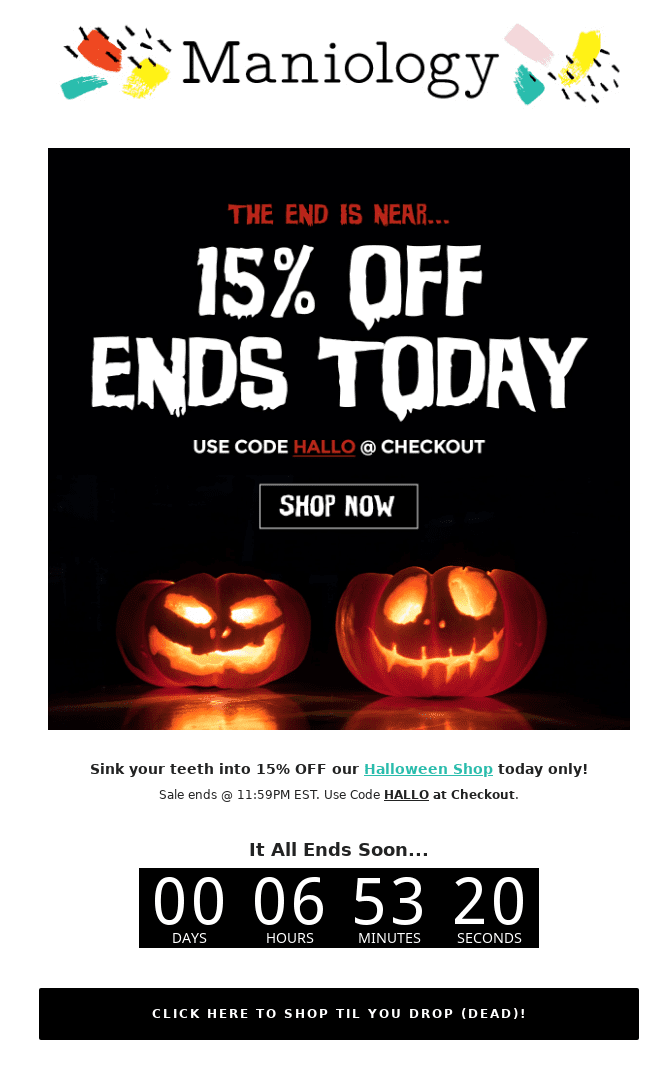
Halloween email marketing boosts engagement and drives sales with themed promotions and spooky content. Crafting eye-catching emails can capture attention and increase conversion rates.
Halloween offers a unique opportunity to engage your audience with themed promotions. Emails with spooky designs and creative subject lines can stand out in crowded inboxes. Highlight special offers, limited-time discounts, and themed products to entice customers. Personalize messages to make them feel exclusive and relevant.
Including interactive elements like countdown timers or animated GIFs can increase engagement. A clear call-to-action is crucial to guide recipients towards making a purchase. Halloween email marketing, when done right, can significantly boost your sales and customer interaction during the holiday season.
Credit: www.smartrmail.com
The Haunting Appeal Of Halloween For Marketers
Halloween is a thrilling time for marketers. It’s a season filled with excitement and creativity. The spooky charm of Halloween captivates everyone. This makes it a golden opportunity for email marketing campaigns. People are more eager to engage with festive content. Let’s explore why Halloween holds such a haunting appeal for marketers.
Seasonal Influence On Consumer Behavior
During Halloween, consumer behavior changes dramatically. People are in the mood to celebrate. They search for costumes, decorations, and treats. This seasonal shift creates a unique chance for marketers. Emails themed around Halloween capture attention easily.
Here are some ways Halloween influences consumer behavior:
Increased spending on themed items
Higher engagement with spooky content
More willingness to try new products
Statistics Behind Halloween Spending
Halloween spending statistics are impressive. People spend billions on this spooky holiday. Knowing these numbers helps marketers plan better.
Category
Average Spending
Costumes
$3.2 Billion
Candy
$2.6 Billion
Decorations
$2.7 Billion
Greeting Cards
$390 Million
These numbers reveal a lot. They show where consumers are willing to spend. Marketers can use this data to tailor their email campaigns.
Crafting A Bewitching Subject Line
Halloween is a fun and spooky time. Your email subject lines should reflect that. A great subject line can capture attention. It can also increase open rates. Let’s explore how to make your subject lines magical.
Puns And Wordplay To Captivate
Puns and wordplay can make your subject line stand out. They are fun and engaging. Here are some tips:
Use Halloween-related words like “spooky”, “boo”, and “witch”.
Combine these words with your product or offer.
Keep it short and simple.
Examples:
Subject Line
Why It Works
“Spooktacular Savings Await!”
Uses wordplay and promises a deal.
“Boo! Don’t Miss This Sale!”
Grabs attention with “Boo!”
Creating A Sense Of Urgency
Urgency can prompt quick action. It makes the reader feel they might miss out. Here are some strategies:
Use words like “limited time” and “last chance”.
Add deadlines to your subject lines.
Highlight exclusive offers.
Examples:
Subject Line
Why It Works
“Only 24 Hours Left for Spooky Deals!”
Combines urgency with Halloween theme.
“Last Chance for Halloween Specials!”
Makes the reader act quickly.
Eerie Email Design Elements
Halloween presents a unique opportunity for email marketers. Capture attention with eerie email design elements. Infusing a spooky touch can boost engagement and conversions. Let’s explore how to create spine-chilling emails.
Incorporating Halloween Themes
Integrate Halloween themes to make your emails stand out. Use spooky fonts and creepy graphics.
Haunted houses
Ghosts and goblins
Witches and cauldrons
Jack-o’-lanterns
These elements set the Halloween mood. They make your emails festive and engaging.
Color Schemes And Imagery To Thrill
Choose colors that scream Halloween. Orange, black, and purple are perfect choices.
Color
Hex Code
Orange
#FFA500
Black
#000000
Purple
#800080
Use eerie imagery to captivate your audience. Add bats, spiders, and full moons.
Start with a spooky header image.
Use Halloween-themed dividers.
End with a hauntingly good call-to-action.
These small touches make your emails visually appealing. They increase the likelihood of clicks and conversions.
Monstrous Deals And Promotions
Halloween is the perfect time for spooky deals. Customers love unique offers that match the season. Brands can use Halloween-themed promotions to attract more buyers. These promotions make customers feel special and excited.
Exclusive Offers For Subscribers
Subscribers should get the best deals. Create exclusive discounts just for them. This makes them feel valued and keeps them loyal. Send emails with a spooky theme to catch their attention.
Offer a 20% discount on Halloween items.
Provide early access to Halloween sales.
Give free shipping on Halloween costumes.
Use a catchy subject line. This will improve your open rates.
Flash Sales And Discount Strategies
Flash sales create urgency. Customers will act fast to get the deal. Plan short, timed sales for Halloween.
Announce a 24-hour Halloween flash sale.
Offer “buy one, get one free” on Halloween decorations.
Give a 30% discount for the first 100 buyers.
Segment your email list. Send targeted promotions to different groups. Use spooky visuals to make the email fun. This will engage more readers.
Here is a sample email layout:
Section
Content
Subject Line
Spooky Savings Inside! Don’t Miss Out!
Header
Exclusive Halloween Deals Just for You!
Body
Grab these monstrous deals before they disappear! Click now!
Footer
Happy Halloween! Unsubscribe | Contact Us
Monitor the results of your email campaigns. Use data to improve future promotions.
Segmenting Your Ghoulish Audience
Halloween is a great time for email marketing. But, sending the same email to everyone won’t work. You need to segment your audience. This way, you can send the right message to the right people.
Targeted Campaigns For Different Demographics
Different people like different things about Halloween. Kids might love candy and costumes. Teens might enjoy spooky stories and haunted houses. Adults might prefer Halloween parties or scary movies.
Use this information to create targeted campaigns. For example, send emails about costume ideas to parents. Send haunted house tickets to teens. Offer party supplies to adults. This will make your emails more relevant.
Personalization Tricks For Engagement
Personalization can make your emails more engaging. Use the recipient’s name in the subject line. Mention past purchases or preferences. For example, “Hi John, check out our new vampire costumes!”
Include interactive elements. A simple quiz can be fun. For example, “What type of Halloween character are you?” This keeps your audience engaged.
Here are some personalization tips:
Use first names in emails
Send product recommendations based on past purchases
Offer special discounts for loyal customers
Use these tricks to make your Halloween email marketing more effective. Happy Halloween!
Spine-chilling Social Proof
Halloween email marketing can be more effective with social proof. Social proof builds trust and excitement. It shows customers that others love your products. This can be done through testimonials, reviews, and influencer shout-outs.
Testimonials And Reviews
Testimonials and reviews are powerful tools. They show real customer experiences. Add these to your Halloween emails. Use short, catchy quotes. Include customer names and photos if possible.
Customer
Review
Jane Doe
“These Halloween costumes are amazing!”
John Smith
“Best Halloween candy ever. My kids love it!”
Positive reviews encourage more people to buy. They see others are happy with your products. It makes them feel safe to purchase.
Influencer Collaborations And Shout-outs
Influencers can boost your Halloween email marketing. They have loyal followers. Partner with influencers for shout-outs. This adds credibility to your brand.
Choose influencers with a Halloween-themed audience.
Send them free products to review.
Ask them to share their experience on social media.
Include these shout-outs in your emails. Add a link to the influencer’s post. This shows customers that influencers trust your brand. It encourages them to try your products too.
Automated Email Series To Raise The Dead
Halloween email marketing is a powerful tool. It can revive your sales. With an automated email series, you can engage your audience. This method keeps your brand in their minds. Let’s explore some spooky ideas to make your emails stand out.
Welcome Series With A Halloween Twist
Make your new subscribers feel special. Start with a Halloween-themed welcome email. Use spooky graphics and colors. Include a special Halloween offer or discount. This will grab their attention.
In the second email, share a Halloween story. This can be a fun ghost tale or a brand story. Make it engaging and relevant.
In the third email, offer a Halloween-themed guide. It could be a costume guide or party planning tips. Add a call-to-action (CTA) to encourage purchases.
Abandoned Cart Emails That Resurrect Sales
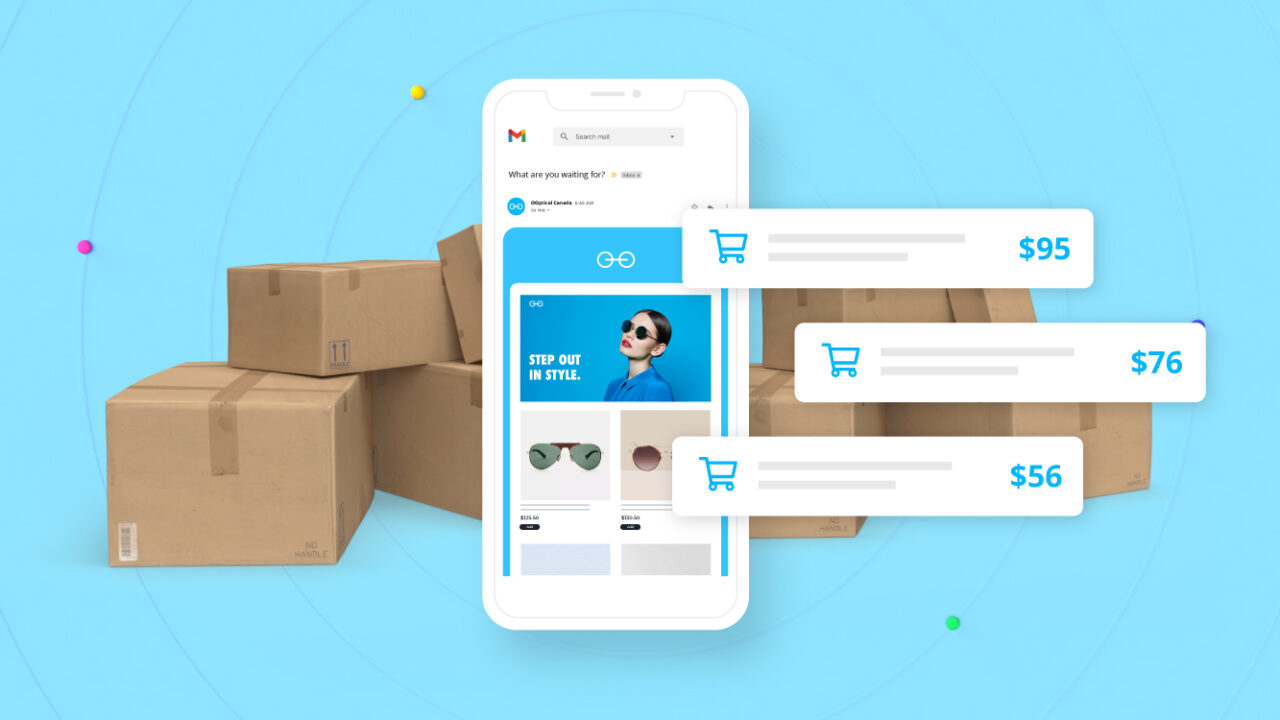
Many customers leave items in their carts. Send a spooky reminder to complete their purchase. Use a catchy subject line like “Don’t let your cart haunt you!”.
In the first email, remind them of the items in their cart. Use Halloween-themed images and text.
In the second email, offer a small discount or free shipping. This can motivate them to complete their purchase.
In the third email, create a sense of urgency. Mention that the offer is ending soon. Use phrases like “Last chance before it vanishes!”.
Email
Content
CTA
Welcome Email 1
Spooky Graphics & Special Offer
Shop Now
Welcome Email 2
Halloween Story
Read More
Welcome Email 3
Halloween Guide
Get Tips
Abandoned Cart Email 1
Reminder of Items
Complete Purchase
Abandoned Cart Email 2
Offer Discount
Shop Now
Abandoned Cart Email 3
Urgency Message
Buy Now
Analyzing The Spirits: Metrics To Watch
Halloween email marketing can be a treat or a trick. Success depends on understanding key metrics. Monitoring these metrics helps fine-tune your strategy and boost engagement.
Open And Click-through Rates
Open rates show how many recipients opened your email. A high open rate means your subject line worked. Use spooky and exciting words to grab attention. Emojis can also make your subject line stand out.
Click-through rates (CTR) measure how many clicked a link in your email. High CTR indicates your content is engaging. Use clear and enticing calls to action (CTA). For example, “Get Your Halloween Discount Now!” works well.
Metric
Benchmark
Open Rate
15-25%
Click-Through Rate
2-5%
Conversion Metrics And A/b Testing
Conversion metrics show how many took the desired action. This could be a purchase or sign-up. High conversion rates mean your email was effective.
A/B testing helps find the best versions of your email. Test subject lines, images, and CTAs. Send two versions to small groups and compare results. Use the best-performing version for the rest of your list.
Test different subject lines
Use varied images
Experiment with different CTAs
Track these metrics and adjust your strategy. Your Halloween email campaign will be a spooktacular success!
Tales From The Crypt: Successful Campaign Examples
Halloween is a time for spooky fun and creative marketing. Many brands have launched successful Halloween email campaigns. These campaigns are both engaging and effective. Let’s explore some of these hauntingly good examples.
Case Studies Of Halloween Hits
Here are some successful Halloween email campaigns. They grabbed attention and boosted sales.
Brand
Campaign
Key Feature
Spirit Halloween
Spooky Sale
Limited-time offers
Starbucks
Witch’s Brew
Halloween-themed drink
Amazon
Trick or Treat Deals
Daily discounts
What We Can Learn From The Ghosts Of Campaigns Past
These campaigns teach us many things. Here are some key takeaways:
Use Urgency: Limited-time offers create urgency.
Theme Your Product: Halloween-themed products catch the eye.
Keep these lessons in mind. They can help you create your own successful Halloween email campaign.
Credit: www.mailjet.com
Avoiding Email Marketing Nightmares
Halloween is a time of fun and fright, but your email marketing shouldn’t scare your subscribers. Avoiding email marketing nightmares is crucial for maintaining a positive relationship with your audience. Let’s dive into some common pitfalls and best practices to ensure your Halloween email campaigns are a treat, not a trick.
Common Pitfalls To Evade
Many marketers fall into traps that can turn their email campaigns into a horror show. Below are some common pitfalls to avoid:
Overloading with Emails: Bombarding subscribers with too many emails can annoy them.
Ignoring Mobile Optimization: Many people check emails on their phones. Ensure your emails look great on mobile.
Weak Subject Lines: A boring subject line can make your email go unread.
Missing Call to Action: Emails without a clear call to action confuse readers.
Spooky Spam Triggers: Words like “free” or “guarantee” can send your email to spam.
Best Practices For Ethical Marketing
Following ethical marketing practices can help you avoid these pitfalls and keep your subscribers happy. Here are some best practices:
Get Permission: Always have permission before adding someone to your email list.
Personalize Content: Use the subscriber’s name and tailor content to their interests.
Provide Value: Offer useful and interesting content in every email.
Easy Unsubscribe: Make it simple for subscribers to opt out if they wish.
Test and Optimize: Regularly test your emails and optimize for better results.
By avoiding these common pitfalls and following best practices, you can create a Halloween email campaign that delights your subscribers. Keep your audience engaged and ensure your emails are a treat to read.
Last-minute Lurches: Timing Your Campaign
Halloween is just around the corner, and your email campaign needs a boost. Timing is everything, especially for last-minute pushes. Knowing when to send your emails can be the difference between a trick or a treat.
Determining The Optimal Send Time
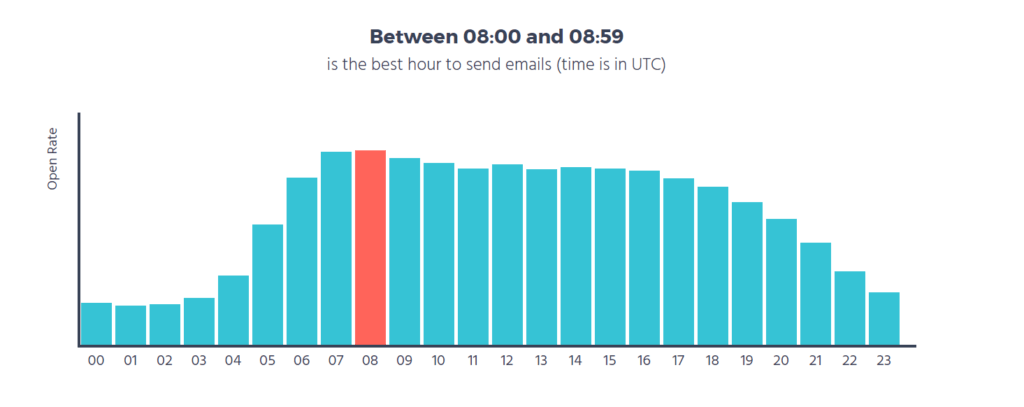
Timing is key for successful email campaigns. Your audience needs to see your emails at the right moment. When is the best time? Studies show that emails sent during the mid-week perform better. Emails sent around 10 AM see the highest engagement rates. Avoid late-night or early-morning sends.
Consider your audience’s time zone. If your subscribers are global, schedule your emails accordingly. Use data from past campaigns to determine the best send times. Analyze open rates and click-through rates to guide your timing.
Countdowns And Time-sensitive Content
Use countdowns to create urgency. A countdown timer can grab attention. It also encourages quick action. Highlight limited-time offers and exclusive deals. Make your audience feel they need to act fast.
Include phrases like “Only 24 hours left!” or “Offer ends tonight!” These phrases can boost engagement and drive conversions. Time-sensitive content can also create excitement. Your readers will look forward to your next email.
Email Timing
Engagement Level
Mid-Week, 10 AM
High
Late-Night
Low
Early-Morning
Low
Send emails mid-week for better engagement.
Use countdown timers for urgency.
Highlight limited-time offers.
Analyze past data to find the best times.
Mobile Optimization For Trick-or-treaters On The Go
Halloween is a busy time. People check their phones often. Your Halloween email marketing should work well on mobile. Optimized emails catch attention and boost engagement.
Responsive Design Considerations
Responsive design adapts emails to any screen size. Use flexible grids and images. Make sure your text is readable on all devices.
Use large, legible fonts.
Keep paragraphs short.
Ensure buttons are easy to tap.
Element
Desktop
Mobile
Font Size
16px
14px
Button Size
Standard
Large
Image Width
Fixed
Flexible
Creating A Seamless Mobile Experience
Make navigation easy. Use clear calls-to-action (CTAs). CTAs should stand out. Avoid cluttering your email.
Place important info at the top.
Use single-column layouts.
Test emails on various devices.
Remember, mobile users are on the go. They need quick and clear information. Optimize your emails for a smooth Halloween experience.
Frequently Asked Questions
How To Write A Halloween Email?
Craft a catchy subject line. Use spooky graphics and Halloween-themed colors. Include a clear call-to-action. Personalize the email with the recipient’s name. Keep the content fun and engaging.
When Should You Send Halloween Emails?
Send Halloween emails 1-2 weeks before the holiday. This timing boosts open rates and engagement. Plan early for success.
When Should I Start Halloween Marketing?
Start Halloween marketing in early September. Early promotions build excitement and increase sales. Focus on engaging content and themed offers.
What Is A Good Email Address For Marketing?
A good email address for marketing should be short, memorable, and professional, like info@yourbusiness. com or marketing@yourbrand. com.
Conclusion
Embrace the spooky season with creative Halloween email marketing strategies. Engage your audience with themed content and offers. Personalize emails for better connection and higher conversion rates. Monitor your campaigns to refine future efforts. Make this Halloween a memorable one for your subscribers and boost your business.
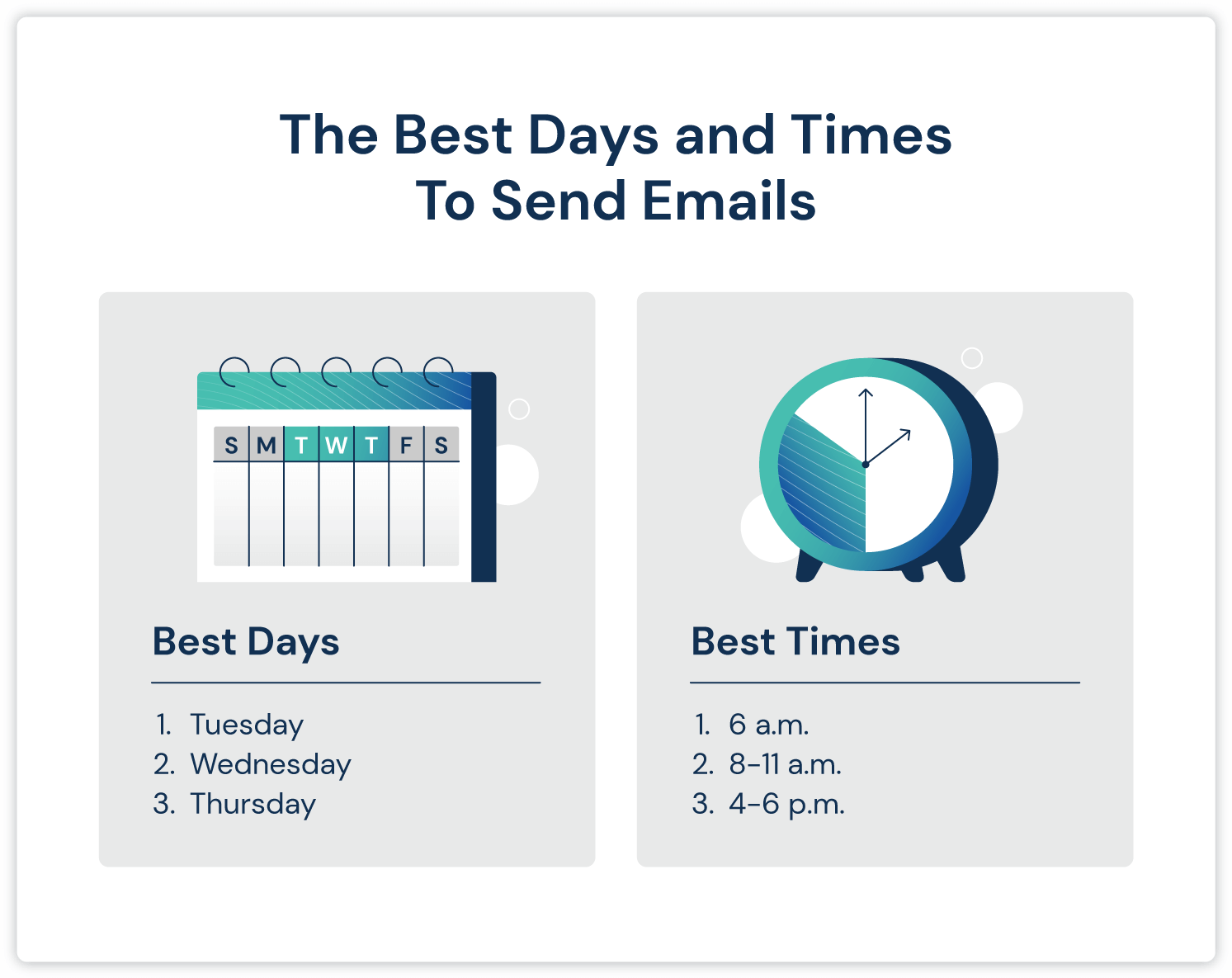
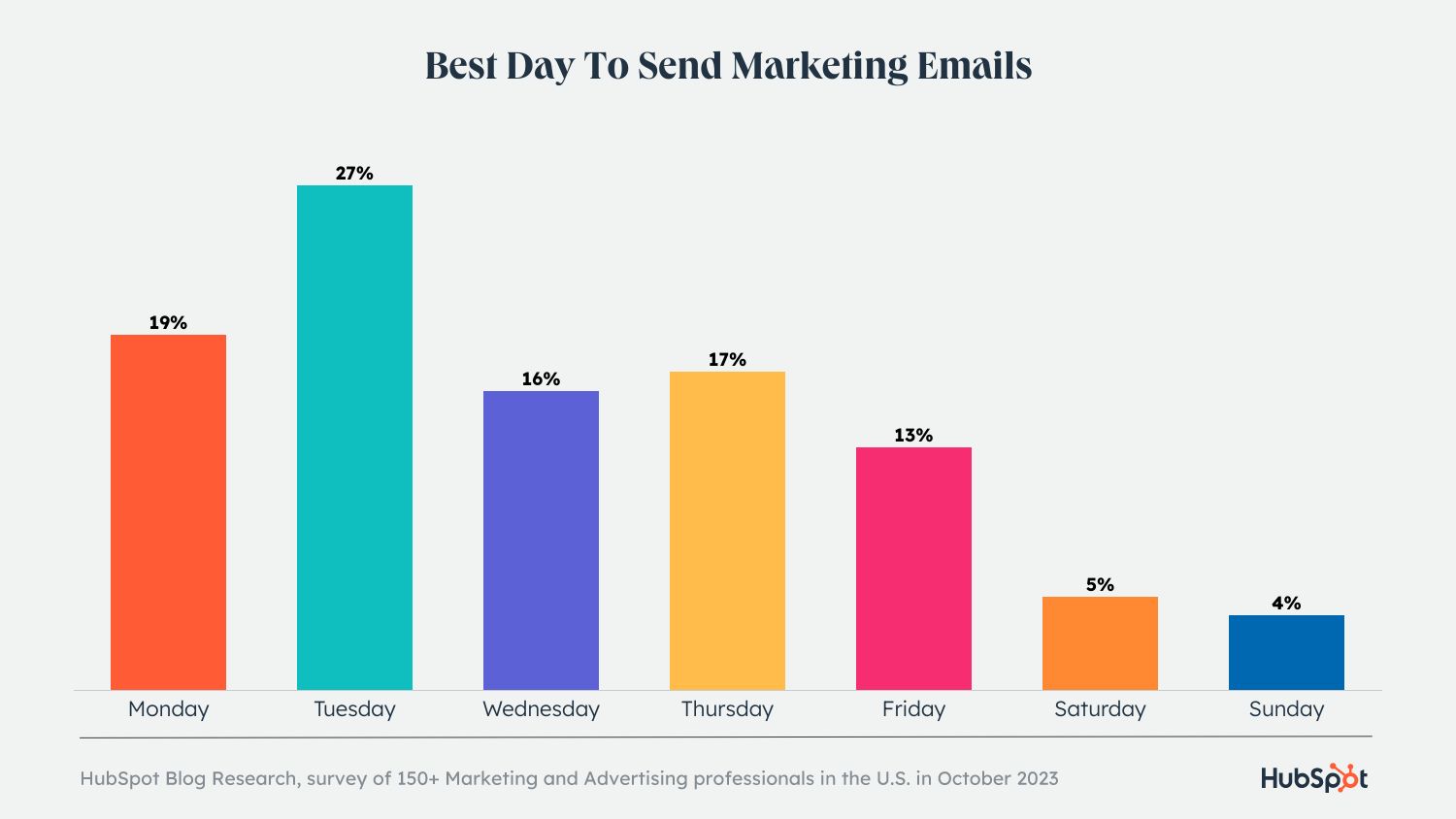
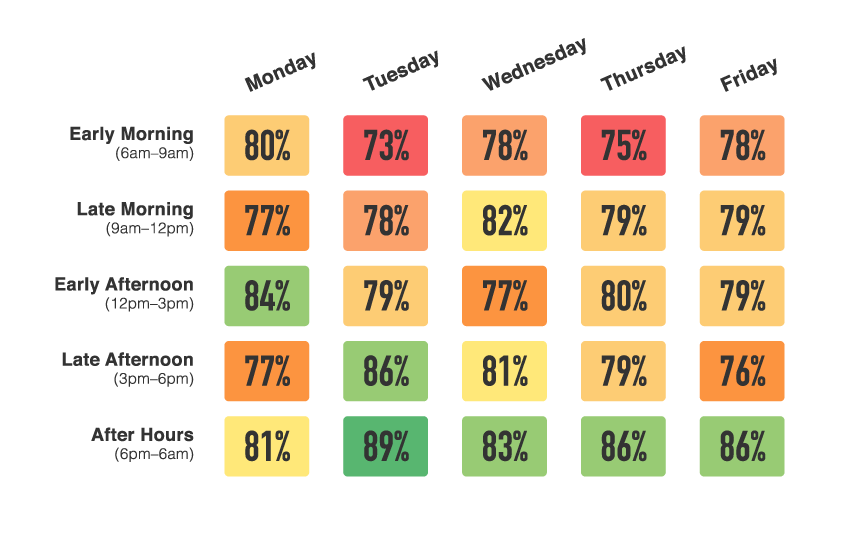
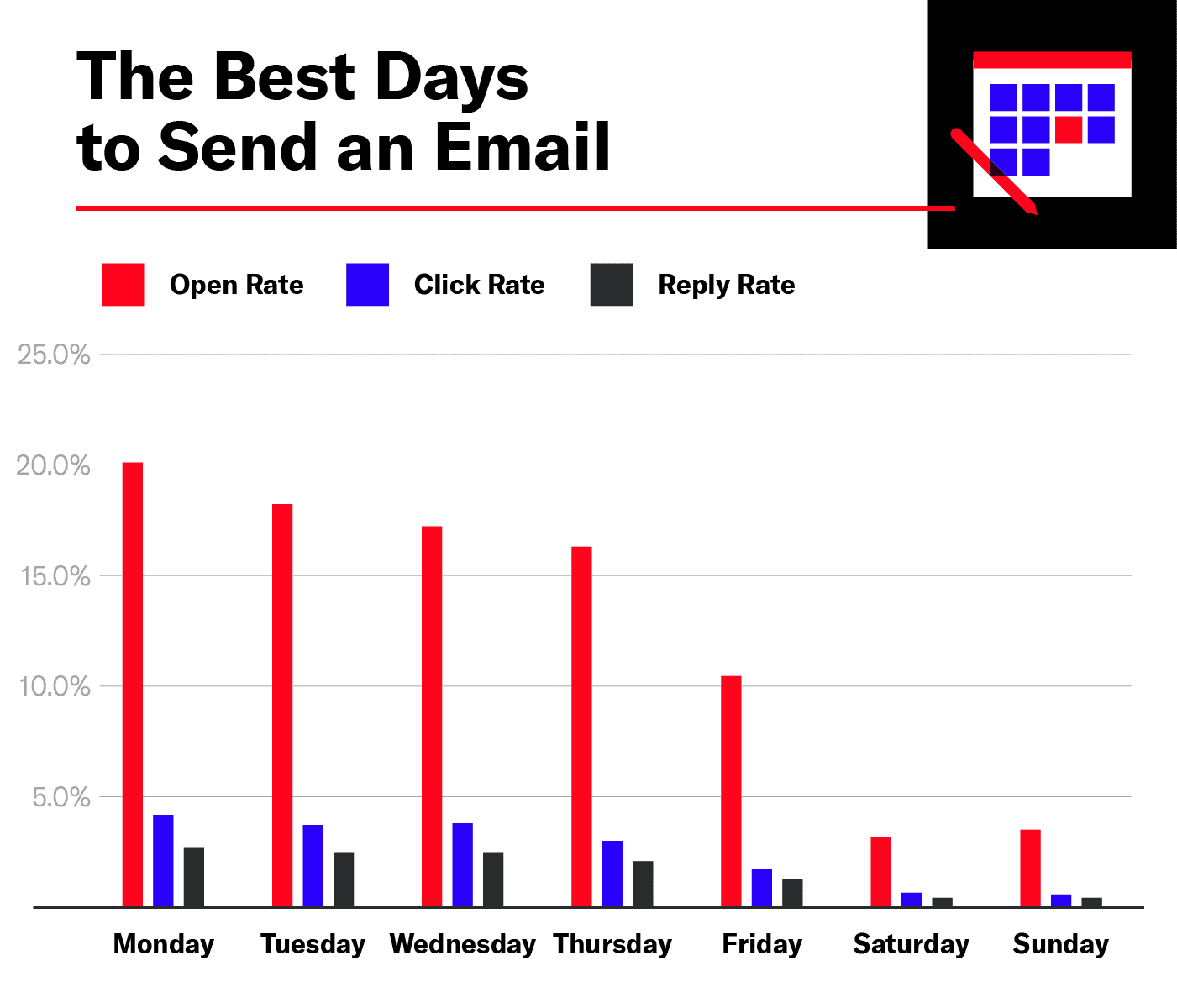
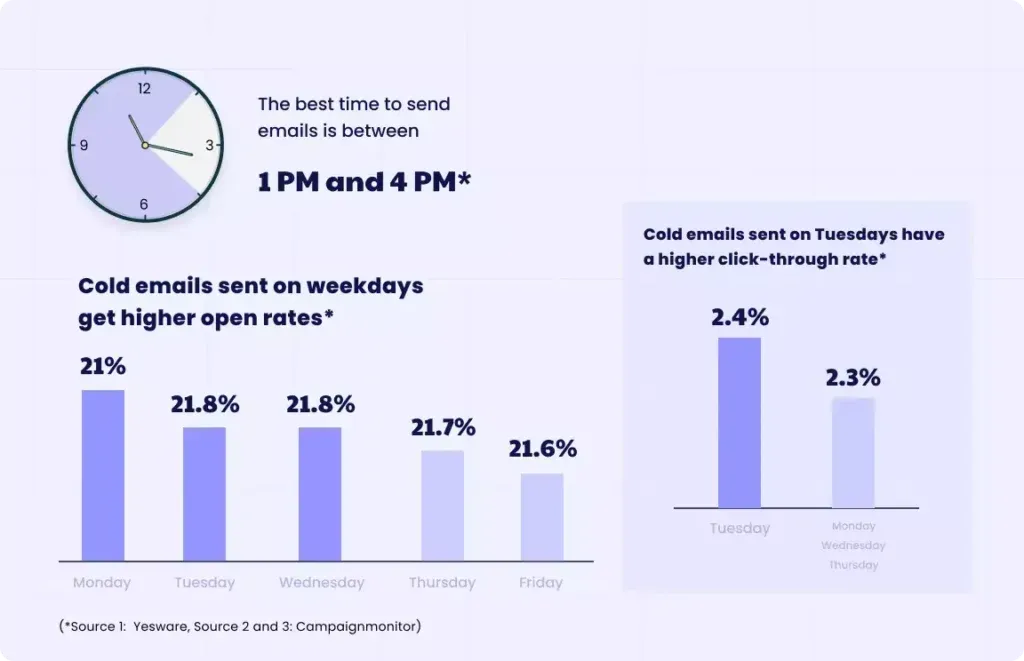
The best days to send email marketing are Tuesday, Wednesday, and Thursday. Optimal times are typically between 10 AM and 2 PM.
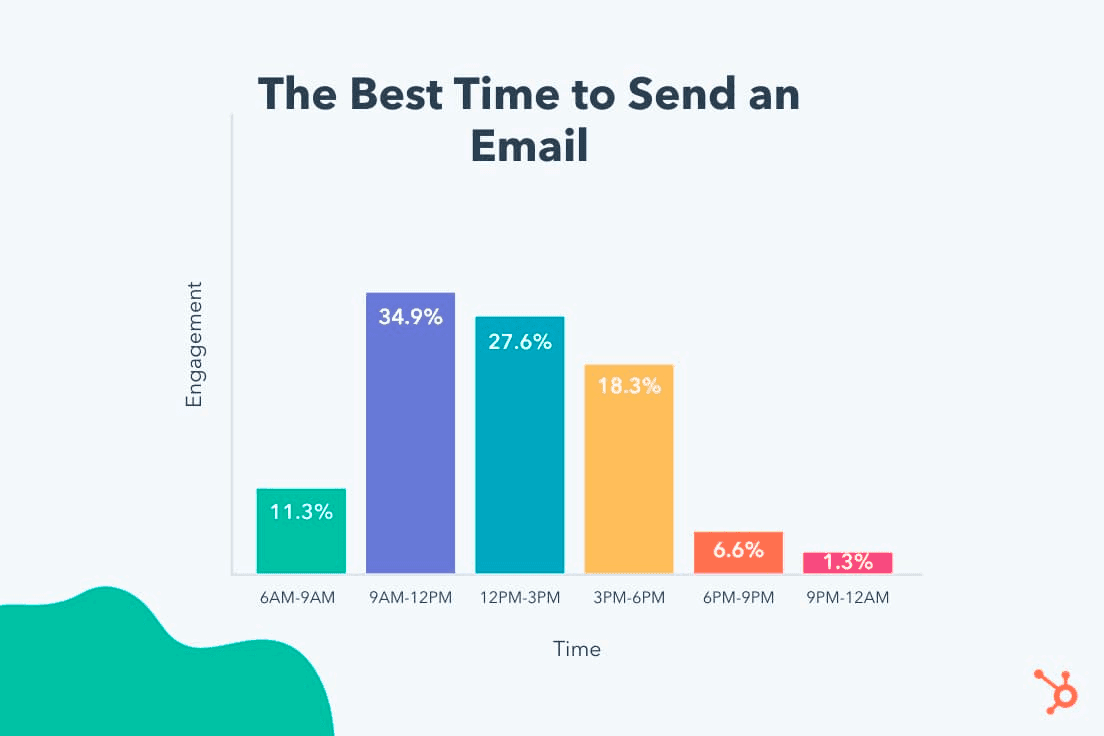
Timing is crucial in email marketing for maximizing open and click-through rates. Sending emails on Tuesday, Wednesday, or Thursday ensures higher engagement, as these days fall in the middle of the workweek when recipients are more likely to check their inboxes.
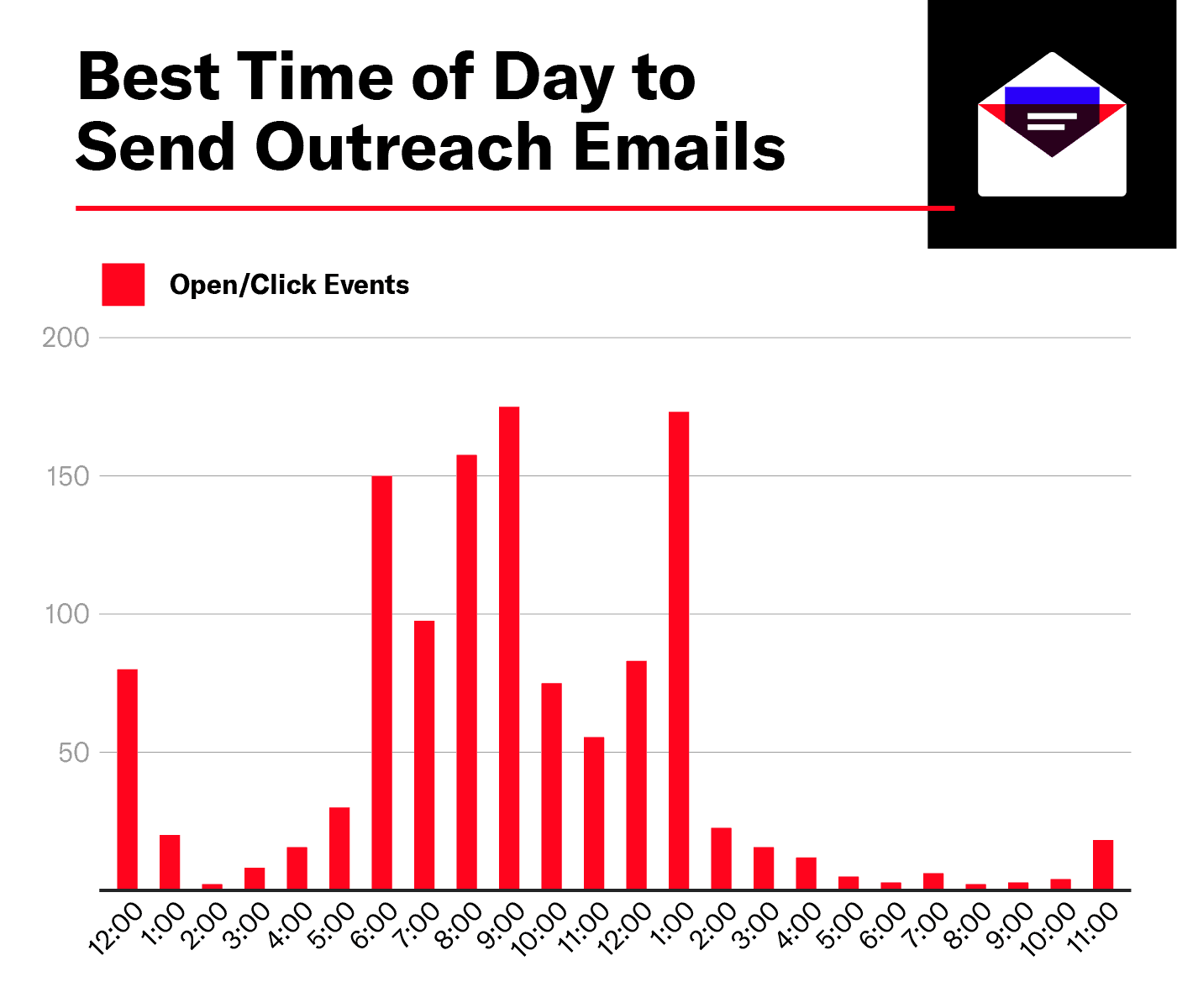
The time of day also matters; sending emails between 10 AM and 2 PM catches recipients when they’re most active. Avoiding Mondays prevents your email from getting lost in the weekend backlog, while Fridays can be less effective as people prepare for the weekend. By choosing the right days and times, you can significantly improve your email marketing results.
Introduction To Email Marketing Timing
Email marketing is a powerful tool. But timing is everything. The right time can boost open rates. The wrong time can mean unread emails. Knowing the best days and times is crucial.
Importance Of Timing
Timing affects your email success. People check emails at specific times. Sending emails then increases visibility. This can lead to higher engagement.
Impact On Open Rates And Engagement
Open rates depend on timing. Emails sent at peak times are more likely to be opened. Engagement increases, too. People are more likely to interact with timely emails.
Day
Best Time
Monday
8 AM – 10 AM
Tuesday
10 AM – 12 PM
Wednesday
9 AM – 11 AM
Thursday
8 AM – 10 AM
Friday
10 AM – 12 PM
These times are general guidelines. Testing your audience’s preferences is key. Different groups may have different habits. Adjust accordingly for best results.
Key Factors Influencing Optimal Send Times
Finding the best time to send your email marketing campaigns can be tricky. Several key factors influence the optimal times, ensuring your emails get the best open rates. Understanding these factors helps you reach your audience effectively.
Audience Demographics
Your audience’s age, gender, and occupation play a huge role. Younger audiences might check emails late at night. Professionals might check emails first thing in the morning.<ul
Age: Younger people often check emails at night.
Gender: Men and women may have different habits.
Occupation: Office workers check emails in the morning.
Behavioral Patterns
Behavioral patterns help in predicting the best send times. Knowing when your audience is most active can boost engagement. Use past data to find these patterns.
Previous Open Rates: Check when past emails were opened.
Website Activity: Monitor peak times on your site.
Social Media Usage: Align email times with social activity.
Time Zones Considerations
Time zones are crucial in global email marketing. Sending emails at the wrong time can lead to low open rates. Consider these tips:
Region
Optimal Time
North America
10 AM – 2 PM
Europe
9 AM – 1 PM
Asia
8 PM – 12 AM
Use email tools to schedule sends according to time zones. This ensures your emails reach recipients at the right time.
Analyzing Industry Trends
Understanding the best days and times to send email marketing can greatly boost your campaign’s success. Analyzing industry trends helps in identifying optimal periods for email engagement. This section explores key trends and differences across various industries.
B2b Vs. B2c Differences
B2B and B2C email marketing strategies differ significantly. B2B emails perform better during weekdays. Professionals check emails mostly between Tuesday and Thursday. The best time is usually mid-morning, around 10 AM.
B2C emails see higher engagement during weekends. Consumers often shop online on Saturdays and Sundays. Evening times, around 8 PM, are ideal for B2C emails.
Type
Best Days
Best Times
B2B
Tuesday to Thursday
10 AM
B2C
Saturday to Sunday
8 PM
Seasonal Variations In Email Engagement
Email engagement varies with seasons. Holidays and special events impact open rates. For example, retail emails perform well during Christmas. Consumers are more likely to shop during holiday seasons.
Summertime shows a decline in email engagement. People are on vacation and check emails less frequently. Spring and fall see moderate engagement levels. Adjust your email strategy according to seasonal trends.
Winter: High engagement during holidays
Spring: Moderate engagement
Summer: Low engagement due to vacations
Fall: Moderate engagement with a rise near Thanksgiving
Knowing these trends helps optimize your email marketing efforts. Target specific days and times for better engagement. Adjust strategies based on industry and seasonal variations.
Credit: optinmonster.com
Days Of The Week For Maximum Impact
Choosing the right day to send an email can boost your open rates. Different days yield different results. Knowing the best days can make your campaigns more effective. Let’s explore which days work best for your email marketing.
Midweek Performance
Midweek days, like Tuesday, Wednesday, and Thursday, are top performers. These days show higher open and click rates. People are more likely to check emails on these days.
A study found Tuesday to be the best day. Emails sent on Tuesday have the highest open rates. Wednesday and Thursday follow closely behind.
Here is a table showcasing open rates for midweek days:
Day
Open Rate
Tuesday
18.3%
Wednesday
17.1%
Thursday
16.8%
Weekend Open Rates
Weekends can also be good for sending emails. People have more free time to check their inboxes. Saturday and Sunday can yield surprising results.
Many businesses avoid weekends. This can work to your advantage. Your email might stand out with less competition.
Here are some tips for weekend emails:
Send casual and friendly content.
Offer weekend-only promotions.
Use engaging subject lines.
Here’s a quick look at weekend open rates:
Day
Open Rate
Saturday
14.5%
Sunday
15.2%
Time Of Day Strategies
Understanding the best times to send email marketing can boost engagement. Timing plays a key role in open rates and click-through rates. Let’s dive into specific strategies for different times of the day.
Morning Sends
Sending emails in the morning can capture fresh attention. People often check emails first thing. Consider sending between 8 AM to 10 AM.
Employees start their workday by checking emails.
Consumers may read emails with their morning coffee.
Morning sends can lead to higher open rates.
Afternoon Peaks
Afternoon emails can reach people during breaks. The best time is from 1 PM to 3 PM. This slot works well for many industries.
Time
Reason
1 PM
Post-lunch break
2 PM
Mid-afternoon slump
3 PM
Pre-end of workday
Evening Opportunities
Evening sends can target relaxed audiences. The best window is 7 PM to 9 PM.
People unwind after dinner.
Less competition from other emails.
Potentially higher engagement rates.
Credit: lmffc.fr
Leveraging Analytics For Personalized Timing
Sending emails at the right time can boost engagement. Leveraging analytics helps in identifying the best send times. Personalizing timing based on user behavior enhances results. Let’s explore how to use data for this purpose.
Using Email Metrics
Email metrics provide insights into user behavior. Key metrics include open rates, click-through rates, and conversion rates. By analyzing these metrics, you can find patterns in user interactions.
Open Rates: Measure the percentage of opened emails.
Click-Through Rates (CTR): Track the percentage of clicked links.
Conversion Rates: Identify the percentage of completed desired actions.
Use these metrics to determine peak engagement times. This helps in personalizing send times for different user segments.
A/b Testing Send Times
A/B testing helps in optimizing email send times. It involves sending emails at different times to two groups. Analyze the results to find the best-performing time.
Select a sample group of subscribers.
Divide the group into two equal segments.
Send emails to each segment at different times.
Compare open and click-through rates.
Repeat the test with different times for accurate results. A/B testing helps in refining the timing strategy.
Email Metric
Importance
Open Rates
Identifies interest in the subject line
Click-Through Rates
Measures engagement with email content
Conversion Rates
Tracks the effectiveness of CTAs
Analyzing these metrics helps in understanding user behavior. This aids in sending emails when users are most likely to engage.
Adapting To Subscriber Behavior
Understanding subscriber behavior is key to successful email marketing. Tailoring your emails based on this behavior can boost engagement. You need to know the best days and times to send emails. This approach ensures your emails reach your audience when they are most active.
Segmentation Tactics
Segmentation is essential for effective email marketing. Divide your email list into smaller segments. Each segment can be based on behavior, preferences, and demographics. This helps in sending targeted emails.
Open rates: Track when your emails are opened the most.
Click rates: See which links are clicked often.
Purchase history: Send offers based on past purchases.
Using these tactics, you can create more personalized emails. Personalized emails lead to higher engagement and conversion rates.
Responsive Sending
Responsive sending means adjusting send times based on subscriber activity. Analyze the data to find peak engagement times. Send emails when subscribers are most likely to open them.
Time Slot
Engagement Level
8 AM – 10 AM
High
12 PM – 2 PM
Medium
6 PM – 8 PM
High
Use this data to schedule your emails. Aim to send emails during high engagement times. This increases the chances of your email being opened and read.
Best Practices And Common Mistakes
Email marketing success depends on timing. Picking the right days and times is key. This section covers best practices and common mistakes to avoid. Learn how to optimize your email campaigns. Below, we discuss consistency, frequency, and avoiding over-saturation.
Consistency And Frequency
Consistency in email marketing builds trust. Send emails on the same days and times. This creates a routine for your audience. They will expect and look forward to your emails.
Frequency is also important. Sending too few emails can make your audience forget you. Sending too many can annoy them. Balance is key. Studies show that 2-3 emails per week work best.
Here is a simple table for guidance:
Frequency
Impact
1 email per week
Low engagement
2-3 emails per week
Optimal engagement
4+ emails per week
High risk of unsubscribes
Avoiding Over-saturation
Over-saturation happens when you send too many emails. Your audience may feel overwhelmed. This can lead to unsubscribes.
To avoid this, segment your audience. Send targeted emails to specific groups. This makes your emails more relevant.
Follow these tips to avoid over-saturation:
Track your email open rates
Monitor unsubscribe rates
Analyze click-through rates
Keep your email content valuable. Provide useful information and offers. This keeps your audience engaged and happy.
The Future Of Email Marketing Timing
Email marketing timing is evolving quickly. Knowing the best days and times to send emails is crucial. The future brings new technologies to enhance timing strategies.
Emerging Technologies
Emerging technologies are reshaping email marketing. AI and machine learning are leading the charge. These tools help predict the best times to send emails.
Artificial Intelligence (AI): AI analyzes user behavior patterns.
Machine Learning (ML): ML learns from past data to predict future actions.
Automation Tools: These tools schedule emails for optimal engagement.
AI and ML enable marketers to send emails at the perfect time. Automation tools streamline this process. These technologies ensure higher open and click-through rates.
Predictive Analytics
Predictive analytics is a game-changer in email marketing. It uses data to forecast the best times to send emails. This approach improves engagement rates significantly.
Here are key features of predictive analytics:
Analyzes historical data
Identifies patterns and trends
Predicts user behavior
Feature
Benefit
Historical Data Analysis
Understanding past behaviors
Pattern Recognition
Identifying user trends
User Behavior Prediction
Sending emails at the right time
Predictive analytics helps marketers tailor their email campaigns. It ensures emails reach users when they are most active. This method boosts engagement and conversion rates.
Credit: mailshake.com
Frequently Asked Questions
What Is The Best Day Of The Week To Send Email Marketing?
The best days to send email marketing are Tuesday and Thursday. They typically see higher open and click-through rates.
Is It Better To Send an Email On Friday Or Monday?
Sending emails on Monday is often more effective. People are more likely to read and respond.
What Is The Ideal Weekly Email Frequency For Marketing?
The ideal weekly email frequency for marketing is 1-3 times. Test and adjust based on audience engagement and feedback.
How Often Should I Send Email Marketing?
Send email marketing 1-2 times per week. Avoid overwhelming your audience while staying consistent. Adjust frequency based on engagement.
Conclusion
Choosing the right day and time for email marketing can significantly boost engagement. Experiment with different schedules to find what works best. Monitor your results and adjust accordingly. Consistency and timing are crucial to the success of email campaigns. Keep refining your strategy to maximize open and click-through rates.
The best time to send business emails is Tuesday at 10 AM. Another optimal time is Thursday at 10 AM.
Timing is crucial for email marketing success. Sending emails at the right time increases open rates and engagement. Tuesday and Thursday mornings are prime times when recipients are more likely to check their inboxes. People are generally more productive and attentive during these hours, making them more receptive to new information.
Avoid sending emails on Monday mornings and Friday afternoons. Monday is often busy with catching up, and Friday is winding down for the weekend. Midweek mornings offer a sweet spot where business professionals are most active and responsive. Maximizing email timing can significantly boost your campaign effectiveness, leading to better business outcomes.
Credit: www.linkedin.com
The Importance Of Timing In Email Marketing
The Importance of Timing in Email Marketing
Sending emails at the right time is very important. Timing can affect if your email is opened or ignored. Many factors decide the best time to send emails. Understanding these factors helps improve your email marketing success.
Why Email Send Time Matters
Email send time matters because people check emails at different times. The right time can increase the chances of your email being seen. If sent at the wrong time, your email may get lost in the inbox.
Time of Day
Reason
Morning
People check emails first thing in the morning.
Afternoon
People may check emails during lunch breaks.
Evening
People might check emails before going to bed.
Impact On Open Rates And Engagement
Email open rates can be higher when sent at the right time. High open rates mean more people read your email. Engagement depends on how interesting your email is and the timing.
Here are some tips to improve open rates and engagement:
Send emails during weekdays.
Avoid sending emails late at night.
Test different times to see what works best.
Credit: blog.hubspot.com
Analyzing Your Audience’s Email Habits
Understanding your audience’s email habits is key to sending business emails at the right time. By analyzing their behavior, you can increase engagement and open rates. This section will guide you through identifying peak activity hours and leveraging analytics tools.
Identifying Peak Activity Hours
Knowing when your audience is most active is crucial. Different groups have different peak times. For instance, some people check emails early in the morning. Others might check during lunch breaks or in the evening.
Consider your audience’s timezone. If you have a global audience, take note of various time zones. It helps in sending emails at the right local time.
Here’s a table showing common peak activity hours:
Region
Peak Hours
North America
8 AM – 10 AM, 4 PM – 6 PM
Europe
9 AM – 11 AM, 2 PM – 4 PM
Asia
10 AM – 12 PM, 6 PM – 8 PM
Leveraging Analytics Tools
Analytics tools help track email performance. They provide data on open rates, click rates, and more. This data is useful for finding the best times to send emails.
Here are some popular analytics tools:
Google Analytics
MailChimp
HubSpot
Sendinblue
Using these tools, you can analyze past email campaigns. Look for patterns in open rates and engagement. This helps refine your email timing strategy.
Consider setting up A/B tests. Send emails at different times to small groups. Compare the results to find the most effective time.
Here’s a sample code snippet for setting up A/B tests:
if (time == "morning") {
  sendEmail("Group A");
} else if (time == "afternoon") {
  sendEmail("Group B");
}
This approach ensures you optimize email timing. Higher engagement leads to better business results.
Differences In B2b Vs B2c Email Timing
Understanding the best time to send an email is crucial. B2B (Business-to-Business) and B2C (Business-to-Consumer) emails require different strategies. This ensures higher open rates and engagement.
Optimal Days For Business Audiences
B2B emails target professionals. These emails perform best on weekdays. The optimal days are:
Tuesday: This day has the highest open rates.
Wednesday: Midweek sees steady engagement.
Thursday: This day is also effective.
Avoid sending B2B emails on Mondays. Professionals are often busy catching up. Fridays are less effective. People are winding down for the weekend.
Best Times For Consumer-focused Emails
B2C emails target individual consumers. These emails perform best in the evenings and weekends. The optimal times are:
Day
Best Time
Saturday
10 AM – 12 PM
Sunday
6 PM – 8 PM
Weekdays
8 PM – 10 PM
Weekends are great for B2C emails. Consumers have more free time. Evening emails catch people after work. Always consider your audience’s lifestyle.
Day-by-day Guide To Email Scheduling
Understanding the best time to send business emails can boost engagement. This day-by-day guide helps you schedule emails for maximum impact.
Breaking Down The Week
Each day of the week has its own email open rates. Knowing these can help you plan better.
Day
Best Time
Reason
Monday
8 AM – 10 AM
People check emails first thing in the morning.
Tuesday
10 AM – 12 PM
Peak productivity time, high engagement.
Wednesday
10 AM – 12 PM
Midweek, people are focused and attentive.
Thursday
8 AM – 10 AM
Early bird catches the worm.
Friday
8 AM – 10 AM
People wrap up their week, check emails.
Weekend Considerations
Sending emails on the weekend can be tricky. People are often busy with personal activities.
Saturday: Best time is 10 AM – 12 PM. People are more relaxed.
Sunday: Avoid sending emails. People prepare for the upcoming week.
Use this guide to refine your email schedule. Boost your email open rates and engagement.
Hourly Breakdown: Maximizing Opens
Knowing the best time to send business emails can increase your open rates. Timing your emails helps ensure your message is seen. In this section, we will explore the best hours to send emails.
Morning Vs Afternoon Vs Evening
The time of day impacts email open rates. Each period has its advantages. Here is a breakdown:
Time of Day
Advantages
Disadvantages
Morning (9 AM – 11 AM)
High open rates
People check emails first thing
Emails might get lost in the morning rush
Afternoon (1 PM – 3 PM)
People are back from lunch
Less email competition
People might be busy with work
Evening (7 PM – 9 PM)
People have free time
Emails stand out more
Lower open rates
People might be relaxing
Time Zone Adjustments
Sending emails across different time zones can be tricky. Adjust your email schedules based on the recipient’s time zone. This ensures your email lands at the right time.
Here are some tips for adjusting to time zones:
Know your audience’s location.
Use email marketing tools to schedule sends.
Test different times to find the best results.
Sending emails at the right time increases open rates. It also ensures your message is read.
Seasonality And Email Timing
Understanding the best time to send business emails involves considering seasonality and timing. Different periods in the year affect how and when emails should be sent. This ensures maximum engagement and effectiveness.
Holiday Season Strategies
The holiday season is a critical time for email campaigns. It’s a period when businesses can leverage high consumer activity. Here are some strategies:
Start early: Send emails before major holidays begin.
Include holiday themes: Use festive designs and greetings.
Offer special deals: Provide discounts and exclusive offers.
Avoid sending emails on the day of the holiday itself. People are often busy with personal activities.
Quarterly Business Cycles
Businesses operate on quarterly cycles. Understanding these cycles helps in timing emails effectively.
Here’s a breakdown of quarterly email strategies:
Quarter
Focus Area
Best Time to Send Emails
Q1 (Jan-Mar)
New Year promotions, tax-related updates
Early mornings on weekdays
Q2 (Apr-Jun)
Mid-year reviews, summer sales
Mid-week, around midday
Q3 (Jul-Sep)
Back-to-school, end of summer
Early mornings, late afternoons
Q4 (Oct-Dec)
Holiday season, year-end reviews
Early mornings, mid-week
By aligning email strategies with these cycles, businesses can enhance engagement. Each quarter presents unique opportunities and challenges.
A/b Testing For Time Optimization
Optimizing the timing of your business emails can increase engagement. A/B testing is an effective method to find the best times. This involves sending emails at different times to see which works best.
Designing Effective Tests
Start by selecting your test groups. Divide your email list into two equal groups. Send emails to the first group at one time. Send emails to the second group at another time. Choose times based on your audience’s behavior.
Use tools to track open rates and click-through rates. Ensure the email content remains the same across both groups. This isolates the time factor. Run the test over several days to get accurate results.
Interpreting Test Results
Collect data on open rates and click-through rates. Create a table to compare the results.
Test Group
Open Rate
Click-Through Rate
Group A
25%
5%
Group B
35%
7%
Analyze which group had higher engagement. Consider the time of day and day of the week. Look for patterns in the data.
Use these insights to refine your email timing strategy. Repeat tests periodically to account for changing behaviors. Document findings and adjust your approach as needed.
Automation And Email Scheduling Tools
Sending business emails at the right time is crucial. Automation and email scheduling tools help streamline this process. They ensure your emails reach recipients at the most effective times. This boosts open rates and engagement.
Software Solutions
Several software solutions offer robust email automation and scheduling features. These tools help you plan and send emails without manual intervention.
Mailchimp: Known for its user-friendly interface and powerful automation features.
Sendinblue: Provides advanced scheduling options and real-time analytics.
HubSpot: Offers comprehensive email marketing tools with CRM integration.
Constant Contact: Ideal for small businesses, with easy-to-use templates and scheduling.
Setting Up Automated Schedules
Setting up automated schedules is simple. Follow these steps to ensure your emails are sent at the best times:
Determine the Best Time: Use analytics to find peak engagement times.
Choose Your Tool: Select a software solution that fits your needs.
Create Your Email: Design an engaging email with a clear call to action.
Set the Schedule: Use the scheduling feature to set the send time.
Review and Confirm: Double-check all details before confirming the schedule.
Here’s a sample table showing the best times to send emails based on industry:
Industry
Best Day
Best Time
E-commerce
Tuesday
10 AM
Healthcare
Wednesday
11 AM
Finance
Thursday
9 AM
Using these tools, you can optimize your email marketing efforts. Automation and scheduling save time and increase efficiency. Make sure to review your analytics regularly. This helps refine your strategy and achieve better results.
Continuous Improvement And Adaptation
Sending business emails at the right time is crucial. The best time may change over time. Continuous improvement and adaptation are key. This helps in keeping your strategy effective. Staying updated and reviewing your strategy is essential.
Staying Updated With Trends
Email trends change frequently. What worked last year may not work now. Stay updated with the latest trends. Follow industry reports and studies. Use tools like Google Trends to see what is popular.
Consider the following points to stay updated:
Subscribe to industry newsletters.
Attend webinars and workshops.
Follow influencers in email marketing.
Use analytics tools to track performance.
Trends can provide insights into user behavior. They help in adjusting your email timing strategy.
Periodic Review Of Email Timing Strategy
Regularly review your email timing strategy. This ensures it aligns with current trends. Use analytics to track the performance of your emails. Look at open rates and click-through rates. This data helps in making informed decisions.
Follow these steps for a periodic review:
Analyze email performance data monthly.
Compare it with industry benchmarks.
Identify patterns in user behavior.
Adjust email timing based on findings.
Use a table to track key metrics:
Metric
Current Value
Target Value
Open Rate
20%
25%
Click-Through Rate
5%
7%
Regular reviews help in optimizing your email strategy. This leads to better engagement and results.
Credit: staffbase.com
Frequently Asked Questions
What Is The Best Day To Send A Business Email?
The best day to send a business email is Tuesday. Studies show higher open and response rates on this day.
Does It Matter What Time You Send A Business Email?
Yes, timing matters for business emails. Aim to send emails during work hours, preferably mid-morning on weekdays. This increases the chance of a prompt response. Avoid sending emails late at night or during weekends.
Is It Rude To Send Business Emails Late At Night?
Sending business emails late at night can be considered rude. Recipients may feel pressured to respond immediately. Schedule emails to send during business hours for better etiquette.
What Is The Best Time To Email Work?
The best time to email work is between 9 AM and 11 AM. Emails sent during this period have higher open rates.
Conclusion
Finding the best time to send business emails can enhance your communication strategy. Aim for optimal times to boost engagement. Test different timings and analyze results for your specific audience. With these insights, you’ll improve open rates and foster better business relationships.
Keep refining your approach for continued success.
The best time to send cold emails is on Tuesday or Thursday mornings. Aim for 8-10 AM to maximize open rates.
Timing is crucial for the success of cold email campaigns. Sending emails at the right time can significantly improve open and response rates. Research indicates that Tuesdays and Thursdays are the most effective days for cold emailing. Early morning, specifically between 8-10 AM, is ideal as recipients are likely to check their inboxes first thing.
Avoid sending emails on Mondays and Fridays when inboxes are typically flooded or when people are winding down for the weekend. By targeting optimal days and times, you can enhance engagement and achieve better results with your cold email outreach.
Credit: www.siegemedia.com
Introduction To Cold Emailing
Best Time to Send Cold Email
Cold emailing is a powerful marketing tool. It helps you reach new prospects. It can open doors to new opportunities. But, it must be done right to be effective. Timing plays a crucial role. Sending emails at the right time can increase engagement. Let’s explore the importance of timing and how to maximize open rates.
The Importance Of Timing
Timing is key in cold emailing. Sending emails at the wrong time can lead to low open rates. People are busy and may ignore your email if sent at a bad time. Knowing the right time to send emails can boost your chances. It ensures your email gets noticed and read.
Maximizing Open Rates
To maximize open rates, understand your audience. Learn their habits and preferences. Test different times to see what works best. Here are some tips to consider:
Weekdays: Send emails during weekdays, not weekends.
Morning Hours: Early morning is a good time.
Lunch Break: Consider sending emails around lunch time.
Follow-Up: Send follow-up emails if no response.
Day
Best Time
Monday
8 AM – 10 AM
Tuesday
9 AM – 11 AM
Wednesday
10 AM – 12 PM
Thursday
11 AM – 1 PM
Friday
12 PM – 2 PM
Analyzing The Audience
Sending cold emails at the right time is crucial. Understanding your audience ensures your emails are read and not ignored. In this section, we will look at how to analyze your audience effectively.
Identifying The Target Demographics
Knowing who your audience is helps in crafting the right message. Identify the age, gender, and interests of your audience.
Age: Are they young adults, middle-aged, or seniors?
Gender: Is your audience primarily male, female, or mixed?
Interests: What are their hobbies or professional interests?
Use surveys or social media insights to gather this information. Knowing these details helps you tailor your email content.
Understanding Recipient Time Zones
Sending emails at the right time increases open rates. Understand the time zones of your audience.
Region
Time Zone
North America
EST, CST, MST, PST
Europe
GMT, CET, EET
Asia
IST, CST, JST
Use tools like Google Calendar to convert time zones. This ensures your email reaches the inbox at the best time.
Days Of The Week Matter
Sending cold emails at the right time can boost your response rate. Different days of the week perform differently. Understanding this can help you plan better. Let’s dive into the details.
Midweek Performance Insights
Midweek days, particularly Tuesday, Wednesday, and Thursday, show high engagement. These days are great for sending cold emails.
On Monday, people catch up on tasks. On Friday, they prepare for the weekend. So, midweek becomes the best time for cold emails.
Day
Engagement Level
Monday
Low
Tuesday
High
Wednesday
High
Thursday
High
Friday
Medium
Saturday
Low
Sunday
Low
Weekend Versus Weekday Engagement
Weekdays generally outperform weekends in cold email engagement. People often ignore work emails during weekends. They relax and spend time with family.
On weekdays, people are in work mode. They check emails more frequently. This makes weekdays perfect for cold emails.
Weekdays: Higher engagement.
Weekends: Lower engagement.
For better results, send your cold emails between Tuesday and Thursday. Avoid weekends for important outreach.
Credit: www.siegemedia.com
Breaking Down The Best Hours
Timing can make or break your cold email strategy. Knowing the best hours to send cold emails helps increase open rates and engagement. This section will guide you through the most effective times of the day.
Morning Momentum
Sending emails in the morning sets the stage for success. The optimal window is between 8 AM to 10 AM. People start their day by checking emails. A morning email can capture their attention quickly.
Between 8 AM to 10 AM
High open rates
Less competition
Afternoon Attention
Afternoons are ideal for detailed reading. Aim to send emails between 1 PM and 3 PM. People often check emails after lunch. They have more time to read and respond.
Between 1 PM to 3 PM
People are more relaxed
Higher engagement
Evening Engagement
Evening emails can catch a relaxed audience. The best time is between 6 PM and 8 PM. People check emails after work. Evening emails often get higher response rates.
Between 6 PM to 8 PM
High response rates
Less email traffic
Here’s a quick summary in table form:
Time of Day
Best Hours
Benefits
Morning Momentum
8 AM – 10 AM
High open rates, less competition
Afternoon Attention
1 PM – 3 PM
People are relaxed, higher engagement
Evening Engagement
6 PM – 8 PM
High response rates, less email traffic
The Role Of Industry
Sending cold emails at the right time can boost response rates. The best time to send emails often depends on the industry. Different industries have unique patterns and schedules.
B2b Timing Nuances
B2B stands for Business to Business. Timing is crucial in B2B emails. Business professionals often check emails during work hours. The best days are Tuesday, Wednesday, and Thursday. Aim for mid-morning, around 10 AM, or early afternoon, around 2 PM.
Day
Best Time
Tuesday
10 AM or 2 PM
Wednesday
10 AM or 2 PM
Thursday
10 AM or 2 PM
These times work because professionals are less busy. Avoid Mondays and Fridays. People are either catching up or winding down.
B2c Email Strategies
B2C stands for Business to Consumer. Timing here is different from B2B. Consumers often check emails outside work hours. Evenings and weekends are best.
Weekdays: 8 PM to 10 PM
Saturday: Morning or late evening
Sunday: Afternoon or evening
Consumers are relaxed and have more free time. This increases the chance of them reading your email. Tailor your email strategy to fit these times.
Credit: www.klenty.com
Seasonality And Email Success
Understanding the right time to send cold emails can boost your success. Various factors influence this, including seasonality. Different times of the year can impact the effectiveness of your emails. This section explores how holiday seasons and quarterly business cycles affect your cold email strategy.
Holiday Seasons Impact
Holiday seasons can significantly impact email success rates. During holidays, people often take time off work. They might not check their emails as frequently. This can lead to lower open and response rates.
To navigate this, avoid sending cold emails during major holidays. Here is a table showing some holidays to avoid:
Holiday
Date
Christmas
December 25
New Year’s Day
January 1
Thanksgiving
Fourth Thursday of November
Instead, send emails before or after these dates. This ensures your email is seen when people return to work.
Quarterly Business Cycles
Businesses often operate on quarterly cycles. Understanding these cycles can help you time your emails better. For example, many companies plan budgets and projects at the start of each quarter.
Here are some key points to consider:
Q1 (January – March): Companies set new goals and budgets.
Q2 (April – June): Projects are in full swing.
Q3 (July – September): Mid-year reviews and adjustments occur.
Q4 (October – December): Companies wrap up the year and plan for the next.
Sending emails at the start of a quarter can be effective. This is when companies are open to new ideas and solutions.
In contrast, avoid sending emails at the end of a quarter. Companies might be focused on closing out their tasks and might not respond.
Use this knowledge to align your cold email strategy with business cycles. This increases the chances of your email being read and responded to.
Technological Tools For Timing
Timing is crucial for cold emails. Using the right tools can increase your success. Technology helps you send emails at the best times. This section explores tools that can help you.
Email Scheduling Software
Email scheduling software helps you send emails at the perfect time. It automates the sending process. You choose the time and the software sends the email. Many tools offer this feature.
Mailchimp: Schedule emails to reach inboxes at the right time.
Sendinblue: Use the “Send Time Optimization” feature.
HubSpot: Schedule emails based on contact’s time zone.
Analytics And Optimization
Analytics tools help you understand when emails are most effective. They track open rates and responses. This data helps you optimize your email timing.
Here are some useful tools:
Google Analytics: Track website traffic from your emails.
Mixpanel: Analyze user engagement and interaction.
Crazy Egg: Visualize where users click after opening your email.
Using these tools, you can improve your email strategy. This leads to higher engagement and better results.
Tool
Feature
Mailchimp
Schedule Emails
Sendinblue
Send Time Optimization
HubSpot
Time Zone Scheduling
Google Analytics
Track Website Traffic
Mixpanel
Analyze Engagement
Crazy Egg
Visual Click Maps
Crafting The Perfect Follow-up
Following up on a cold email can be challenging. You want to remain top-of-mind without being intrusive. The key is to strike a balance between persistence and respect for the recipient’s time. This section will guide you through the best practices for crafting the perfect follow-up email.
Timing Your Sequences
Timing is crucial in follow-up emails. Sending too soon may seem pushy. Waiting too long may result in your email being forgotten. A well-timed follow-up can boost your chances of a response.
First Follow-Up: Send it 3 days after the initial email.
Second Follow-Up: Send it 5 days after the first follow-up.
Third Follow-Up: Send it 7 days after the second follow-up.
Follow this sequence to stay on their radar without being annoying. Always be mindful of weekends and holidays.
Persistence Without Annoyance
Your persistence should never cross into annoyance. Each follow-up should add value.
Personalize: Reference their interests or recent activities.
Offer Value: Share a useful resource or piece of information.
Keep it Short: Write concise, straightforward follow-ups.
Use these strategies to maintain a positive tone. Always give an easy opt-out option.
Follow-Up Timing
Action
3 Days After Initial Email
Send First Follow-Up
5 Days After First Follow-Up
Send Second Follow-Up
7 Days After Second Follow-Up
Send Third Follow-Up
Remember, persistence is key, but always be respectful. With the right timing and approach, you can craft the perfect follow-up emails that get responses.
Case Studies And Success Stories
Knowing the best time to send a cold email can boost your outreach. Many companies have tested different times and shared their results. Learning from their experiences can help you find the perfect time to hit send.
Learning From The Best
Successful companies have shared their winning strategies. Here are some examples:
Company
Best Time to Send
Success Rate
Company A
Tuesday, 10 AM
45%
Company B
Wednesday, 9 AM
50%
Company C
Thursday, 2 PM
55%
These companies found that mid-week mornings or early afternoons work best. These times catch people when they are most active.
Adapting Strategies From Failures
Not all attempts are successful. Learning from mistakes can also guide us.
Company D: Sent emails on Mondays at 8 AM. Low open rates.
Company E: Tried Fridays at 4 PM. High bounce rates.
Company F: Used weekends. Very poor engagement.
These companies learned that early mornings and weekends are not ideal. People are often busy or not checking emails then.
Analyzing both successes and failures helps refine your strategy. Try different times, track results, and adjust as needed.
Conclusion: Synthesizing Timing Strategies
Choosing the best time to send cold emails can be tricky. Timing plays a vital role in improving open rates and responses. We’ve explored various factors that affect the timing of your emails. Now, let’s bring it all together and apply these insights.
Key Takeaways
Emails sent on Tuesday and Thursday perform better.
Morning emails between 8 AM and 10 AM get more attention.
Emails sent at 1 PM to 3 PM see higher engagement.
Consider the recipient’s time zone for better results.
Implementing Insights For Success
Use these strategies to optimize your cold email timing:
Schedule emails for Tuesday and Thursday.
Send emails between 8 AM and 10 AM or 1 PM to 3 PM.
Adjust sending time based on the recipient’s time zone.
Test different times to find what works best for your audience.
Day
Optimal Time
Engagement Level
Tuesday
8 AM – 10 AM
High
Thursday
1 PM – 3 PM
High
Wednesday
8 AM – 10 AM
Moderate
By following these tips, you can improve your cold email results. Always track your performance and adjust your strategy as needed.
Frequently Asked Questions
What Is The Best Time Of Day To Send Prospecting Emails?
The best time to send prospecting emails is between 10 AM and 11 AM. Aim for mid-week, especially Tuesday to Thursday.
Should I Send A Cold Email On Friday?
Sending a cold email on Friday can be risky. People may overlook it as they prepare for the weekend. Aim for mid-week instead.
Is Monday A Good Day To Cold Email?
Yes, Monday is a good day to cold email. People often check emails to plan their week.
What Is The Best Time To Send An Email Response?
The best time to send an email response is between 10 AM and 11 AM. Emails sent during this period have higher open rates. Early afternoon, around 1 PM to 2 PM, is also effective. Avoid late evenings and weekends for optimal engagement.
Conclusion
Choosing the right time to send cold emails can boost your response rates. Test different times and track results. Early mornings or mid-week often work best. Consistency is key to finding what works for your audience. Fine-tuning your approach will lead to better engagement and success.
Email marketing involves sending targeted messages to a list of subscribers. It aims to promote products, services, or content.
Email marketing is a powerful tool for businesses of all sizes. It allows direct communication with customers and prospects. By personalizing content, businesses can boost engagement and conversion rates. Cost-effective and measurable, email marketing helps track the effectiveness of campaigns.
Automated email sequences can nurture leads and encourage repeat business. Regular updates and newsletters keep audiences informed and engaged. With strong calls to action, emails can drive traffic to websites and increase sales. Integrating email marketing with other digital strategies enhances overall marketing efforts. Mastering email marketing can significantly improve customer relationships and business growth.
The Power Of Email Marketing
Email marketing holds immense power in the digital world. It connects businesses directly with their audience. Emails land straight in the inbox, making sure the message gets seen. Let’s explore why email marketing is so effective.
Why Email Reigns Supreme
Email marketing remains a top choice for marketers. Here are key reasons:
Personalization: Emails can be tailored to individual interests.
Direct Reach: Emails go directly to the recipient’s inbox.
Cost-Effective: Sending emails is cheaper than many other channels.
High Engagement: Email campaigns often see better engagement rates.
Comparing Roi: Email Vs. Other Channels
ROI is crucial in marketing. Let’s compare email marketing with other channels:
Channel
Average ROI
Email Marketing
$42 for every $1 spent
Social Media
$10 for every $1 spent
PPC (Pay-Per-Click)
$2 for every $1 spent
Email marketing clearly leads in ROI. It offers the highest return among all channels.
Building Your Email List
Building your email list is essential for effective email marketing. A strong email list allows you to reach more potential customers. This section explores strategies to grow your email list.
Opt-in Strategies
Opt-in strategies encourage visitors to join your email list. Use these methods to gain more subscribers:
Sign-Up Forms: Place sign-up forms on your website. These forms should be easy to find.
Pop-Ups: Use pop-ups to capture visitors’ emails. Ensure they are not intrusive.
Landing Pages: Create dedicated landing pages for email sign-ups. Offer a freebie or discount as an incentive.
Exit Intent Pop-Ups: Trigger pop-ups when visitors intend to leave. This can capture last-minute subscribers.
Leveraging Social Media For List Growth
Social media is a powerful tool for growing your email list. Here are ways to leverage it:
Promote Sign-Up Links: Share sign-up links on your social media profiles. Make them easy to access.
Run Contests: Host contests requiring email sign-up for entry. This can attract many new subscribers.
Use Social Media Ads: Invest in social media ads targeting potential subscribers. These ads should link to your sign-up forms.
Engage with Followers: Engage with your followers regularly. Encourage them to join your email list for exclusive content.
Crafting The Perfect Email
Email marketing can be a powerful tool. But success depends on crafting the perfect email. This involves creating compelling subject lines and engaging content. Let’s dive into these essential aspects.
Subject Line Secrets
The subject line is the first thing your reader sees. It must grab their attention immediately.
Keep it short and sweet. Aim for 6-10 words.
Use action verbs. Encourage your reader to take action.
Make it personal. Use their name or interests.
Create urgency. Use words like “now” or “limited time”.
Avoid spammy words. Words like “free” can trigger spam filters.
Here are some examples:
Effective Subject Line
Reason
“Last chance to save 50%”
Creates urgency
“John, your exclusive offer inside”
Makes it personal
“Unlock your special discount now”
Uses action verbs
Content That Converts
Your email content should be clear and engaging. It must encourage readers to act.
Start with a strong opening: Grab attention with the first sentence.
Be concise: Keep paragraphs short and to the point.
Use bullet points: They make information easy to read.
Include a call-to-action (CTA): Tell readers what you want them to do.
Use visuals: Images and videos can boost engagement.
Here’s a simple structure:
Introduction: Greet your reader and introduce the topic.
Main content: Provide valuable information or offers.
Call-to-action: Encourage the reader to take the next step.
Example:
Subject Line: “Unlock Your Special Discount Now”
    Opening: Hi John, we have a special offer just for you.
    Main Content: For a limited time, save 50% on your next purchase.
    CTA: Click here to claim your discount.
By following these tips, you can create emails that convert. Your readers will appreciate the clarity and value in your messages.
Segmentation Strategies
Email Marketing Online: Segmentation Strategies
Segmentation strategies make your email marketing powerful. They help you send the right message to the right person. You will see better results with good segmentation.
Targeting Your Audience
First, understand who your audience is. Use data to find out what they like. You can use:
Age
Location
Purchase history
Interests
Group your audience based on these factors. This way, you can send more relevant emails.
Personalization Techniques
Personalization makes your emails special. Use their name in the email. You can also use their past purchases to suggest new products.
Technique
Description
First Name
Use their first name in the greeting.
Location
Mention their city or region.
Past Purchases
Recommend products based on past buys.
These small touches make a big difference. Customers feel valued and are more likely to respond.
Timing Your Emails
Timing is crucial in email marketing. Sending emails at the right time boosts engagement. It ensures your audience sees and interacts with your content. In this section, we will explore the best practices for scheduling emails and how to analyze engagement metrics.
Best Practices For Scheduling
Timing your emails can greatly impact open and click-through rates. Here are some best practices for scheduling:
Know your audience: Understand your audience’s habits and time zones.
Test different times: Experiment with sending emails at various times.
Avoid weekends: Weekdays generally have higher engagement rates.
Consider time zones: Schedule emails according to your audience’s local time.
Monitor industry trends: Stay updated on when your industry sees the highest engagement.
Analyzing Engagement Metrics
To optimize email timing, you need to analyze engagement metrics. This helps in understanding the best times to send emails.
Metric
What to Look For
Open Rate
Check the percentage of opened emails.
Click-Through Rate
Measure the number of clicks on your links.
Bounce Rate
Track the number of undelivered emails.
Unsubscribe Rate
Observe how many users unsubscribe.
Use these metrics to adjust your email timing. By doing so, you can find the optimal times for sending emails.
Automating Your Email Campaigns
Email marketing automation is a powerful tool. It helps you save time and improve efficiency. With automation, you can send the right message at the right time. This increases engagement and conversions. Let’s explore how you can automate your email campaigns effectively.
Tools For Email Automation
There are many tools available for email automation. They help you streamline your campaigns. Here are some popular options:
Tool
Features
Pricing
Mailchimp
Drag-and-drop editor, templates, analytics
Free and paid plans
Sendinblue
SMS marketing, CRM, advanced segmentation
Free and paid plans
HubSpot
CRM integration, lead scoring, workflows
Free and paid plans
Creating Email Workflows
Email workflows help you automate the process of sending emails. They allow you to create sequences based on user actions. Here is how you can create effective email workflows:
Define Your Goals: Know what you want to achieve. This could be welcoming new subscribers or nurturing leads.
Segment Your Audience: Group your subscribers based on their interests or behavior. This makes your emails more relevant.
Create Email Content: Write engaging and valuable content. Use clear and simple language.
Set Triggers: Decide what actions will start the workflow. This could be a user signing up or clicking a link.
Test and Optimize: Monitor your workflows and make improvements. Check open rates and click-through rates.
Email automation is key to successful email marketing. Use the right tools and create smart workflows. Your campaigns will be more effective and efficient.
Designing For Success
Email Marketing Online – Designing for Success
Email marketing can boost your business. But designing the perfect email is key. A well-designed email grabs attention. It drives action. Let’s explore how to design emails that succeed.
Responsive Email Design
Your emails must look great on all devices. Many people check emails on their phones. Use responsive design to adjust layouts. Ensure text and images fit any screen size.
To achieve responsive design, consider these tips:
Use fluid grids.
Set flexible images.
Apply media queries.
A responsive email reaches more people. It offers a better user experience. This leads to higher engagement.
Visual Elements That Pop
Visuals make your email stand out. Use colors, images, and icons smartly. They should support your message. Avoid clutter. Keep it simple and clean.
Here are some tips for great visuals:
Choose a color scheme that matches your brand.
Use high-quality images.
Add icons to highlight important points.
Visuals can guide readers’ eyes. They make your email more appealing. This helps in getting better results.
Credit: www.maropost.com
Testing And Optimization
Email marketing is a powerful tool for businesses. Testing and optimization make it even stronger. By testing and optimizing, you can improve your email campaigns. This process helps you understand what works best. Let’s dive into some key methods for testing and optimization.
A/b Testing Essentials
A/B testing is a simple yet powerful method. It involves comparing two versions of an email. These versions are sent to different groups. The goal is to see which performs better.
Here are the steps for A/B testing:
Choose one element to test. This could be the subject line, call-to-action, or content.
Create two versions of your email. Make sure only one element is different.
Send each version to a small portion of your list. Ensure the groups are similar in size and characteristics.
Analyze the results. Look at metrics like open rates, click-through rates, and conversions.
Choose the winning version. Send it to the rest of your list.
Repeat this process to continuously improve your emails. Keep tests simple to understand what changes make a difference.
Continuous Improvement Of Campaigns
Optimization is not a one-time task. It requires ongoing effort. Here are some tips for continuous improvement:
Monitor Metrics: Regularly check your email performance. Key metrics include open rates, click rates, and conversion rates.
Segment Your Audience: Group your audience based on their behavior and preferences. This allows for more personalized emails.
Test Regularly: Always run A/B tests on different elements. This helps you find what works best over time.
Analyze Feedback: Pay attention to feedback from your audience. Use it to make your emails more relevant and engaging.
Use these strategies to keep improving your email campaigns. This will lead to better engagement and higher conversions.
Navigating Email Regulations
Email marketing can yield great results. But, it’s vital to follow the rules. Ignoring email regulations can lead to fines or bans. This section will help you understand key email laws. Learn about CAN-SPAM and GDPR compliance. Keep your email campaigns safe and effective.
Understanding Can-spam
The CAN-SPAM Act sets rules for commercial emails. It protects consumers from spam. Here are the main points of CAN-SPAM:
Accurate Header Information: Your “From,” “To,” and “Reply-To” fields must be correct.
Subject Lines: They must reflect the content of the email.
Identify the Message as an Ad: Clearly state if your email is an advertisement.
Include Your Location: Provide a valid physical postal address.
Opt-Out Mechanism: Give recipients a way to unsubscribe.
Honor Opt-Out Requests: Process these requests within 10 business days.
Gdpr Compliance For Email Marketers
The GDPR applies to businesses in the EU. It also affects companies that send emails to EU residents. Key GDPR requirements include:
Consent: Obtain clear permission before sending emails.
Data Protection: Keep personal data secure and private.
Transparency: Inform users about how their data will be used.
Access: Allow users to access their data upon request.
Right to be Forgotten: Delete user data when requested.
Below is a comparison of CAN-SPAM and GDPR:
Criteria
CAN-SPAM
GDPR
Scope
Commercial Emails in the US
All emails to/from EU residents
Consent Requirement
Not required
Required
Opt-Out Requirement
Mandatory
Mandatory
Data Protection
Not specified
Mandatory
Credit: instructor-academy.onlinecoursehost.com
Measuring Success In Email Marketing
Measuring Success in Email Marketing
Measuring success in email marketing is crucial. It helps you understand your campaigns. Knowing what works and what doesn’t is key. You can improve your emails by measuring success. This section will guide you. Learn about key performance indicators (KPIs) and using analytics to drive strategy.
Key Performance Indicators
KPIs help you measure success. They show how well your emails perform. Here are some important KPIs:
Open Rate: The percentage of opened emails.
Click-Through Rate (CTR): The percentage of clicked links.
Conversion Rate: The percentage of completed actions.
Bounce Rate: The percentage of undelivered emails.
Unsubscribe Rate: The percentage of unsubscribed users.
Using Analytics To Drive Strategy
Analytics help you understand your data. They show what is working. You can use this information to improve your strategy. Here are some ways to use analytics:
Track User Behavior: See how users interact with your emails.
Segment Your Audience: Group users by behavior.
Test Different Approaches: Try A/B testing for better results.
Monitor Trends: Look for patterns over time.
Using KPIs and analytics together gives you a full picture. You can see what works best. This helps you create better email campaigns.
Email Marketing Case Studies
Email Marketing Case Studies
Email marketing can boost your business. Real-world case studies show its power. Learn from successes and failures. Improve your email campaigns.
Success Stories
Successful email marketing stories inspire and teach. Here are some examples:
Company
Strategy
Outcome
Company A
Personalized Emails
50% Increase in Engagement
Company B
Welcome Series
30% More Conversions
Company C
Re-engagement Campaign
20% Reactivated Users
Personalized emails can increase engagement. Welcome series can boost conversions. Re-engagement campaigns can bring back users.
Learning From Failures
Failures provide valuable lessons. Avoid common mistakes. Here are some examples:
Company D: Overloaded Subscribers with Emails – Result: High Unsubscribe Rate
Company E: Poor Subject Lines – Result: Low Open Rates
Company F: Ignored Mobile Optimization – Result: Low Click-Through Rates
Sending too many emails can lead to unsubscribes. Poor subject lines reduce open rates. Ignoring mobile users lowers clicks.
Learn from these mistakes. Improve your email campaigns. Get better results.
Future Trends In Email Marketing
Future Trends in Email Marketing
Email marketing is evolving fast. New trends are emerging every year. Keeping up with these trends is crucial. This helps businesses stay ahead. Let’s explore the future of email marketing.
Innovations On The Horizon
Innovations are driving email marketing forward. Here are some key trends:
Trend
Description
AI and Machine Learning
AI helps personalize emails. Machine learning improves targeting.
Interactive Emails
Interactive elements engage users. These include polls and quizzes.
Automation
Automation saves time. It helps send timely, relevant emails.
Preparing For Change
Preparation is key to staying ahead. Here are steps to prepare:
Adopt New Technologies: Use AI and automation tools.
Focus on Personalization: Tailor emails to individual preferences.
Embrace Interactivity: Add interactive elements to your emails.
These steps ensure you stay relevant. They help you engage your audience better.
Credit: mailsend.com
Frequently Asked Questions
How To Do Email Marketing Online?
Sign up for an email marketing platform. Build a targeted email list. Create engaging, personalized content. Schedule and send emails. Monitor and analyze performance metrics.
How To Make Money Online With Email Marketing?
Build an email list, offer valuable content, and promote affiliate products or your own services. Use compelling subject lines and clear calls-to-action. Consistently engage subscribers to drive sales and increase revenue.
Which Site Is Best For Email Marketing?
Mailchimp is widely regarded as the best site for email marketing. It offers user-friendly features, automation, and analytics.
Can I Do Email Marketing For Free?
Yes, you can do email marketing for free. Platforms like Mailchimp and Sendinblue offer free plans.
Conclusion
Mastering email marketing can transform your business. Focus on building strong relationships and providing value. Use personalized content to engage your audience. Monitor your campaigns and adjust strategies for optimal results. Embrace the power of email marketing to achieve business growth and success.
### Follow Up Email When No Response Subject: Follow-Up: [Your Subject] Hi [Recipient’s Name], I hope this email finds you well. I wanted to check in on my previous message regarding [specific topic].
— Following up on an email can feel daunting, especially when there’s no initial response. It’s essential to stay professional and concise to maintain a positive impression. A follow-up email should gently remind the recipient of the previous message while expressing continued interest.
This shows persistence without being overly aggressive. It’s also important to provide any additional context that might help them respond more effectively. Always include a clear call to action to guide them on the next steps. Crafting a well-structured follow-up email can significantly increase the chances of getting a response and moving the conversation forward.
The Importance Of Follow-up Emails
Follow-up emails are crucial in today’s fast-paced business world. They ensure your message gets the attention it deserves. Often, emails get lost or forgotten. A follow-up email can remind the recipient of your initial message. This can lead to better communication and more opportunities.
Boosting Response Rates
Follow-up emails can significantly boost response rates. Sending a reminder shows you are serious about your message. Recipients often appreciate this persistence. It shows you value their time. This can lead to quicker replies and more productive conversations.
Reminders increase visibility.
They show commitment.
They prompt quicker responses.
Consider these statistics:
Initial Email Response Rate
Follow-Up Email Response Rate
30%
60%
The data shows follow-up emails can double your response rate.
Maintaining Professional Relationships
Follow-up emails help maintain professional relationships. They show you care about the connection. This can lead to better networking and trust. People appreciate the effort to stay in touch. This can result in long-term business relationships.
They show you value the relationship.
They build trust over time.
They keep the communication lines open.
Here are some tips for effective follow-up emails:
Be polite and respectful.
Keep the message brief.
Include a clear call to action.
These tips can make your follow-up emails more effective.
Timing Your Follow-up
Sending a follow-up email can feel tricky. The timing of your follow-up is crucial. It can make or break your chances of getting a response. You need to know the right wait period and recognize time-sensitive scenarios.
Ideal Wait Periods
How long should you wait before sending a follow-up email? Here are some general guidelines:
After the first email: Wait 3-5 days. This shows patience but keeps you on their radar.
After the second email: Wait 7-10 days. This gives the recipient more time to respond.
After the third email: Wait 2-3 weeks. This avoids being too pushy.
These wait periods help you stay polite and persistent.
Recognizing Time-sensitive Scenarios
Some situations need faster follow-ups. Here are some examples:
Job Applications: Follow up within a week. Hiring decisions happen fast.
Sales Leads: Follow up within 2-3 days. Keep the prospect’s interest high.
Event Invitations: Follow up within 1-2 days. Ensure they have time to respond.
Time-sensitive scenarios require quicker action. This shows you value their time and opportunity.
Crafting An Effective Subject Line
An effective subject line can make or break your follow-up email. It determines if your email gets opened or ignored. A strong subject line grabs attention and compels the recipient to read further. Here, we’ll explore how to craft subject lines that get responses.
Creating A Sense Of Urgency
Urgency can prompt quick action. Use words that create a feeling of missing out. Consider these examples:
“Last Chance to Secure Your Spot!”
“Urgent: Action Needed Today”
“Don’t Miss Out: Limited Time Offer”
These phrases encourage the reader to act quickly. They create a sense of importance and immediacy.
Personalization Techniques
Personalization can increase open rates. Use the recipient’s name in the subject line. Here are some examples:
“John, Your Feedback Is Needed”
“Sarah, Don’t Miss This Opportunity”
“David, Here’s a Special Offer for You”
These subject lines feel more tailored and relevant. They show you value the recipient as an individual.
Combine urgency and personalization for even better results. For example:
“John, Urgent: Only 2 Days Left!”
“Sarah, Act Now: Limited Seats Available”
A well-crafted subject line can significantly boost your email’s effectiveness. Use these tips to create subject lines that engage and convert.
Structuring The Email Body
Writing a follow-up email can be tricky. You want a response, but you don’t want to seem pushy. Structuring the email body correctly can help. Here are some key elements to include.
Opening With Context
Start by reminding the recipient of your previous email. This helps them recall the topic. Use a friendly tone.
Example: “I hope you are well.”
Example: “Just following up on my last email.”
This sets the stage and gives them context.
Polite Reminders Vs. Pushy Prompts
Polite reminders are key. You want to nudge them, not annoy them.
Polite Reminder
Pushy Prompt
“Could you please let me know your thoughts?”
“Why haven’t you replied yet?”
“I’m looking forward to your response.”
“I need your answer now.”
Use phrases that show respect and patience.
Avoid sounding demanding.
Keep the tone friendly.
The Art Of Polite Persistence
The Art of Polite Persistence
Following up on emails is crucial. Sometimes, people do not respond immediately. Polite persistence can help you get a reply. This art involves balance and courteous language. Let’s explore how to master it.
Balancing Follow-up Frequency
Sending too many emails can annoy people. Not sending enough can lead to no response. Aim for balance. Wait three to five days before sending a follow-up. If no response, wait a week for the next one.
Follow-Up Number
Days to Wait
First Follow-Up
3-5 Days
Second Follow-Up
7 Days
Third Follow-Up
10 Days
Tone And Courteous Language
Use a friendly tone in your emails. Be polite and respectful. Avoid demanding language. Start with a greeting. Thank them for their time. Remind them of your previous email.
Use phrases like “I hope you are well.”
Say “Thank you for considering my request.”
End with “Looking forward to your response.”
Here is a sample follow-up email:
Subject: Follow-Up on Previous Email

Hi [Name],

I hope you are well.

I am following up on my previous email. I wanted to ensure you received it. Thank you for your time and consideration.

Looking forward to your response.

Best regards,
[Your Name]
Credit: sloovi.com
Leveraging Previous Communication
When you send a follow-up email and get no response, leverage previous communication. This method can revive the conversation and prompt a reply. Referencing past interactions and including proofs of value is essential.
Referencing Past Interactions
Mention previous emails or meetings in your follow-up. This reminds the recipient of your last conversation.
Use clear and concise language. Here are some examples:
“In our last email, you mentioned your interest in our product.”
“During our call on March 5th, we discussed your project needs.”
This shows you are attentive and value the past interaction. It sets the context and makes the email more personal.
Including Proofs Of Value
Including proofs of value in your follow-up email can make a difference. These proofs highlight the benefits of your product or service.
Here are some ways to include proofs of value:
Customer Testimonials:
“Our sales increased by 20% after using this service.” – Happy Client
Case Studies:
“Company X saw a 30% boost in productivity with our software.”
Data Points:
Share statistics that show the effectiveness of your product.
Metric
Before
After
Sales Growth
10%
25%
Customer Retention
50%
75%
These proofs can build trust and show the value you offer. They make your follow-up email more compelling and likely to get a response.
When To Escalate
Sending follow-up emails can be tricky. Sometimes, despite your best efforts, you receive no response. Knowing when to escalate your follow-up is crucial. This section will help you understand the perfect timing and method to do so.
Identifying Decision Makers
To escalate your email, identify the decision makers. These are the people who can make things happen. Look at the company’s website or LinkedIn. Find out who holds key positions. You may need to reach out to:
Managers
Directors
Team Leads
Use this information to target your follow-up emails. Address them directly to these individuals.
Expanding The Conversation Circle
Sometimes, it helps to include more people in the conversation. Add relevant team members in your follow-up email. This can create a sense of urgency. It also ensures your message gets the attention it needs.
Consider adding:
Project Managers
HR Representatives
Department Heads
Including more people can increase your chances of getting a response.
Here is an example of how to format your email:
Subject: Follow-Up on [Project/Issue] - Urgent Attention Needed

Dear [Recipient Name],

I hope this email finds you well. I am writing to follow up on my previous email regarding [Project/Issue]. I have not yet received a response and wanted to ensure this matter gets the attention it requires.

I am cc'ing [Additional Contacts] in this email to ensure that it reaches the right people.

Thank you for your time and attention to this matter.

Best regards,
[Your Name]
Escalate your emails wisely. With the right approach, you will likely see better results.
Credit: www.saleshandy.com
Using Technology To Your Advantage
Sending a follow-up email can be daunting, especially if you get no response. Thankfully, technology offers tools to ease this process. By using the right software, you can track emails and automate follow-ups. These tools save time and increase the chance of getting a reply.
Email Tracking Tools
Email tracking tools help you know if your email was opened. They can also tell you if links in the email were clicked. This data helps you understand if your recipient is interested.
Here are some popular email tracking tools:
Mailtrack: A simple tool that shows if your email was read.
Yesware: It offers tracking and templates for emails.
HubSpot: A comprehensive tool that tracks emails and provides analytics.
Automated Follow-up Systems
Automated follow-up systems help you send reminders without manual effort. These systems can schedule multiple follow-ups at set intervals. This ensures your message doesn’t get forgotten.
Consider these automated follow-up systems:
Gmelius: It integrates with Gmail and automates follow-ups.
Reply: It allows for personalized and automated email sequences.
Woodpecker: A tool designed for cold email campaigns with follow-ups.
By using these tools, you can boost your email response rates. Technology makes the follow-up process efficient and effective.
Evaluating And Adapting Your Approach
Sending follow-up emails without getting a response can be frustrating. But the key to success lies in evaluating and adapting your approach. Understanding what works and what doesn’t is crucial. This process involves analyzing response patterns and continuously improving your strategies.
Analyzing Response Patterns
Start by examining the response rate of your emails. Look for patterns in the responses you receive. For example, check if certain times of day yield better responses. Identify which subject lines get the most opens.
Aspect
Response Rate
Time of Day
Morning: 15%, Afternoon: 25%, Evening: 10%
Subject Line
Question-based: 20%, Offer-based: 30%
Use this data to adjust your email schedule. If afternoons work better, send your emails then. Also, tweak your subject lines based on what gets the best results.
Continuous Improvement Of Strategies
Improving your follow-up emails is an ongoing process. Regularly update your email templates. Test different approaches to see which gets better results.
Change your greeting to be more personal.
Shorten your email content for clarity.
Include a clear call-to-action.
Track the performance of each change. Use tools like A/B testing to see what works best. Keep refining your approach to maximize your response rate.
Knowing When To Move On
Knowing when to move on is crucial in email marketing. You can waste time on unresponsive leads. This section helps you identify those leads. It also shows you how to focus on new opportunities.
Recognizing Unresponsive Leads
Unresponsive leads show no interest in your emails. They do not open or reply. Recognizing these leads saves you time and effort. Here are signs of unresponsive leads:
Emails remain unopened after several attempts
No clicks on links in your emails
No replies to follow-up messages
High bounce rate from their email addresses
Track these metrics to spot unresponsive leads. Use email tracking tools for accurate data. This helps you make informed decisions.
Focusing Energy On New Opportunities
Shifting focus to new opportunities is essential. Engage with leads who show interest. Here’s how to do it:
Segment your email list. Separate active leads from inactive ones.
Craft personalized emails for active leads.
Use attention-grabbing subject lines.
Offer value in every email. Share useful tips and insights.
Follow up with interested leads promptly.
Focusing on responsive leads boosts your success. It increases your chances of converting leads into customers. Keep your email list fresh and active. Regularly update it by removing unresponsive leads.
Credit: hunter.io
Frequently Asked Questions
How Do You Politely Follow Up On An Email With No Response?
Send a brief, polite reminder email. Mention the previous email and kindly ask for an update. Keep it concise and courteous.
How Do You Follow Up If Someone Hasn’t Responded To Email?
Send a polite follow-up email after 3-5 days. Keep it brief, and restate your request or question.
How Do You Follow Up On An Email After No Response Time?
Send a polite follow-up email after 3-5 days. Keep it brief and to the point. Restate your request. Include a clear call to action. End with a thank you.
What To Say Instead Of Just Following Up?
Sure, here are some alternatives: “Just checking in on our last conversation. ” “Can you provide an update on my last email? ” “Any news regarding our previous discussion? ” “Following up on my previous message. ” “Could you update me on this matter?
“
Conclusion
Crafting an effective follow-up email can boost your response rates significantly. Keep it concise and polite. Personalize your message to show genuine interest. Remember, persistence is key, but always remain respectful. By mastering these techniques, you’ll enhance your communication and achieve better outcomes in your professional interactions.