Automation Marketing Jobs: A Comprehensive Guide to Keap
Are you curious about Automation Marketing Jobs? Do you want to know how they can help your business grow? Look no further! In this article, I’ll tell you all about Keap, a powerful tool for small businesses.
Automation marketing jobs are tasks that help businesses grow by using technology. These tasks can include sending emails, tracking leads, scheduling appointments, and processing payments. By automating these tasks, businesses can save time and focus on other important things.
Introducing Keap
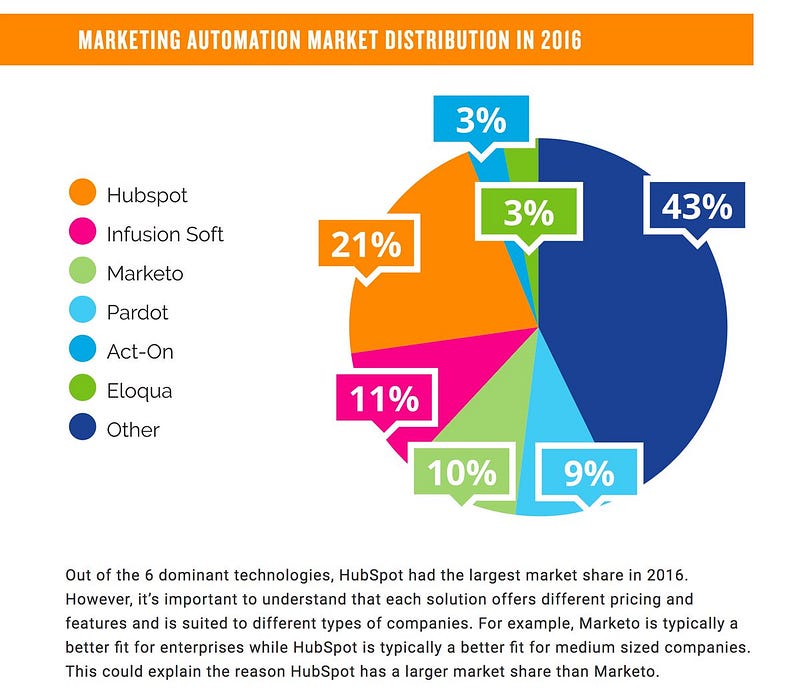
Keap, previously known as Infusionsoft, is an all-in-one customer relationship management (CRM) software. It is designed to help small businesses automate their marketing, sales, and customer follow-ups. This way, businesses can streamline their operations and grow more efficiently.
Key Features Of Keap
Email Marketing: Keap allows you to create and send personalized emails to your customers.
Lead Tracking: You can track potential customers and see where they are in the sales process.
Appointment Scheduling: Keap makes it easy to schedule meetings and appointments with your customers.
Payment Processing: You can process payments directly through Keap, making transactions smooth and easy.
Why Choose Keap?
Keap is popular among entrepreneurs and small businesses for many reasons. Here are a few:
Ease of Use: Keap is designed to be user-friendly, even for those who are not tech-savvy.
All-in-One Solution: Keap combines multiple tools into one platform, making it easier to manage your business.
Automation: Keap helps you automate repetitive tasks, saving you time and increasing productivity.
Customer Focus: Keap offers tools to manage customer interactions and organize data effectively.
How Keap Can Help Your Business
Let’s explore how Keap can help your business through automation marketing jobs:
Email Marketing
With Keap, you can create and send personalized emails to your customers. This helps you stay in touch with them and keep them informed about your products and services. You can also set up automated email campaigns, which means you can send emails to your customers without having to do it manually every time.
Lead Tracking
Keap allows you to track potential customers and see where they are in the sales process. This helps you understand your customers better and tailor your marketing efforts to meet their needs. You can also set up automated follow-ups, ensuring that no lead falls through the cracks.
Appointment Scheduling
Scheduling meetings and appointments with your customers can be time-consuming. Keap makes it easy by allowing you to set up appointments directly through the platform. You can also send automated reminders to your customers, ensuring they don’t miss their appointments.
Payment Processing
Keap enables you to process payments directly through the platform. This makes transactions smooth and easy for both you and your customers. You can also set up automated payment reminders, ensuring that you get paid on time.
Frequently Asked Questions
What Is Automation Marketing?
Automation marketing uses software to automate repetitive marketing tasks.
How Do Automation Marketing Jobs Work?
Automation marketing jobs involve creating and managing automated marketing campaigns.
Why Are Automation Marketing Jobs Important?
They save time and increase marketing efficiency and effectiveness.
What Skills Are Needed For Automation Marketing?
Skills include data analysis, CRM proficiency, and campaign management.
Conclusion
In conclusion, Automation Marketing Jobs can greatly benefit your business by saving you time and increasing productivity. Keap is a powerful tool that offers a range of features to help you automate your marketing, sales, and customer follow-ups. With its ease of use and all-in-one solution, Keap is an excellent choice for small businesses looking to grow more efficiently.
FAQs
Question Answer What is Keap? Keap is an all-in-one CRM software designed for small businesses. What are automation marketing jobs? Tasks that help businesses grow by using technology, like sending emails and tracking leads. What are the key features of Keap? Email marketing, lead tracking, appointment scheduling, and payment processing. Why choose Keap? Ease of use, all-in-one solution, automation, and customer focus.
Thank you for reading! I hope this article helps you understand how Automation Marketing Jobs can benefit your business with Keap. If you have any questions, feel free to ask!
Keap — Automated Marketing CRM for Small Businesses
Hi there! Today, I want to share something exciting with you about Keap, an amazing Automated Marketing CRM. Keap, which was known as Infusionsoft, helps small businesses grow faster.
Keap is an all-in-one customer relationship management (CRM) software. It’s designed especially for small businesses. It helps them manage and automate tasks like marketing, sales, and customer follow-ups.
Why Do We Need an Automated Marketing CRM?
Imagine having a tool that handles many tasks for you. An Automated Marketing CRM can send emails, track leads, schedule appointments, and even process payments. This means you can focus on growing your business instead of doing repetitive tasks.
Key Features of Keap
Keap offers many features that make it a favorite among small business owners. Let’s look at some of them:
Email Marketing: Keap can send emails to your customers automatically. This helps keep them engaged with your business.
Lead Tracking: Keap helps you keep track of potential customers. You can see who is interested in your products or services.
Appointment Scheduling: Keap makes it easy to schedule meetings with your customers. No more back-and-forth emails to find a time that works.
Payment Processing: Keap can process payments directly. This makes it easy for your customers to pay you.
How Keap Helps Small Businesses
Keap helps small businesses in many ways. Here are some of the benefits:
Benefit Explanation Automates Tasks Keap handles repetitive tasks so you don’t have to. This saves time and effort. Organizes Data Keap keeps all your customer information in one place. This makes it easy to find what you need. Enhances Productivity With Keap, you can focus on what matters most — growing your business. Simplifies Sales and Marketing Keap makes it easy to manage your sales and marketing efforts. Everything is in one place.
Why Choose Keap?
Keap is popular among entrepreneurs and small businesses. Here are some reasons why:
Ease of Use: Keap is user-friendly. You don’t need to be a tech expert to use it.
All-in-One Solution: Keap combines many tools in one package. This makes it convenient and efficient.
Focus on Small Businesses: Keap is designed with small businesses in mind. It understands their needs and challenges.
Getting Started with Keap
Starting with Keap is easy. Here’s how you can do it:
Sign Up: Visit the Keap website and sign up for an account.
Set Up Your Profile: Enter your business information and customize your settings.
Import Your Contacts: Add your customer information to Keap.
Start Automating: Use Keap’s features to automate your tasks and streamline your operations.
Frequently Asked Questions
What Is An Automated Marketing Crm?
An automated marketing CRM combines marketing automation with customer relationship management to streamline and enhance business operations.
Why Use An Automated Marketing Crm?
Automated marketing CRMs save time, improve efficiency, and enhance customer engagement by automating repetitive tasks and tracking interactions.
How Does A Marketing Crm Improve Sales?
It tracks customer interactions, manages leads, and automates follow-ups, making sales processes more efficient and effective.
Can Small Businesses Benefit From Automated Crm?
Yes, small businesses can streamline operations, improve customer relationships, and drive growth with automated CRM tools.
Conclusion
In conclusion, Keap is an excellent Automated Marketing CRM for small businesses. It helps automate tasks, organize data, and enhance productivity. With Keap, you can focus on growing your business and achieving your goals. So, why wait? Give Keap a try and see the difference it can make for your business!
Frequently Asked Questions (FAQs)
Here are some common questions about Keap:
Is Keap suitable for large businesses? Keap is designed mainly for small businesses. Large businesses might need more advanced features.
Can I try Keap for free? Yes, Keap offers a free trial. You can test its features before committing.
Is Keap easy to use? Yes, Keap is user-friendly. It’s designed to be simple and intuitive.
Thank you for reading! I hope this article helps you understand how Keap can benefit your small business. If you have any questions or need more information, feel free to reach out. Happy growing!
Top marketing automation platforms include HubSpot, Marketo, and Mailchimp. These tools streamline marketing tasks and improve efficiency.
Marketing automation platforms have revolutionized the way businesses approach their marketing strategies. HubSpot offers an all-in-one solution with robust features for lead generation and customer relationship management. Marketo stands out with its advanced analytics and scalable solutions, making it ideal for larger enterprises.
Mailchimp excels in email marketing and is user-friendly for small businesses. These platforms help businesses automate repetitive tasks, personalize customer interactions, and track campaign performance. By leveraging these tools, companies can enhance their marketing efforts, save time, and ultimately drive better results. Choosing the right platform depends on your specific needs and business goals.
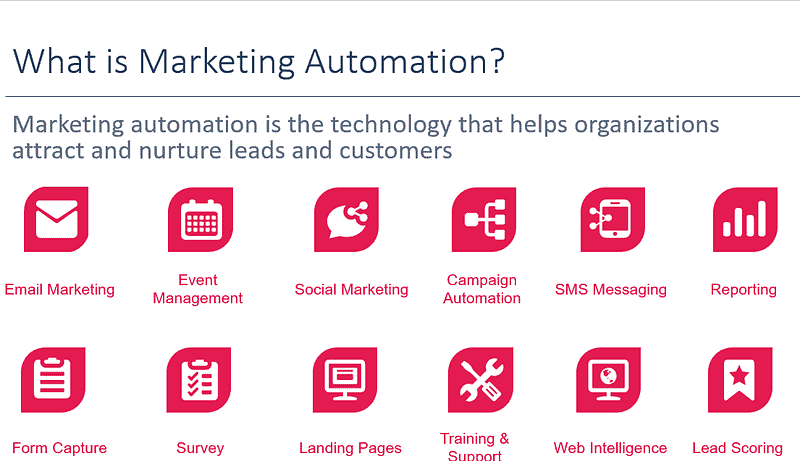
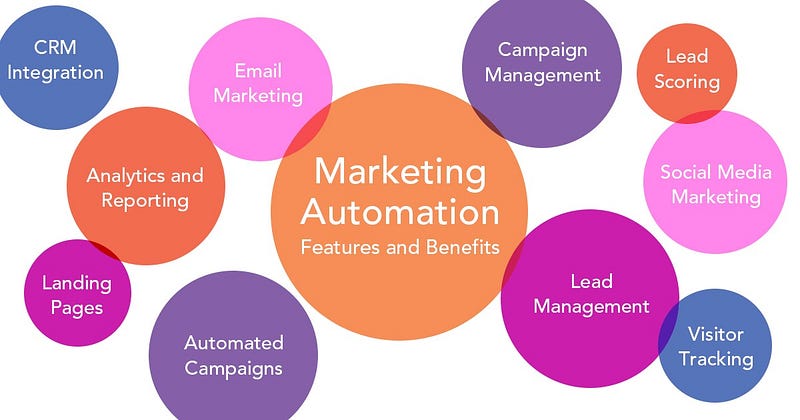
Marketing automation helps businesses streamline their marketing efforts. It uses software to automate repetitive tasks. This saves time and ensures consistency. Below, we dive into what marketing automation is and how it benefits businesses.
What Is Marketing Automation?
Marketing automation uses technology to manage marketing processes. It automates tasks such as emails, social media posts, and ad campaigns. This allows marketers to focus on strategy and creativity.
Automation platforms use data to personalize marketing efforts. They track customer behavior and tailor messages accordingly. This improves engagement and conversion rates.
Benefits For Businesses
Businesses gain several benefits from marketing automation. Here are some key advantages:
Time-saving: Automates repetitive tasks, freeing up valuable time.
Consistency: Ensures consistent messaging across all channels.
Personalization: Customizes messages based on customer data.
Improved ROI: Increases efficiency, leading to better returns on investment.
Analytics: Provides detailed reports to measure campaign success.
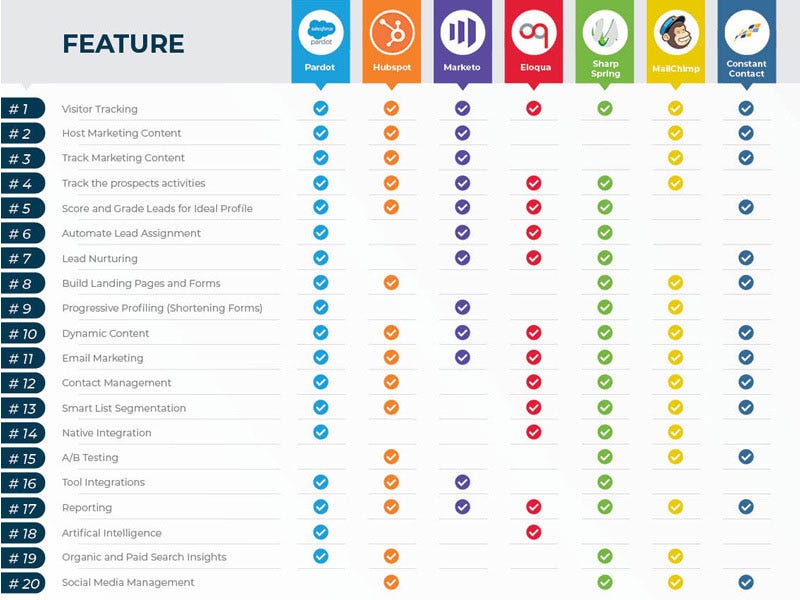
Marketing automation platforms come with various features. Here’s a comparison of some popular platforms:
Platform Key Features Pricing HubSpot Email marketing, CRM, analytics Starts at $50/month Marketo Lead management, analytics, sales integration Contact for pricing ActiveCampaign Email automation, CRM, messaging Starts at $9/month
Key Features To Look For
When selecting the best marketing automation platform, it’s crucial to understand the key features that drive success. This section breaks down the most important functionalities, ensuring you choose a platform that meets your needs. Here are the key features to look for:
Email Campaign Management
Email Campaign Management is vital for any marketing automation platform. Look for features like:
Drag-and-drop builders for easy email creation.
Personalization options to tailor messages to individual recipients.
Automated follow-up sequences based on user actions.
A/B testing to optimize email content.
Advanced segmentation to target specific audience groups.
Lead Scoring
Lead Scoring helps prioritize potential customers based on their actions and behaviors. Key features include:
Customizable scoring models to rank leads effectively.
Real-time tracking and updates of lead scores.
Integration with CRM systems for seamless data flow.
Automated lead nurturing based on scores.
Visual dashboards for easy score monitoring.
Analytics And Reporting
Analytics and Reporting are crucial for measuring the success of your campaigns. Essential features include:
Feature Description Real-time Analytics Monitor campaign performance as it happens. Custom Reports Create tailored reports for different metrics. Visual Data Representation Use charts and graphs for easy data understanding. ROI Tracking Measure the return on investment of campaigns. Integration Capabilities Sync data with other marketing tools.
Hubspot
HubSpot is a popular marketing automation platform. It offers a wide range of tools. These tools help businesses grow and thrive online. Let’s dive into what makes HubSpot special.
Overview
HubSpot is an all-in-one marketing software. It includes CRM, email marketing, and social media tools. HubSpot helps manage customer interactions and marketing campaigns. It is user-friendly and suitable for businesses of all sizes.
Pros And Cons
Pros Cons
Easy to use interface
Comprehensive CRM integration
Powerful email marketing tools
Great for lead generation
Can be expensive for small businesses
Limited customization options
Some features are complex to set up
Pricing
HubSpot offers various pricing plans. These plans cater to different business needs. Below is a summary:
Free Plan: Basic CRM and marketing tools
Starter Plan: $50/month — Advanced features
Professional Plan: $800/month — Full suite of tools
Enterprise Plan: $3,200/month — Extensive features for large businesses
Each plan includes different levels of support and features. Choose the plan that fits your business needs best.
Marketo
Marketo is a powerful marketing automation platform designed to help businesses streamline their marketing efforts. It offers a range of features to automate and measure marketing tasks, ultimately improving efficiency and driving better results.
Overview
Marketo is renowned for its comprehensive suite of marketing tools. It supports email marketing, lead management, consumer marketing, customer base marketing, and mobile marketing. This platform is suitable for businesses of all sizes and industries. Marketo integrates seamlessly with other popular tools like Salesforce, ensuring cohesive marketing and sales processes.
Pros And Cons
ProsCons
Comprehensive marketing automation tools
Excellent integration capabilities
Advanced analytics and reporting
User-friendly interface
High cost for small businesses
Steep learning curve for beginners
Occasional bugs and glitches
Customer support can be slow
Pricing
Marketo offers flexible pricing plans tailored to different business needs. Pricing is based on the number of users and contacts. Here’s a quick overview of their plans:
Basic: Ideal for small businesses, this plan includes core features and starts at $1,195 per month.
Standard: Suitable for growing businesses, this plan offers advanced features and starts at $1,995 per month.
Enterprise: Designed for large enterprises, this plan includes all features and custom pricing based on specific needs.
Marketo also offers a free trial, allowing businesses to explore the platform before committing. This helps in assessing the suitability of the platform for their unique requirements.
Activecampaign
ActiveCampaign is a top marketing automation platform. It offers a range of features that help businesses streamline their marketing efforts. From email marketing to customer relationship management (CRM), ActiveCampaign covers it all.
Overview
ActiveCampaign is known for its powerful automation capabilities. It allows businesses to create custom workflows that automate tasks like sending emails, updating contact information, and more. The platform also offers a robust CRM system, making it easy to manage customer relationships.
Pros And Cons
ProsCons
Powerful automation features
Integrated CRM system
Easy-to-use interface
Excellent customer support
Pricing can be high for small businesses
Complex setup for beginners
Limited free plan
Pricing
ActiveCampaign offers various pricing plans to fit different needs.
Lite: Starts at $9/month
Plus: Starts at $49/month
Professional: Starts at $129/month
Enterprise: Custom pricing available
The pricing is based on the number of contacts. The more contacts you have, the higher the price.
Credit: interruptmedia.com
Pardot
Pardot is a powerful marketing automation platform by Salesforce. It helps businesses automate marketing tasks and manage email campaigns. Pardot offers advanced features for lead generation, nurturing, and scoring.
Overview
Pardot is designed for B2B marketing automation. It integrates seamlessly with Salesforce CRM, making data management easier. The platform offers tools for creating and managing email campaigns, landing pages, and forms. It also provides detailed analytics to track campaign performance.
Pros And Cons
Pros Cons
Seamless Salesforce integration
Advanced lead scoring
Comprehensive analytics
Customizable email templates
High cost
Steep learning curve
Limited A/B testing
Complex setup
Pricing
Pardot offers several pricing plans. These are based on the number of users and features. Here is a quick overview:
Growth Plan: $1,250/month for up to 10,000 contacts
Plus Plan: $2,500/month for up to 10,000 contacts
Advanced Plan: $4,000/month for up to 10,000 contacts
Premium Plan: $15,000/month for up to 75,000 contacts
Each plan includes different levels of features and support. Businesses can choose based on their needs and budget.
Comparing Platforms
Choosing the right marketing automation platform is crucial. It can enhance your marketing efforts significantly. To help you decide, we’ve compared top platforms based on features, price, and user reviews.
Feature Comparison
Different platforms offer various features. Here’s a comparison table to help you understand what each platform provides:
Platform Email Marketing Social Media Integration Analytics Customer Support Platform A Yes Yes Advanced 24/7 Platform B Yes No Basic Business Hours Platform C Yes Yes Intermediate 24/7
Price Comparison
Budget is always a concern. Here’s a quick look at the pricing for each platform:
Platform A: $50/month
Platform B: $30/month
Platform C: $40/month
User Reviews
User reviews provide insights into the actual performance. Here are some key points from users:
Platform A: Users love its advanced analytics.
Platform B: Users find it affordable but lacking features.
Platform C: Users appreciate its balance of features and price.
Choosing The Right Platform
Marketing automation can revolutionize your business. Choosing the right platform is crucial. The perfect fit meets your unique needs. It aligns with your budget and scales with your growth. Below, we explore essential factors in choosing a marketing automation platform.
Business Needs
Identify your business needs first. What do you want the platform to do? Here are some common requirements:
Email marketing
Social media management
Lead nurturing
Analytics and reporting
Ensure the platform supports these tasks. This alignment is essential for success.
Budget Considerations
Budget is a vital factor. Determine your budget before choosing. Here are some cost factors:
Feature Price Range Basic Plan $20 — $100 per month Advanced Features $100 — $500 per month Enterprise Solutions $500+ per month
Choose a plan that fits your budget. Do not overspend on unnecessary features.
Scalability
Your business will grow. The platform should grow too. Check if the platform scales easily. Consider these factors:
Number of users
Volume of data
Complexity of campaigns
A scalable platform supports long-term growth. This ensures sustained success.
Implementation Tips
Implementing a marketing automation platform can be a game-changer for your business. However, proper implementation is crucial to ensure success. Below are some key tips to help you effectively implement a marketing automation platform.
Onboarding Process
The onboarding process sets the stage for success. Here are key steps:
Define Goals: Clearly outline what you want to achieve.
Choose the Right Platform: Select a platform that meets your needs.
Data Migration: Ensure all data is accurately transferred.
Initial Setup: Configure the platform to align with your goals.
Team Training
Proper training ensures your team can fully utilize the platform. Steps to consider:
Identify Key Users: Determine who will use the platform daily.
Provide Training: Offer comprehensive training sessions.
Create Documentation: Develop easy-to-follow guides and manuals.
Ongoing Support: Ensure continuous support and training updates.
Measuring Success
Measuring success helps you understand the effectiveness of your implementation. Follow these tips:
Step Action 1 Set Metrics: Define KPIs to measure success. 2 Monitor Performance: Regularly check platform analytics. 3 Adjust Strategies: Optimize based on data insights. 4 Report Findings: Share results with your team.
Implementing a marketing automation platform involves careful planning, training, and measurement. Follow these tips to ensure a successful implementation.
A marketing automation platform is software that automates marketing tasks. It helps streamline workflows, manage campaigns, and analyze data.
Why Use Marketing Automation Platforms?
Using marketing automation platforms saves time and increases efficiency. They help target the right audience and optimize marketing efforts.
Which Marketing Automation Platforms Are Best?
Top marketing automation platforms include HubSpot, Marketo, and ActiveCampaign. Each offers unique features for different business needs.
How Do Marketing Automation Tools Improve Roi?
Marketing automation tools improve ROI by targeting the right audience. They also automate repetitive tasks and provide insightful analytics.
Conclusion
Choosing the right marketing automation platform can boost your business efficiency and growth. Evaluate your needs and budget. Consider features, user experience, and integrations. The right tool can streamline your marketing efforts. Start exploring options today and elevate your marketing strategy.
Make informed decisions for better results and success.
Marketing funnel automation streamlines the customer journey from awareness to purchase, enhancing efficiency and boosting conversions. It utilizes technology to automate repetitive tasks, ensuring consistent engagement.
Marketing funnel automation plays a crucial role in modern digital marketing strategies. By automating various stages of the funnel, businesses can effectively nurture leads, reduce manual workload, and ensure timely follow-ups. This automation helps in delivering personalized content to prospects at each stage, increasing the likelihood of conversion.
It also provides valuable insights into customer behavior, enabling marketers to make data-driven decisions. Implementing an automated marketing funnel not only saves time but also optimizes resources, leading to improved ROI. Embracing this technology can give businesses a competitive edge by maintaining consistent communication and fostering stronger customer relationships.
Marketing Funnel Automation is a powerful tool for businesses today. It helps to streamline and optimize the customer journey. This process can save time and increase sales. Understanding its benefits can transform your marketing strategy.
What Is Marketing Funnel Automation?
Marketing Funnel Automation uses technology to guide customers through the sales funnel. It automates tasks like email marketing, social media posts, and ad campaigns. This ensures a consistent and personalized experience for each customer. Automation tools can track customer behavior and adjust strategies in real-time.
Stage Description Awareness Customers learn about your brand. Interest Customers show interest in your products. Decision Customers consider making a purchase. Action Customers complete the purchase.
Importance For Modern Businesses
Marketing Funnel Automation is crucial for modern businesses. It helps in reducing manual work and improving efficiency. Automated funnels can handle multiple customers at once. This leads to better customer service and increased revenue.
Time-saving: Automation reduces manual tasks.
Consistency: Provides a consistent customer experience.
Personalization: Delivers personalized content to users.
Businesses that use Marketing Funnel Automation often see higher conversion rates. It helps them understand customer behavior better. This leads to more effective marketing strategies. In today’s fast-paced world, automation is not just an option, it’s a necessity.
Credit: pushalert.co
Key Components Of An Automated Marketing Funnel
An automated marketing funnel is essential for efficient, scalable business growth. It helps streamline lead generation, nurturing, and conversion. Let’s explore the key components of an automated marketing funnel.
Lead Generation
Lead generation is the first step in your marketing funnel. It involves attracting potential customers to your brand.
Landing Pages: Create engaging landing pages to capture user information.
Forms: Use forms to collect contact details.
Call-to-Actions (CTAs): Persuasive CTAs encourage users to take action.
Lead Nurturing
Lead nurturing keeps potential customers engaged with your brand. It involves consistent, targeted communication.
Email Campaigns: Send personalized emails to educate and engage leads.
Content Marketing: Provide valuable content that addresses their needs.
Social Media Engagement: Interact with leads on social platforms.
Conversion Strategies
Conversion strategies turn engaged leads into paying customers. Implement tactics to persuade them to make a purchase.
Special Offers: Provide discounts or exclusive deals.
Testimonials: Showcase customer reviews to build trust.
Free Trials: Offer a trial period for your product or service.
An automated marketing funnel can significantly enhance your marketing efforts. Implement these key components for better results.
Tools And Technologies
Marketing Funnel Automation is crucial for modern businesses. The right tools and technologies streamline the process. They help in managing customer journeys and ensuring efficient lead nurturing. Below, we explore popular automation platforms and their integration with CRM systems.
Popular Automation Platforms
There are many marketing automation platforms available. They offer varied features and benefits. Here are a few popular ones:
HubSpot: A robust tool with CRM integration and lead scoring capabilities.
Marketo: Known for advanced analytics and customer segmentation.
Mailchimp: Great for email marketing and small businesses.
ActiveCampaign: Combines email marketing with sales automation.
Pardot: Ideal for B2B marketing with Salesforce integration.
Platform Best For Key Features HubSpot All-in-one solution CRM, lead scoring, analytics Marketo Advanced analytics Customer segmentation, reporting Mailchimp Email marketing Templates, automation, audience insights ActiveCampaign Small to medium businesses Sales automation, email marketing Pardot B2B marketing Salesforce integration, lead nurturing
Integration With Crm
Integrating marketing automation platforms with CRM is essential. It ensures seamless data flow and improved customer insights. Here are key benefits:
Unified Data: All customer data in one place.
Enhanced Targeting: Better segmentation and personalized marketing.
Efficient Lead Management: Track and nurture leads effectively.
Improved Analytics: Comprehensive reports for better decision-making.
Most automation platforms offer easy CRM integration. For example, HubSpot’s CRM integrates naturally with its marketing tools. Marketo and Salesforce work seamlessly together. This integration is vital for a cohesive marketing strategy.
Creating A Seamless Customer Journey
A seamless customer journey helps in building trust and loyalty. It ensures that every interaction with your brand is smooth and engaging. With marketing funnel automation, you can create a seamless experience for your customers. This involves personalized content and automated follow-ups to keep them engaged.
Personalized Content
Personalized content makes your customers feel valued. It speaks directly to their needs and interests. Use customer data to create tailored messages. This can include:
Product recommendations
Special offers
Relevant articles
Personalization increases engagement and conversion rates. It keeps your audience interested and coming back for more. Consider using dynamic content in your emails and website. This changes based on the user’s behavior and preferences.
Automated Follow-ups
Automated follow-ups are crucial for maintaining customer relationships. They ensure timely communication and help in nurturing leads. Set up automated emails for different stages of the customer journey. Examples include:
Welcome emails
Abandoned cart reminders
Post-purchase follow-ups
These automated messages keep your customers informed and engaged. They help in converting leads into loyal customers. Use CRM tools to manage and automate these follow-ups. This saves time and ensures consistency in your communication.
Understanding the success of your marketing funnel automation is crucial. Measuring success helps you see what’s working and what needs improvement. Let’s dive into the key metrics and data analysis for better performance.
Key Metrics To Track
Tracking the right metrics is vital. Here are some key metrics to monitor:
Conversion Rate: This shows the percentage of leads that turn into customers.
Click-Through Rate (CTR): This measures how many people click your calls-to-action.
Cost Per Acquisition (CPA): This tells you how much you spend to acquire a customer.
Customer Lifetime Value (CLV): This estimates the total revenue from a customer over their lifetime.
Return on Investment (ROI): This shows the profitability of your marketing efforts.
Analyzing Data For Improvements
Data analysis helps you spot trends and areas for improvement. Follow these steps:
Collect Data: Use tools like Google Analytics and CRM software.
Segment Data: Break data into segments like age, location, and behavior.
Identify Patterns: Look for trends in the data. Are there specific times when conversions spike?
Test Hypotheses: Create and test new strategies based on your findings.
Implement Changes: Make data-driven changes to your funnel and monitor the results.
Use the metrics and data analysis to refine your funnel. This will enhance your marketing automation success.
Credit: vipecloud.com
Common Pitfalls And How To Avoid Them
Common Pitfalls and How to Avoid Them in Marketing Funnel Automation
Marketing funnel automation can boost efficiency and enhance customer experience. Yet, many businesses face common pitfalls that hamper success. Let’s explore these pitfalls and learn how to avoid them.
Over-automation
Over-automation can make your marketing efforts feel cold and impersonal. While automation saves time, too much can alienate your audience. Balance is key. Use automation to handle repetitive tasks but maintain human touch for interactions.
How to avoid:
Use automation for routine tasks like email follow-ups.
Personalize messages to keep the human touch.
Monitor results and adjust strategies as needed.
Ignoring Customer Feedback
Ignoring customer feedback can lead to missed opportunities and unhappy customers. Feedback provides valuable insights into customer needs and preferences. Integrating feedback helps improve your marketing funnel.
How to avoid:
Regularly collect customer feedback through surveys and reviews.
Analyze feedback to identify common themes and issues.
Implement changes based on feedback to improve customer experience.
Case Studies And Success Stories
Marketing Funnel Automation has transformed many businesses. Real-world examples and success stories reveal its immense potential. Let’s explore how companies have thrived using this approach.
Real-world Examples
Many companies have adopted Marketing Funnel Automation with great success. Here are a few notable examples:
Company Industry Results XYZ Tech Software 30% increase in lead conversions HealthPlus Healthcare 20% growth in customer retention GreenFoods Food & Beverage 25% boost in online sales
Lessons Learned
Each success story offers valuable lessons. Here are key takeaways from these real-world examples:
Personalization is key. Tailor messages to individual customer needs.
Data-driven decisions. Use analytics to refine strategies.
Automation saves time. Focus on strategic tasks, not repetitive ones.
Follow-up is crucial. Engage leads consistently to maintain interest.
Measure and optimize. Continuously improve based on performance data.
Implementing these lessons can help achieve similar success. Marketing Funnel Automation is a powerful tool for growth.
The marketing landscape is changing fast. Marketing automation tools are evolving. Businesses need to stay ahead. Understanding future trends can help. Let’s explore some key trends in marketing automation.
Ai And Machine Learning
Artificial Intelligence (AI) and Machine Learning (ML) are revolutionizing marketing automation. These technologies improve customer interactions. AI can analyze large datasets quickly. It can identify patterns in customer behavior. ML helps in predicting future actions. These insights help create personalized campaigns.
AI can automate repetitive tasks. It can manage email marketing, social media posts, and more. This frees up time for creative work. AI chatbots offer instant customer support. They enhance user experience and increase engagement.
Predictive Analytics
Predictive analytics is another game-changer. It uses data, statistical algorithms, and ML to identify future outcomes. Predictive analytics helps in understanding customer needs. It can forecast trends and customer behavior.
This technology can improve lead scoring. It identifies which leads are most likely to convert. This helps in prioritizing efforts. Predictive analytics can also optimize marketing strategies. It provides data-driven insights for decision-making.
Trend Benefit AI and Machine Learning Improves customer interactions, automates tasks Predictive Analytics Forecasts trends, improves lead scoring
These trends are shaping the future of marketing automation. Embracing these technologies can give businesses a competitive edge.
/media/3de62826de5a5d7bf55ab97a3c85d52c
Frequently Asked Questions
What Is Marketing Funnel Automation?
Marketing funnel automation uses technology to streamline and manage marketing processes. It helps in nurturing leads, converting them into customers, and retaining them. Automation tools handle repetitive tasks, saving time and improving efficiency.
How Does Marketing Funnel Automation Work?
Marketing funnel automation works by using software to automate marketing tasks. It includes email campaigns, lead nurturing, and customer segmentation. These tools track user behavior and deliver personalized content, enhancing engagement and conversion rates.
Why Is Marketing Funnel Automation Important?
Marketing funnel automation is important because it saves time and boosts efficiency. It ensures consistent communication with leads and customers. Automation also helps in tracking performance and optimizing marketing strategies for better results.
What Are The Benefits Of Marketing Funnel Automation?
The benefits of marketing funnel automation include increased efficiency, better lead management, and higher conversion rates. It also provides valuable insights into customer behavior. Automation enhances personalization and improves overall marketing ROI.
Conclusion
Automating your marketing funnel can transform your business. It saves time, boosts efficiency, and enhances customer engagement. Implementing these strategies ensures consistent growth and improved ROI. Stay ahead by integrating automation into your marketing efforts. Your business will benefit from streamlined processes and better results.
Omnisend is an all-in-one ecommerce marketing automation platform. It helps businesses increase sales through personalized email, SMS, and push notifications.
Omnisend simplifies ecommerce marketing with its user-friendly interface and robust features. The platform allows businesses to create automated workflows, segment audiences, and personalize messages. It integrates seamlessly with major ecommerce platforms like Shopify, WooCommerce, and BigCommerce. Users can set up automated campaigns for welcome emails, abandoned carts, and order confirmations.
Omnisend also offers detailed analytics to measure campaign performance. Its drag-and-drop editor makes it easy to design professional emails without coding. By automating repetitive tasks, Omnisend helps businesses save time and focus on growth. It’s a powerful tool for boosting customer engagement and driving revenue.
Omnisend is a powerful ecommerce marketing automation tool. It helps businesses grow by automating their marketing efforts. With Omnisend, you can focus on what matters most. This tool makes it easy to connect with your customers.
What Is Omnisend?
Omnisend is an all-in-one marketing platform. It is designed for ecommerce businesses. With Omnisend, you can create targeted email campaigns. You can also send SMS messages and push notifications. It integrates with many ecommerce platforms like Shopify and WooCommerce.
Omnisend offers various features. These include automated workflows and segmentation. It also provides advanced reporting. This helps you understand your marketing performance better.
Importance Of Marketing Automation
Marketing automation is crucial for any business. It saves time and increases efficiency. With automation, you can send personalized messages. This improves customer engagement and boosts sales.
Using marketing automation, you can track customer behavior. This helps you create targeted campaigns. Automated workflows ensure timely follow-ups. This keeps your customers engaged and informed.
Benefits of Marketing Automation:
Time-saving
Improved customer engagement
Increased sales
Better targeting
Enhanced reporting
Omnisend makes marketing automation easy. It offers a user-friendly interface. You don’t need technical skills to use it.
Omnisend offers powerful tools to boost your ecommerce marketing. Discover the key features that make it stand out.
Email Marketing
Omnisend’s Email Marketing tools are easy to use. Create beautiful emails with the drag-and-drop editor. You can personalize messages for your audience. Use segmentation to send targeted campaigns. Automated workflows save time and increase engagement.
Drag-and-drop editor
Personalized messages
Audience segmentation
Automated workflows
Sms Campaigns
Reach your customers instantly with SMS Campaigns. Omnisend provides easy-to-use templates. Schedule messages to reach users at the right time. Personalize SMS messages for higher engagement. Track performance with detailed analytics.
Feature Description Templates Ready-to-use SMS templates Scheduling Send messages at optimal times Personalization Customize messages for users Analytics Track and measure performance
Push Notifications
Use Push Notifications to engage users directly on their browsers. Send real-time updates about sales and new arrivals. Customize notifications to match your brand. Track click-through rates and conversions easily. Push notifications are a great way to stay connected with your audience.
Real-time updates
Brand customization
Click-through tracking
Conversion measurement
/media/9eaed4cb355ee2573d2f6f78bb765ed6
Setting Up Omnisend
Setting up Omnisend for your eCommerce business is straightforward. This guide will help you get started quickly. We will cover account creation and store integration.
Account Creation
Creating an Omnisend account is the first step. Follow these simple steps to get started:
Visit the Omnisend website.
Click on the Sign Up button.
Fill in your details like email and password.
Agree to the terms and conditions.
Click Create Account.
You will receive a confirmation email. Click the link to verify your account. Once verified, you can log in and start setting up.
Integrating With Your Store
Integrating Omnisend with your store is essential. This allows seamless data flow. Follow these steps to integrate:
Log in to your Omnisend account.
Navigate to the Integrations tab.
Choose your eCommerce platform from the list.
Click Connect and follow the prompts.
Provide necessary permissions for data access.
Omnisend supports major platforms like Shopify, WooCommerce, and BigCommerce. Ensure you follow specific instructions for your platform. Integration usually takes a few minutes.
Once integrated, you can start creating campaigns. Omnisend offers powerful tools for email and SMS marketing. Your store data will sync automatically.
Step Description 1 Create an account on Omnisend. 2 Verify your email address. 3 Log in and navigate to Integrations. 4 Choose and connect your eCommerce platform. 5 Start creating marketing campaigns.
Setting up Omnisend is quick and easy. This ensures your marketing efforts are efficient and effective. Follow this guide to get started today.
Creating Effective Campaigns
Creating effective campaigns with Omnisend Ecommerce Marketing Automation can boost your sales. It’s crucial to design appealing templates and personalize your messages. This section will guide you through these steps.
Designing Templates
Designing templates is easy with Omnisend’s drag-and-drop editor. You don’t need coding skills. Choose from a variety of pre-built templates.
Customize these templates to match your brand’s identity. Use your brand colors, fonts, and logos. This consistency builds trust with your audience.
Here are some tips for designing effective templates:
Keep your design clean and simple.
Use high-quality images.
Make sure your call-to-action buttons stand out.
Ensure your template is mobile-friendly.
Remember, a well-designed template can increase user engagement.
Personalization Techniques
Personalization makes your campaigns more relevant to your audience. Omnisend offers several personalization techniques to help you connect better.
Segment your audience based on their behavior and preferences. Send targeted messages to each segment.
Use the customer’s name in the email subject line and body. This small touch can significantly increase open rates.
Here are some personalization techniques to consider:
Send birthday or anniversary emails.
Recommend products based on past purchases.
Use dynamic content to show different products to different segments.
Personalized campaigns can lead to higher conversion rates and customer loyalty.
Automation Workflows
Omnisend’s Ecommerce Marketing Automation offers powerful automation workflows. These workflows help engage customers and boost sales. Each workflow targets a specific stage of the customer journey.
Welcome Series
A Welcome Series introduces new subscribers to your brand. It creates a positive first impression. These emails share your brand story, values, and bestsellers.
First email: Thank new subscribers and offer a discount.
Second email: Introduce your top products or services.
Third email: Share customer testimonials and social proof.
Cart Abandonment
Cart Abandonment emails remind customers of their incomplete purchases. These emails encourage customers to return and complete their orders.
First email: Send a reminder within an hour of cart abandonment.
Second email: Offer a small discount or incentive.
Third email: Highlight the urgency with limited stock alerts.
Post-purchase Follow-up
A Post-Purchase Follow-Up workflow keeps customers engaged after a purchase. It helps build long-term relationships and encourages repeat business.
First email: Thank the customer and confirm the order.
Second email: Share product care tips and usage guides.
Omnisend Ecommerce Marketing Automation is a powerful tool for any online store. It brings efficiency and precision to marketing campaigns. One of its standout features is Segmentation and Targeting. This allows businesses to personalize their marketing efforts. With this, you can reach the right audience with the right message.
Customer Segmentation
Customer segmentation involves dividing your audience into specific groups. These groups are based on various criteria. Omnisend allows you to segment by:
Purchase History
Behavioral Data
Demographic Information
Email Engagement
Each segment can be targeted with tailored campaigns. This increases the relevance of your messages. You can create segments for:
New customers
Returning buyers
High-spending customers
Inactive users
Targeting Strategies
Targeting strategies are crucial for effective marketing. Omnisend offers several targeting options:
Email Campaigns: Send personalized emails to specific segments.
SMS Marketing: Reach customers through SMS for time-sensitive offers.
Push Notifications: Engage users with timely push notifications.
Social Media Ads: Target segments on social platforms.
By using these strategies, you can ensure your marketing is effective. It helps to boost engagement and conversion rates. Here’s a quick comparison of different targeting methods:
Method Usage Best For Email Campaigns Regular updates, promotions Existing customers SMS Marketing Urgent alerts, limited-time offers All customer segments Push Notifications Real-time updates, reminders App users Social Media Ads Brand awareness, targeted ads Potential customers
Analyzing Performance
Understanding how your ecommerce marketing campaigns perform is crucial. Omnisend offers robust tools for analyzing performance, helping you fine-tune your strategies. Let’s delve into the key aspects of performance analysis with Omnisend.
Tracking Metrics
Tracking metrics is essential for understanding your campaign’s impact. Omnisend provides detailed reports on various metrics. You can monitor open rates, click rates, and conversion rates.
Here is a simple table to understand some key metrics:
Metric Description Open Rate Percentage of opened emails. Click Rate Percentage of clicks on email links. Conversion Rate Percentage of completed actions.
Tracking these metrics helps identify successful strategies. You can also spot areas needing improvement.
A/b Testing
A/B testing is a powerful feature in Omnisend. It allows you to compare two versions of a campaign. This helps you understand which version performs better.
Here’s how to conduct A/B testing:
Create two versions of your email.
Send each version to a small segment of your audience.
Track the performance of both versions.
Identify the winning version based on key metrics.
Send the winning version to the rest of your audience.
A/B testing helps you optimize your campaigns. You can make data-driven decisions to improve performance.
By analyzing performance through tracking metrics and A/B testing, you can enhance your ecommerce marketing efforts. Omnisend provides the tools you need to succeed.
When using Omnisend Ecommerce Marketing Automation, following best practices ensures success. This helps build trust, avoid legal issues, and reach your audience effectively.
Compliance And Gdpr
Ensuring GDPR compliance is crucial. Collect consent before sending marketing emails. Use clear language when asking for permission. Store consent records securely.
Create a privacy policy. Explain how data will be used. Make it easily accessible. Update it regularly to reflect changes in data usage.
Offer an easy opt-out option in every email. Respect users’ choices. Remove them from your list promptly.
Avoiding Spam Filters
Avoiding spam filters is key to successful email marketing. Use these tips:
Use a recognizable sender name.
Include a clear subject line.
Avoid all caps and excessive punctuation.
Keep your email content relevant. Personalize your emails to engage your audience. Avoid using too many images.
Check your email reputation. Monitor your sender score. Maintain a good score to avoid spam filters.
Best Practice Details Use a recognizable sender name Builds trust and reduces spam reports Include a clear subject line Encourages opens and avoids spam filters Monitor your sender score Ensures emails are delivered to inboxes
Frequently Asked Questions
What Is Omnisend Ecommerce Marketing Automation?
Omnisend Ecommerce Marketing Automation is a platform that helps online stores automate their marketing campaigns. It integrates various channels like email, SMS, and social media to optimize customer engagement and boost sales.
How Does Omnisend Benefit Ecommerce Stores?
Omnisend benefits ecommerce stores by automating marketing tasks, saving time, and increasing efficiency. It offers personalized campaigns, advanced segmentation, and comprehensive analytics to improve customer engagement and drive sales.
Can Omnisend Integrate With Other Ecommerce Platforms?
Yes, Omnisend can integrate with popular ecommerce platforms like Shopify, BigCommerce, and WooCommerce. This allows seamless data synchronization and efficient marketing automation to enhance your store’s performance.
What Features Does Omnisend Offer?
Omnisend offers features like email marketing, SMS campaigns, segmentation, automation workflows, and A/B testing. These tools help you create personalized marketing strategies and analyze their effectiveness.
Conclusion
Omnisend transforms ecommerce marketing with its automation features. It saves time, boosts conversions, and enhances customer engagement. Experience seamless integration and powerful tools for your business. Elevate your marketing strategy today with Omnisend and watch your ecommerce success grow. Start automating, and see the difference it makes.
Insurance marketing automation streamlines marketing tasks using technology, saving time and enhancing efficiency. It helps in targeting the right audience with personalized messages.
Insurance companies face immense competition in attracting and retaining clients. Effective marketing is crucial for success. Automation tools simplify marketing efforts by automating repetitive tasks like email campaigns, social media posts, and lead nurturing. These tools enable insurers to deliver personalized content, improving client engagement and satisfaction.
Marketing automation also provides valuable insights and analytics, helping companies refine strategies. As a result, insurers can focus more on building relationships and less on administrative tasks. Embracing marketing automation can lead to higher conversion rates and better customer experiences, ultimately driving business growth.
Marketing automation is a powerful tool. It helps businesses streamline marketing tasks. In the insurance industry, it boosts efficiency and enhances customer experience. This blog explores the basics of marketing automation.
What Is Marketing Automation?
Marketing automation uses software. It automates marketing tasks. These tasks include emails, social media posts, and other website actions. This technology saves time and resources. It also personalizes customer interactions.
Importance In Insurance Industry
The insurance industry is complex. Marketing automation simplifies processes. It helps in targeting the right audience. It ensures timely follow-ups and provides personalized services. This leads to better customer satisfaction.
Here are some benefits of marketing automation in insurance:
Improved customer segmentation
Personalized communication
Enhanced lead nurturing
Increased operational efficiency
Better data management
These benefits make marketing automation a crucial tool. It helps insurers stay competitive. It allows them to focus on their core tasks.
Credit: gocrm.io
Key Benefits
Insurance marketing automation offers numerous advantages. It streamlines processes, enhances targeting, and boosts efficiency. Below, we explore the key benefits in detail.
Increased Efficiency
Increased efficiency is one of the major benefits of insurance marketing automation. Automated systems handle repetitive tasks quickly, allowing your team to focus on strategic activities. This means less time on manual data entry and more time on meaningful customer interactions.
Automation tools can manage:
Email campaigns
Lead scoring
Follow-up sequences
These tools ensure that every lead gets timely attention, thereby reducing potential lost opportunities.
Improved Customer Targeting
Another significant benefit is improved customer targeting. Automated systems analyze customer data to create personalized marketing strategies. This results in more relevant and engaging content for your audience.
Key features include:
Feature Benefit Segmentation Divides customers into specific groups for targeted campaigns Behavior Tracking Monitors customer behavior to tailor messages Personalization Creates customized content for each customer
These features help deliver the right message to the right person at the right time.
/media/5f7e2dd26f8e24d241f4b5ccef48ad07
Essential Tools
Insurance marketing automation can boost your efficiency and results. Key tools streamline processes and engage customers effectively. Below, explore two essential tools.
Crm Integration
Customer Relationship Management (CRM) systems are vital in insurance marketing. They help manage customer data, track interactions, and automate tasks. Integrating a CRM with your marketing platform offers numerous benefits:
Centralized Data: All customer information is in one place.
Automated Tasks: Schedule follow-ups and reminders automatically.
Improved Analytics: Gain insights into customer behavior and preferences.
Email campaigns are crucial for insurance marketing. They allow you to reach customers directly and personally. Automated email campaigns save time and increase engagement. Key features include:
Segmentation: Target different customer groups with specific messages.
Personalization: Use customer names and details to make emails relevant.
Analytics: Track open rates, click-through rates, and conversions.
Top email marketing tools include:
Mailchimp: User-friendly and offers free plans.
Constant Contact: Excellent customer support.
SendinBlue: Advanced automation features.
Using these tools can transform your insurance marketing efforts. Implement them to see improved results and happier customers.
In the world of insurance, lead generation is crucial. It helps to find potential clients who need insurance services. Marketing automation tools can make this process smoother. They help identify, score, and reach out to leads in a more efficient way.
Automated Lead Scoring
Automated lead scoring uses technology to rank leads. It identifies which leads are most likely to convert. This helps sales teams focus on the best opportunities. Automated lead scoring can save time and increase efficiency. It uses data to make decisions, removing guesswork.
Here are some ways automated lead scoring helps:
Improves accuracy in identifying potential clients.
Saves time by focusing on high-scoring leads.
Uses data-driven insights for better decision-making.
Personalized Outreach
Personalized outreach tailors messages to individual leads. It uses data to understand the lead’s needs and preferences. This makes the communication more relevant and engaging. Personalized outreach can improve the chances of conversion.
Here are some benefits of personalized outreach:
Increases engagement by addressing specific needs.
Builds trust with potential clients.
Leads to higher conversion rates.
Combining automated lead scoring with personalized outreach can supercharge your lead generation efforts. It ensures you focus on the right leads and communicate effectively.
Customer retention is crucial for insurance companies. Retaining customers saves money on acquisition costs. It also builds long-term relationships. Marketing automation helps in keeping customers engaged and satisfied.
Automated Follow-ups
Automated follow-ups ensure customers feel valued. They receive timely reminders for policy renewals. Automated emails can offer personalized policy updates.
Use automated SMS to remind customers of payments. This reduces the chance of missed payments. Automated follow-ups can also share educational content. This helps customers understand their policies better.
Loyalty programs reward customers for their loyalty. They can earn points for timely payments. These points can be redeemed for rewards. This encourages customers to stay with the company.
Offer discounts for long-term policyholders.
Provide exclusive benefits for loyal customers.
Send personalized offers based on customer history.
Use marketing automation to manage loyalty programs. Automated systems track customer activities. They can send personalized rewards and reminders.
Data Analytics
Data analytics is transforming insurance marketing automation. It helps you understand your performance and customer behavior. By leveraging data, insurers can make informed decisions and optimize their strategies.
Performance Metrics
Tracking performance metrics is crucial for insurance marketing. Key metrics include:
Conversion rates
Customer acquisition cost
Return on investment (ROI)
Analyzing these metrics helps you identify what works. Use this data to refine your campaigns. A/B testing can also provide valuable insights. Compare different strategies to see which performs better.
Customer Insights
Understanding your customers is essential. Data analytics provides customer insights that can guide your marketing efforts. Segment your audience based on:
Demographics
Behavior patterns
Purchase history
Use this information to create personalized marketing messages. Tailored content resonates better with your audience. This can lead to higher engagement and conversions.
Here’s a table summarizing key benefits of data analytics in insurance marketing:
Benefit Description Improved Targeting Reach the right audience with personalized messages. Cost Efficiency Optimize spending by focusing on high-performing campaigns. Enhanced Customer Experience Deliver relevant content that meets customer needs.
By harnessing the power of data analytics, insurance companies can stay ahead in a competitive market.
Best Practices
Insurance marketing automation can streamline your processes and increase efficiency. Knowing the best practices is key to making the most of your efforts. These practices ensure your campaigns are effective and deliver results.
Segmentation Strategies
Effective segmentation is crucial in insurance marketing automation. Divide your audience based on demographics, buying behavior, and interaction history. This allows you to send targeted messages to each group.
Use demographic data like age, gender, and location to create segments. Analyze buying behavior to identify patterns and preferences. Track interaction history to see how users engage with your content.
Segmentation Type Data Source Purpose Demographic Age, Gender, Location Personalized Messaging Behavioral Purchase History Predictive Offers Interaction Email Opens, Clicks Engagement Tracking
A/b Testing
A/B testing helps you find the most effective strategies. Split your audience into two groups and send different messages to each. Analyze the results to see which message performs better.
Test various elements like subject lines, call-to-action buttons, and images. Use clear metrics to measure success, such as click-through rates and conversion rates.
Choose one variable to test.
Create two versions of the message.
Send each version to a different group.
Analyze the performance of each version.
By following these best practices, you can enhance your insurance marketing automation efforts. Effective segmentation and A/B testing are key to success.
Credit: solutionsreview.com
Future Trends
Insurance marketing automation is evolving rapidly. The future trends hold great promise for the industry. Let’s explore some of the key advancements shaping the future.
Ai And Machine Learning
Artificial Intelligence (AI) and Machine Learning (ML) are transforming insurance marketing. These technologies analyze vast amounts of data quickly. They can predict customer behavior and preferences.
AI can personalize marketing messages. This increases engagement and conversion rates. ML algorithms learn from past interactions. They optimize future marketing campaigns efficiently.
Companies can use chatbots powered by AI. These chatbots provide instant customer support. They can answer common questions and guide customers through processes. This enhances the customer experience significantly.
Omnichannel Automation
Omnichannel automation ensures a seamless customer experience. It integrates multiple communication channels. Customers can interact with the brand through their preferred channels.
For instance, a customer may start an inquiry on social media. They can continue it through email or phone. The system tracks all interactions. This provides a consistent and personalized experience.
Here are some benefits of omnichannel automation:
Improved customer satisfaction
Higher engagement rates
Better data collection and analysis
Insurance companies can use automation tools to manage these channels. These tools schedule and distribute content. They also track performance metrics across channels.
Future Trend Key Benefit AI and Machine Learning Personalized marketing messages, higher engagement Omnichannel Automation Consistent customer experience, better data analysis
Frequently Asked Questions
What Is Insurance Marketing Automation?
Insurance marketing automation uses software to streamline marketing tasks. It helps insurers target customers more effectively. This leads to increased efficiency and sales.
Why Is Marketing Automation Important For Insurers?
Marketing automation saves time and resources. It enables personalized communication, improves lead generation, and enhances customer relationships. This boosts overall profitability.
How Does Automation Improve Lead Generation?
Automation identifies potential customers through data analysis. It nurtures leads with personalized content. This increases conversion rates and reduces manual effort.
What Tools Are Used In Insurance Marketing Automation?
Popular tools include HubSpot, Marketo, and Salesforce. These platforms offer features like email marketing, CRM integration, and analytics.
Conclusion
Insurance marketing automation transforms how agencies engage with customers. It streamlines processes, enhances personalization, and boosts ROI. By embracing these tools, insurers can stay competitive and meet evolving customer expectations. Implementing automation is essential for growth and efficiency in the insurance industry.
Start leveraging automation today to drive success and customer satisfaction.
Marketing automation services help businesses automate tasks. This includes marketing, sales, and customer follow-ups. These services make business operations smooth and efficient.
What is Keap?
Keap, formerly known as Infusionsoft, is an all-in-one customer relationship management (CRM) software. It is designed for small businesses. Keap helps in automating tasks like marketing and sales. It also helps with customer follow-ups.
Key Features of Keap
Keap has many features that help small businesses grow. Let’s look at some of them:
Email Marketing: Send emails to many people at once.
Lead Tracking: Keep track of new customers and their activities.
Appointment Scheduling: Schedule meetings easily.
Payment Processing: Accept payments directly through the software.
Why Use Keap?
Keap helps in many ways. It makes tasks easier and faster. Here are some reasons why small businesses love Keap:
Ease of Use: Keap is simple to use. Even beginners can use it.
Time-Saving: Automate repetitive tasks and save time.
Better Organization: Keep all customer data in one place.
Increased Productivity: Focus on growing your business while Keap handles the rest.
How Keap Helps in Marketing Automation
Marketing automation is essential for business growth. Keap helps automate marketing tasks. Here is how it works:
Feature Benefit Email Campaigns Reach many customers quickly. Lead Scoring Identify potential customers easily. Follow-Up Automation Keep customers engaged without effort.
Customer Interaction Management
Keap offers tools to manage customer interactions. It allows businesses to:
Organize customer data
Track customer activities
Automate follow-ups
This helps businesses maintain good relationships with customers.
Organizing Data with Keap
Keeping data organized is crucial. Keap helps in:
Storing customer information
Accessing data quickly
Keeping data secure
This ensures that businesses can find and use data easily.
Automating Repetitive Tasks
Repetitive tasks can be time-consuming. Keap helps by automating these tasks. This includes:
Sending emails
Scheduling appointments
Processing payments
This saves time and allows businesses to focus on growth.
Frequently Asked Questions
What Is Marketing Automation?
Marketing automation uses software to automate repetitive marketing tasks.
How Can Automation Improve Marketing Efficiency?
Automation streamlines tasks, saving time and reducing errors.
What Are The Benefits Of Marketing Automation?
It boosts productivity, improves targeting, and enhances customer engagement.
Can Small Businesses Use Marketing Automation?
Yes, small businesses can benefit greatly from marketing automation.
Conclusion
Keap is an excellent marketing automation service. It helps small businesses automate tasks. This makes operations smooth and efficient. With Keap, businesses can grow faster. It is easy to use and saves time. If you are looking for a marketing automation service, give Keap a try.
Marketing Automation Software Companies: A Deep Dive into Pipedrive
Let’s talk about marketing automation software companies. These companies help businesses grow by automating marketing tasks. Today, we will focus on one company, Pipedrive.
Pipedrive is a tool that helps small and medium-sized businesses (SMBs). It focuses on sales. Imagine you’re selling lemonade. Pipedrive helps you keep track of your lemonade sales. It makes sure you don’t forget to follow up with customers.
Pipedrive’s Website: Sleek and Simple
When you visit Pipedrive’s website, you will see a sleek design. It’s very simple and user-friendly. Even a 9-year-old can navigate it easily!
The website focuses on three main things:
Sales pipeline management
Customer success stories
Integrations with other tools
Services Offered by Pipedrive
Pipedrive offers many services to help businesses. Let’s break them down:
Visual Sales Pipelines: Imagine a funnel where you pour in leads at the top. Pipedrive helps you see each step until the sale is made.
Automated Workflows: It automates repetitive tasks. For example, sending a thank you email after a sale.
Email Integration: Pipedrive can connect to your email. This helps keep all communications in one place.
Reporting Features: It gives you reports on your sales. You can see what’s working and what needs improvement.
Why Choose Pipedrive?
So, why should you choose Pipedrive over other marketing automation software companies? Here are some reasons:
Easy to Use: Even if you’re not tech-savvy, you can use Pipedrive.
Focus on Sales: It’s designed specifically for sales teams.
Great Customer Support: If you have any problems, their support team is there to help.
Customer Success Stories
Many businesses have succeeded using Pipedrive. Here are some quick stories:
Company A: Increased their sales by 30% using Pipedrive’s visual sales pipelines.
Company B: Saved 10 hours a week with automated workflows.
Company C: Improved their customer communication with email integration.
Integrations
Pipedrive can connect with many other tools. This makes it even more powerful. Here are some tools it can integrate with:
They save time, optimize campaigns, and improve lead nurturing.
How Does Marketing Automation Benefit Businesses?
It boosts efficiency, enhances customer targeting, and increases ROI.
What Features To Look For In Marketing Automation?
Look for email marketing, CRM integration, and analytics.
Conclusion
Marketing automation software companies can help your business grow. Pipedrive is a great choice if you’re focused on sales. It offers many useful features and is easy to use. Give it a try, and you might see your sales soar!
Final Thoughts
So there you have it! Pipedrive is one of the top marketing automation software companies. It helps sales teams manage leads, track activities, and improve conversions. With its easy-to-use interface and powerful features, it’s a great choice for businesses of all sizes.
Don’t wait! Visit Pipedrive’s website today and see how it can help your business grow.
The Network Automation Market is rapidly growing due to increased demand for efficient network management. Businesses seek to automate repetitive tasks and improve network performance.
Network automation streamlines the management of complex networks, reducing human error and operational costs. It plays a critical role in enhancing network reliability and scalability. Companies use automation tools to monitor, configure, and maintain network infrastructure. This trend is driven by the rise of cloud computing, IoT, and 5G technologies.
Automated networks can quickly adapt to changing demands, ensuring seamless connectivity. As a result, network automation is becoming essential for businesses aiming to stay competitive. The market’s growth is fueled by advancements in AI and machine learning, which enable more intelligent and adaptive network solutions.
Network Automation is revolutionizing the IT sector. It involves using software to automate network and security provisioning and management. This ensures faster deployments and reduces human errors.
Definition And Scope
Network Automation refers to the process of using software to automate network tasks. These tasks include configuration, management, testing, deployment, and operations. It covers a wide range of activities:
Provisioning
Configuration
Management
Testing
Security management
Orchestration
The scope of network automation is vast. It applies to data centers, service providers, and enterprises.
Importance In Modern It
Automation is crucial in modern IT for several reasons:
Speed: Automating tasks reduces the time taken to deploy networks.
Accuracy: It minimizes human errors, ensuring configurations are correct.
Scalability: Automation can handle growing network demands efficiently.
Security: Automated systems quickly detect and respond to threats.
Cost-Effectiveness: Reduces the need for manual intervention, saving labor costs.
Network automation is a game-changer. It ensures efficient and secure network management.
Benefits Description Speed Faster deployment of network resources. Accuracy Reduces human errors in configurations. Scalability Handles growing demands efficiently. Security Quickly detects and responds to threats. Cost-Effectiveness Saves on labor costs.
Network Automation is transforming how IT departments operate. It enhances efficiency, security, and cost savings.
Market Dynamics
Network Automation Market Dynamics
The Network Automation Market is growing rapidly. Understanding its dynamics is crucial. This section covers the key drivers and challenges.
Key Drivers
Several factors drive the Network Automation Market forward:
Increasing Demand for Efficient Network Management: Businesses need faster and reliable networks.
Rising Adoption of Cloud-Based Solutions: Cloud solutions simplify network management.
Growing Need for Network Security: Automated networks enhance security measures.
Advancements in AI and Machine Learning: AI-driven tools optimize network performance.
Challenges
Despite growth, the Network Automation Market faces challenges:
High Initial Setup Costs: Automation tools can be expensive to implement.
Lack of Skilled Professionals: There is a shortage of network automation experts.
Complexity of Integration: Integrating new systems with existing networks is challenging.
Security Concerns: Automated networks are targets for cyber-attacks.
Key Driver Impact Efficient Network Management Faster and more reliable networks Cloud-Based Solutions Simplifies management tasks Network Security Enhances protection measures AI and Machine Learning Optimizes performance
Understanding these dynamics helps businesses plan better. Addressing challenges will ensure sustained growth.
Technological Advancements
The network automation market is evolving rapidly. Technological advancements drive this growth. Key technologies include AI, machine learning, and software-defined networking. These innovations make networks smarter and more efficient.
Ai And Machine Learning
AI and machine learning are transforming network automation. They help networks learn and adapt. This technology can predict issues before they occur. Networks use AI to optimize performance automatically.
AI detects network anomalies.
Machine learning improves network security.
AI-driven analytics provide real-time insights.
AI and machine learning reduce human errors. They enable faster decision-making. These technologies make networks more reliable and robust.
Software-defined Networking
Software-Defined Networking (SDN) is another key technology. SDN separates network control from hardware. This allows for easier management and automation. SDN makes networks more flexible and scalable.
Benefits of SDN Centralized control Improved network agility Cost savings
SDN enables rapid deployment of new services. It simplifies network management. SDN enhances network performance and reduces costs.
Benefits Of Network Automation
Network automation offers numerous advantages to businesses. It simplifies tasks and enhances efficiency. Below, we explore the key benefits of network automation.
Operational Efficiency
Network automation improves operational efficiency. Automated systems handle repetitive tasks. This reduces human error and speeds up processes. IT staff can focus on strategic activities.
Automation tools monitor network health. They detect and resolve issues instantly. This leads to better performance and uptime.
Task Manual Process Automated Process Network Configuration Hours Minutes Issue Detection Minutes Seconds Software Updates Days Hours
Cost Reduction
Network automation significantly reduces costs. Automated systems lower the need for manual labor. This cuts down on staffing expenses.
Automation also reduces downtime. Fewer outages mean less lost revenue. Efficient networks use resources better, leading to savings.
Consider these cost-saving areas:
Reduced staffing needs
Lowered downtime costs
Optimized resource usage
Industry Applications
Industry Applications in Network Automation Market
The network automation market has diverse applications across multiple industries. Key sectors such as telecommunications and data centers rely heavily on automation. Let’s explore these applications in detail.
Telecommunications
Telecommunications companies use network automation to manage complex networks. This helps in reducing manual tasks and improving efficiency.
Automation tools monitor network performance, ensuring high-speed data transmission. It also helps in quickly resolving issues and minimizing downtime.
Improves network reliability
Reduces operational costs
Enhances customer experience
Feature Benefit Automated Monitoring Detects and resolves issues swiftly Configuration Management Ensures consistent network settings Traffic Analysis Optimizes data flow
Data Centers
Data centers need network automation for managing large-scale operations. Automation enhances resource allocation and security.
It aids in scaling resources according to demand. This ensures data centers run smoothly without manual intervention.
Optimizes power usage
Enhances security measures
Reduces human errors
Automation Aspect Impact Resource Management Efficiently allocates resources Security Protocols Strengthens data protection System Updates Ensures up-to-date software
The Network Automation Market is booming. It has major players driving innovation. Key players include both established companies and innovative startups. Let’s explore the key players shaping this market.
Leading Companies
Several established companies lead the network automation market. These companies have a significant market share.
Company Specialization Market Share Cisco Systems Network hardware and software solutions 35% Juniper Networks Network innovation and automation 20% VMware Cloud and virtualization solutions 15%
Cisco Systems is known for its robust network hardware. They offer comprehensive network automation solutions.
Juniper Networks focuses on network innovation. They provide cutting-edge automation tools.
VMware specializes in cloud and virtualization. They integrate these with network automation seamlessly.
Innovative Startups
Many startups are emerging in the network automation market. These startups bring fresh ideas and innovative solutions.
Anuta Networks: Provides network orchestration and assurance solutions.
AppViewX: Focuses on network automation and security management.
NetBrain Technologies: Offers dynamic network mapping and automation.
Anuta Networks offers orchestration and assurance. They ensure seamless network operations.
AppViewX combines automation with security management. This makes networks both efficient and secure.
NetBrain Technologies provides dynamic mapping. Their automation solutions are highly regarded.
Market Trends
The Network Automation Market is evolving rapidly. Businesses seek efficiency and scalability. Let’s explore the latest trends driving this market.
Adoption Rates
Many companies are embracing network automation. It reduces manual tasks and boosts productivity. According to recent reports:
60% of enterprises have adopted some form of network automation.
40% plan to implement it within the next year.
Adoption rates are higher in industries like IT, telecom, and finance. Small and medium-sized businesses are catching up. The need for real-time data and seamless connectivity drives adoption.
Future Predictions
Experts predict significant growth in the network automation market. By 2025, the market size could reach $10 billion. Key factors influencing this growth include:
Increasing demand for cloud services.
Growth of IoT devices.
Advancements in AI and machine learning.
Network automation will become essential for cybersecurity. Automated systems will detect and respond to threats faster. 5G technology will also boost market growth. Faster networks require efficient automation solutions.
Robust solutions will dominate the market. Companies offering end-to-end automation will lead. Businesses will seek tools that integrate easily with existing systems.
Challenges And Solutions
The Network Automation Market is growing rapidly. However, it faces some significant challenges. Here, we explore these challenges and offer practical solutions.
Security Concerns
Security is a major issue in network automation. Automated systems are vulnerable to cyber-attacks. Many hackers target these systems to steal data. To address these issues, companies should:
Implement strong encryption methods
Conduct regular security audits
Use multi-factor authentication
Moreover, training employees on security practices is essential. This helps in reducing human errors that could lead to breaches.
Integration Issues
Integrating various network components is challenging. Different systems often have compatibility issues. This can slow down the automation process. To solve these problems, businesses can:
Use open standards for better compatibility
Invest in middleware solutions
Seek expert advice for complex integrations
Additionally, regular testing is crucial. This ensures all systems work smoothly together.
Addressing these challenges effectively can lead to more secure and efficient network automation.
/media/54e61fb63ace128da5d6c730edffae61
Case Studies
Network automation is revolutionizing businesses. Case studies reveal its potential. This section explores real-world examples and valuable insights from successful implementations.
Successful Implementations
Many companies have successfully implemented network automation. They have achieved remarkable results.
Company A: Reduced operational costs by 40% within six months. Automated repetitive tasks.
Company B: Improved network uptime by 30%. Used AI-driven solutions.
Company C: Enhanced security protocols. Detected threats faster.
Lessons Learned
Implementing network automation offers valuable lessons. These insights can guide future projects.
Start Small: Begin with simple tasks. Gradually scale up.
Training: Ensure staff are well-trained. Knowledge is key.
Monitor and Adjust: Continuously monitor systems. Make necessary adjustments.
Company Benefit Implementation Time Company A Reduced Costs 6 Months Company B Improved Uptime 8 Months Company C Enhanced Security 10 Months
Network automation involves using software to automate network and security provisioning and management. It reduces manual tasks and enhances efficiency.
Why Is Network Automation Important?
Network automation is crucial for improving efficiency, reducing errors, and enhancing network security. It enables consistent and reliable network management.
How Does Network Automation Work?
Network automation uses scripts and tools to automate network configuration and management tasks. It reduces the need for manual intervention.
What Are The Benefits Of Network Automation?
Network automation improves efficiency, reduces operational costs, enhances network security, and minimizes human error. It also allows for faster deployment of network services.
Conclusion
The network automation market is growing rapidly and transforming industries. Businesses must embrace automation to stay competitive. By integrating advanced technologies, companies can streamline operations, reduce costs, and improve efficiency. Stay ahead by investing in network automation solutions. The future promises even more innovations, making this an exciting field to watch.
Marketing Automation And CRM: A Deep Dive Into Pipedrive
Hi there! Today, we’re going to talk about a fantastic tool called Pipedrive. It’s all about Marketing Automation And CRM. If you’re wondering what CRM means, it’s short for Customer Relationship Management. Let’s dive in!
Pipedrive is a CRM tool. It helps small and medium-sized businesses (SMBs) manage their sales. It’s like having a super organized notebook for all your customer information.
Why Is Pipedrive Special?
It has a sleek and intuitive design.
It focuses on simplicity and user-friendliness.
It emphasizes sales pipeline management.
It showcases customer success stories.
It offers many integrations.
Services Offered by Pipedrive
Pipedrive offers a bunch of amazing services. Let’s break them down:
Service Description Sales Pipeline Management Visual sales pipelines to track your sales progress. Automated Workflows Automate repetitive tasks to save time. Email Integration Integrate your emails for better communication. Reporting Features Generate reports to understand your sales better.
How Does Pipedrive Help SMBs?
Pipedrive is designed for small and medium-sized businesses. It helps them manage leads, track sales activities, and improve conversion rates. Let’s see how:
Manage Leads: Keep track of potential customers easily.
Track Sales Activities: Know what your sales team is up to.
Improve Conversion Rates: Turn more leads into paying customers.
Visual Sales Pipelines
Pipedrive offers visual sales pipelines. This means you can see your sales process at a glance. It’s like a colorful board game where you can see each step clearly.
Automated Workflows
Automated workflows mean Pipedrive can do some tasks for you. For example, it can send reminder emails or update records. This saves you time and effort.
Email Integration
With email integration, you can connect your email account to Pipedrive. This way, you can manage all your communication in one place. No more switching between different apps!
Reporting Features
Pipedrive offers reporting features. You can generate reports to see how well your sales are doing. It’s like getting a report card at school, but for your business.
Customer Success Stories
Pipedrive loves to share customer success stories. These are real stories from businesses that have used Pipedrive to improve their sales. It’s always inspiring to see how others have succeeded.
Integrations
Pipedrive offers many integrations. This means it can connect with other tools you use. For example, you can integrate it with your email, calendar, and even social media. It’s like having a Swiss Army knife for your business!
Frequently Asked Questions
What Is Marketing Automation?
Marketing automation uses software to streamline marketing tasks.
How Does Crm Improve Sales?
CRM centralizes customer data, aiding in better sales tracking.
Why Combine Marketing Automation And Crm?
Combining both enhances customer engagement and sales efficiency.
Can Crm Integrate With Marketing Tools?
Yes, many CRMs offer integrations with marketing tools.
Conclusion
In conclusion, Pipedrive is a fantastic tool for small and medium-sized businesses. It helps with Marketing Automation And CRM. With its sleek design and user-friendly features, it’s a game-changer for managing sales. So, if you want to improve your sales process, give Pipedrive a try!
Remember, a well-organized business is a successful business. So, let’s get organized with Pipedrive!
FAQs
Here are some frequently asked questions about Pipedrive:
Q: What is CRM? A: CRM stands for Customer Relationship Management. It’s a tool to manage customer information.
Q: Who can use Pipedrive? A: Pipedrive is designed for small and medium-sized businesses.
Q: What are visual sales pipelines? A: Visual sales pipelines let you see your sales process clearly.
Q: Can I integrate my email with Pipedrive? A: Yes, you can integrate your email for better communication.
Thanks for reading! I hope you found this article helpful. Now go out there and rock your sales with Pipedrive!